


AppBrain's verdict
Established- Rating on App Store
- 4.29
- 14 ratings
- Last updated
- April 17, 2026
- Size
- 39.3 MB
It doesn't have enough ratings yet to judge what users think.
User feedback
Ratings and reviews on the App StoreComments on Clear Touch Collage for iOS
We don't have enough comments to show example comments. Please check back later.
Store listing
By Clear Touch Interactive, from the App StoreDescription by Clear Touch Interactive Written by the developer, not by AppBrain. Click to read.
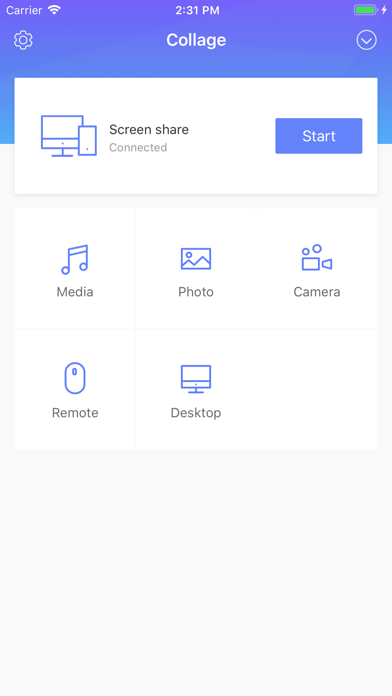
that lets you share up to four devices directly to your Clear
Touch™ panel. It enables you to encourage interaction and
involvement, even in a classroom setting where each student has his
or her own device. Helpful permission controls give you the ability
to manage who is able to connect, ensuring you have the necessary
control for keeping everything organized and running
smoothly.
Collage is especially useful for show-and-tell and student
presentations, but it is equally useful in enabling teachers to
teach cooperatively. For example, in a lab setting one teacher
could moderate the presentation from his or her laptop, while
another teacher or teacher’s assistant could demonstrate an
experiment on a camera-enabled device. A teacher could even connect
multiple devices in the classroom and then move easily from device
to device without having to constantly disconnect and
reconnect.
The true genius of Collage is that it is a highly compatible
solution that works seamlessly with nearly all of today’s most
popular devices, including iPhones and iPads. On top of that, connecting to Collage is remarkably easy to do. Simply enable Collage on your Clear Touch™ panel, enter the displayed access code, and you’re ready to
go!
Clear Touch Collage™ Offers:
* Wide-ranging Compatibility.
- A truly open architecture supports all types of devices, including
iPhones and iPads.
* Multiple Device Sharing.
- Collage currently enables up to 32 devices to connect and up to 4
to share simultaneously.
*Permissions Mode.
- Permission controls give the teacher the ability to allow or
restrict devices from connecting and sharing content.
* Easy Connectivity.
- Clear Touch Collage provides a remarkably uncomplicated way to
connect and share content. Simply download the app on the
connecting device and input the access code to start
sharing.
* Connect and Play Video from Other Devices.
- Collage enables you to connect smartphones, tablets, and cameras
and project video directly on-screen.
* Intuitive, Universal User Interface.
- The application’s controls and interface are remarkably easy to
understand and use.
* Full Notetaking Toolset.
- While Collage is running, you can still access all of your panels
native note-taking tools, enabling you to easily add markup over
connected content.
* Pre-installed on Your Panel.
- Collage comes pre-installed on each Clear Touch panel.
* Full-Service Support.
- If you ever have questions or run into problems, Clear Touch offers
US-based support services, automatic updates, and installation
assistance.
Safety and technology
Found in the app by AppBrain- Price
- Free
- App size
- 39.3 MB
- Content rating
- Everyone
Technologies used by Clear Touch Collage
Releases
Updates seen on the App Store- Version
- 5.13.2.7703
- Launched
- December 2018
No changelog data
Alternatives
Similar apps and more from Clear Touch InteractiveAlternatives to Clear Touch Collage


Rankings
App Store top chartsApp Store Rankings for Clear Touch Collage
About the app and developer
About Clear Touch Collage
Clear Touch Collage is an education app developed by Clear Touch Interactive.
User Ratings
Clear Touch Collage is rated 4.29 out of 5 stars. The rating is based on 14 ratings.
App Information
Clear Touch Collage is freely available from the App Store. The app size is 39.30 MB. The latest version available is 5.13.2.7703. The last update was on April 17, 2026.
Technical Requirements
The app has a content rating of Everyone. The app has been available on the App Store since December 2018.
Clear Touch Collage is made and published by Clear Touch Interactive. AppBrain is an independent app data site and isn't affiliated with Clear Touch Interactive. The app name, icon, screenshots and description belong to Clear Touch Interactive and are shown as published on the App Store.
Developer information for Clear Touch Interactive
Address:
Frequently asked questions about Clear Touch Collage
Is Clear Touch Collage free?
Yes. Clear Touch Collage is free on the App Store.
Is Clear Touch Collage still available?
Yes. Clear Touch Collage is on the App Store, and the last update we saw was on April 17, 2026.
How large is Clear Touch Collage?
Clear Touch Collage is 39.30 MB.
Is Clear Touch Collage suitable for children?
App Store rates the content of Clear Touch Collage as suitable for everyone.
How do people rate Clear Touch Collage?
Clear Touch Collage scores 4.29 out of 5 stars, from 14 ratings on the App Store.
Who made Clear Touch Collage?
Clear Touch Collage was developed by Clear Touch Interactive. It is listed in the education category on the App Store.
What are the best alternatives to Clear Touch Collage?
People looking at Clear Touch Collage also look at these education apps: Incident IQ, lead4ward, SecureTestBrowser, Unified Talent Mobile, PBIS Rewards Staff.