

Clear Wave: Volume Booster
Clear Wave: Volume Booster is made and published by Gaurav Babbar. AppBrain is an independent app data site and isn't affiliated with Gaurav Babbar. The app name, icon, screenshots and description belong to Gaurav Babbar and are shown as published on the App Store.
AppBrain's verdict
Loved by users- Rating on App Store
- 4.63
- 1,365 ratings
- Last updated
- August 28, 2026
- Size
- 58.7 MB
Users love it: 4.6 stars from 1,365 ratings.
User feedback
Ratings and reviews on the App StoreComments on Clear Wave: Volume Booster for iOS
We don't have enough comments to show example comments. Please check back later.
Store listing
By Gaurav Babbar, from the App Store




Description by Gaurav Babbar Written by the developer, not by AppBrain. Click to read.
Key Features:
Advanced Speaker Testing
3 Ultimate speaker testing modes
Volume booster mode to test speaker performance at maximum capabilities
Dedicated bass testing to evaluate low-frequency response
Complete stereo channel testing
Frequency generator with precise control from 100 Hz to 20,000 Hz
Choose between 7 classic waveforms: Sine, Square, Triangle, Sawtooth, and more
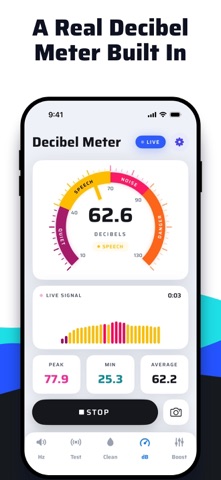
Built-in decibel meter to measure environmental sound levels
Clear Wave is the perfect tool for audiophiles, sound engineers, or anyone who wants to ensure their device speakers are performing optimally.
Note: This app does not remove water from your iPhone. This is not a volume booster app.
Subscription Details:
Payment will be charged to iTunes Account at confirmation of purchase. Subscription with a free trial period will automatically renew to a paid subscription. Subscription automatically renews unless auto-renew is turned off at least 24 hours before the end of the current period. Account will be charged for renewal within 24 hours prior to the end of the current period at the rate of the selected plan. Subscriptions and auto-renewal may be managed by going to Account Settings after purchase. You can cancel your subscription or free trial in the iTunes settings at least 24-hours before the end of the free trial period. The cancellation will take effect the day after the last day of the current subscription period and you will be downgraded to the free service.
Subscription Options:
Weekly: $3.99
Yearly: $5.99
Lifetime: $19.99
Privacy Policy: https://enacti.com/clear_wave_app_privacy_policy.html
Terms of Use: https://enacti.com/clear_wave_app_terms.html
Support: services@enacti.com
EULA - https://www.apple.com/legal/internet-services/itunes/dev/stdeula/
Safety and technology
Found in the app by AppBrain- Price
- Free
- App size
- 58.7 MB
- Content rating
- Everyone
Technologies used by Clear Wave: Volume Booster
Releases
Updates seen on the App Store- Version
- 3.3
- Launched
- March 2022
No changelog data
Alternatives
Similar apps and more from Gaurav BabbarAlternatives to Clear Wave: Volume Booster







More from Gaurav Babbar






Rankings
App Store top chartsApp Store Rankings for Clear Wave: Volume Booster
About the app and developer
About Clear Wave: Volume Booster
Clear Wave: Volume Booster is a music app developed by Gaurav Babbar.
User Ratings
Clear Wave: Volume Booster is rated 4.63 out of 5 stars. The rating is based on 1.4 thousand ratings.
App Information
Clear Wave: Volume Booster is freely available from the App Store. The app size is 58.68 MB. The latest version available is 3.3. The last update was on August 28, 2026.
Technical Requirements
The app has a content rating of Everyone. The app has been available on the App Store since March 2022.
Developer information for Gaurav Babbar
Address: