

ClickPing is made and published by Ramiz Raja. AppBrain is an independent app data site and isn't affiliated with Ramiz Raja. The app name, icon, screenshots and description belong to Ramiz Raja and are shown as published on the App Store.
AppBrain's verdict
- Last updated
- August 21, 2026
Rankings
App Store top chartsApp Store Rankings for ClickPing
Competitors
Similar apps and more from Ramiz RajaAlternatives to ClickPing


More from Ramiz Raja


Releases
Updates seen on the App Store- Version
- 1.1.3
- Launched
- July 2026
No changelog data
User feedback
Ratings and reviews on the App StoreComments on ClickPing for iOS
We don't have enough comments to show example comments. Please check back later.
Technology
Found in the app by AppBrain- Price
- Free
- App size
- 11.3 MB
- Content rating
- Everyone
Technologies used by ClickPing
About the app and developer
About ClickPing
ClickPing is an utilities app developed by Ramiz Raja.
User Ratings
The app has no ratings yet.
App Information
ClickPing is freely available from the App Store. The app size is 11.30 MB. The latest version available is 1.1.3. The last update was on August 21, 2026.
Technical Requirements
The app has a content rating of Everyone. The app has been available on the App Store since July 2026.
Developer information for Ramiz Raja
Address:
Frequently asked questions about ClickPing
Is ClickPing free?
Yes. ClickPing is free on the App Store.
Is ClickPing still available?
Yes. ClickPing is on the App Store, and the last update we saw was on August 21, 2026.
How large is ClickPing?
ClickPing is 11.30 MB.
Is ClickPing suitable for children?
App Store rates the content of ClickPing as suitable for everyone.
Who made ClickPing?
ClickPing was developed by Ramiz Raja. It is listed in the utilities category on the App Store.
What are the best alternatives to ClickPing?
People looking at ClickPing also look at these utilities apps: SnapSCII, QRDrop: QR Code File Transfer, QR Scene Wallet, Memolight for Safari, Private Voice Notes.
Store listing
By Ramiz Raja, from the App Store



Description by Ramiz Raja Written by the developer, not by AppBrain. Click to read.
ClickPing is a click-to-chat tool that opens a WhatsApp chat with any number without saving it to your contacts. Type or paste a number, or share one from another app with the Share sheet — ClickPing sorts out the country code and opens the chat in the official WhatsApp or WhatsApp Business app you choose.
WHY CLICKPING
• One small banner on the free version, and no ads at all with ClickPing Plus. Never full-screen, never a video, and never personalised to you.
• No saved contact, no history, no recent-number list you didn't ask for.
• Opens the official WhatsApp or WhatsApp Business chat — you pick which.
• Sorts out the country code for you, so the right chat opens.
• Scan a number with your camera or a QR code — free, no upgrade needed.
PERFECT FOR
• Messaging a marketplace seller, buyer, or classified-ad contact you'll never save.
• Freelancers and service providers replying to one-off client numbers.
• Coordinating a delivery, pickup, or booking.
• Reaching a number from a website, email, invoice, or document.
• Short trips where you message a number just once.
HANDLES THE TRICKY CASES
Numbers don't always come with a country code. ClickPing figures it out and shows a clear preview before anything opens. If a block of text has several numbers, you pick the one you want. It only asks when a decision is genuinely needed — otherwise it just opens.
PERSONAL OR BUSINESS
If you have both WhatsApp and WhatsApp Business installed, ClickPing asks which one to use. Remember your choice and it skips the question next time.
MORE WAYS TO START
• Type or paste a number on the main screen.
• Scan a number with your camera, including a QR code.
• Share text or a photo of a number from any app via the Share sheet.
• Add a Home Screen shortcut for one-tap access.
MORE THAN WHATSAPP
Once ClickPing has a number, you don't have to stop at WhatsApp. You can also:
• Call it, or text it in Messages.
• Copy it, or share it to another app.
• Save it as a new contact.
ClickPing simply hands the number to your phone's own Phone, Messages, or Contacts app — it never takes those permissions itself. WhatsApp is still the one tap ClickPing is built for; these just save you a detour.
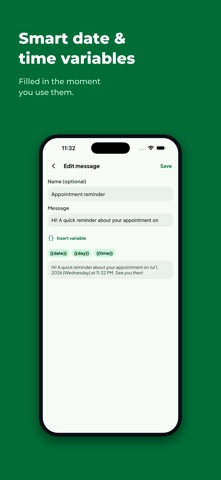
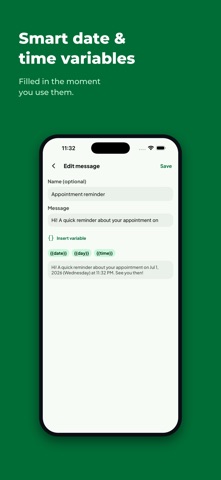
MESSAGE TEMPLATES WITH LIVE VARIABLES
Keep a short list of reusable messages. Drop in variables that fill themselves in the moment you use them:
{{date}} — today's date
{{day}} — the weekday
{{day_month}} — day and month
{{time}} — the current time
No recipients are stored. No history is kept.
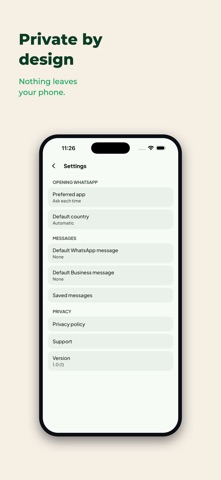
PRIVACY YOU CAN CHECK, NOT JUST TRUST
• No contacts. No call log. No location. No microphone. No background clipboard.
• The number you open and any message you compose stay on your device — not collected, not stored.
• Saved templates and preferences back up to your own iCloud account; no phone numbers and no recipients are included.
• Crash and usage diagnostics are content-free — never a phone number, a message you wrote, or a link ClickPing built.
FREE CORE, OPTIONAL PLUS
ClickPing's core features are free: opening chats, sorting out country codes, scanning a number with your camera or a shared image, the Share sheet, Home Screen shortcuts, and up to three saved message templates. ClickPing Plus is an optional one-time purchase that unlocks permanently — no subscription — and adds:
• No ads. The banner disappears everywhere in the app.
• Unlimited saved message templates, beyond the free limit of three.
• Default-message auto-fill, so a chosen template drops into every chat you open.
ONE JOB, DONE PROPERLY
ClickPing has a single focus: open the right WhatsApp chat, fast, without saving a contact. No status downloader, no feature bloat.
ClickPing is independent and is not affiliated with, endorsed by, or connected to WhatsApp, WhatsApp Business, Meta, or their owners.