

Clip Keyboard: Paste Snippets
Clip Keyboard: Paste Snippets is made and published by hyunho lee. AppBrain is an independent app data site and isn't affiliated with hyunho lee. The app name, icon, screenshots and description belong to hyunho lee and are shown as published on the App Store.
AppBrain's verdict
Established- Rating on App Store
- 4.82
- 11 ratings
- Last updated
- October 21, 2026
It doesn't have enough ratings yet to judge what users think.
Rankings
App Store top chartsApp Store Rankings for Clip Keyboard: Paste Snippets
Competitors
Similar apps and more from hyunho leeAlternatives to Clip Keyboard: Paste Snippets





More from hyunho lee


Releases
Updates seen on the App Store- Version
- 5.1.13
- Launched
- December 2020
No changelog data
User feedback
Ratings and reviews on the App StoreComments on Clip Keyboard: Paste Snippets for iOS
We don't have enough comments to show example comments. Please check back later.
Technology
Found in the app by AppBrain- Price
- Free
- App size
- 69.1 MB
- Content rating
- Everyone
Technologies used by Clip Keyboard: Paste Snippets
About the app and developer
About Clip Keyboard: Paste Snippets
Clip Keyboard: Paste Snippets is a productivity app developed by hyunho lee.
User Ratings
Clip Keyboard: Paste Snippets is rated 4.82 out of 5 stars. The rating is based on 11 ratings.
App Information
Clip Keyboard: Paste Snippets is freely available from the App Store. The app size is 69.13 MB. The latest version available is 5.1.13. The last update was on October 21, 2026.
Technical Requirements
The app has a content rating of Everyone. The app has been available on the App Store since December 2020.
Developer information for hyunho lee
Address:
Store listing
By hyunho lee, from the App Store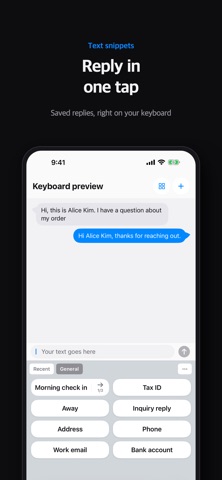


Description by hyunho lee Written by the developer, not by AppBrain. Click to read.
Keep the account numbers, addresses, introductions and email openers you reuse as snippets. In Messages, Mail, Safari, anywhere you can type, switch to ClipKeyboard, tap once, and the text lands in the field.
What it does
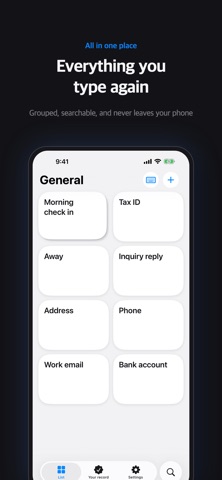
Snippets: what you saved goes in exactly as it is. One tap.
Templates: leave the parts that change as blanks, then fill them from values you already saved.
Stacks: keep several values in one place and send them in order, or switch between them with the arrow.
Secure snippets: lock passport and card numbers behind Face ID and open them only when you need them.
Smart clipboard: what you copy is sorted for you. It recognizes emails, phone numbers, addresses, card numbers and IBANs, so you find them again in a second.
Text recognition: photograph a card or a document, swipe over the part you want, and only that text becomes a value.
iCloud backup: it survives a new phone, image snippets included.
Please know this first
This is a keyboard for putting saved text in. It does not replace the keyboard you type on. Switch to it when you need to drop something in, then switch back.
Privacy
What you write stays on your device. If you turn on iCloud backup, it is stored encrypted in your own iCloud. We do not collect the contents of your snippets and we use no third-party analytics.
Free and Pro
Every feature is free until you have inserted snippets 100 times. After that, everything you made keeps working; the free limits apply only to new items. Pro removes every limit, as a one-time purchase or a yearly subscription.
Works on iPhone and iPad. Available in English, Korean, Japanese, Chinese (Simplified and Traditional), Russian, Spanish, German, French, Italian, Portuguese (Brazil), Dutch, Polish, Czech, Greek, Turkish, Indonesian, Swedish, Danish, Norwegian, Finnish, Thai and Vietnamese.
Contact: leeo@kakao.com
User guide: https://m1zz.github.io/ClipKeyboard/tutorial.html?lang=en
Terms of Use: https://m1zz.github.io/ClipKeyboard/terms.html?lang=en