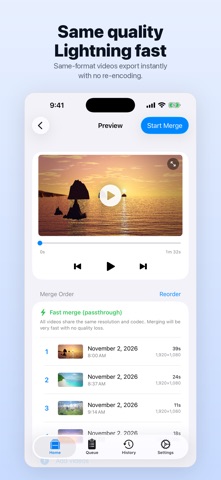
Clip Stitch - Video Merger is a photo & video app developed by Yasuyuki Kuwai.
What is the rating of Clip Stitch - Video Merger?
Clip Stitch - Video Merger has no ratings yet.
Is Clip Stitch - Video Merger free?
Clip Stitch - Video Merger is free. The app size is 14.11 MB. The latest version available is 1.6. The last update was on November 4, 2026.
What are the requirements for Clip Stitch - Video Merger?
The app has a content rating of Everyone. The app has been available on the App Store since July 2026.
Clip Stitch - Video Merger is made and published by
Yasuyuki Kuwai.
AppBrain is an independent app data site and isn't affiliated with Yasuyuki Kuwai.
The app name, icon, screenshots and description belong to Yasuyuki Kuwai and are shown as published on the App Store.
Description by Yasuyuki Kuwai(from the App Store)
Clip Stitch merges several videos into one, at speed. Pick your clips and tap! What comes out is yours to keep or to share, straight away.
Are short clips piling up in your Camera Roll? Each one is too short to watch on its own and too good to delete. And video eats storage, so your phone and your iCloud both run out of room.
Merge them into one with Clip Stitch and they are worth watching again, and far easier to keep.
▶ Fast, when the clips match Videos with the same orientation and aspect ratio are simply joined end to end. It takes about ten seconds, and the quality is untouched. Work that takes minutes in Premiere Pro or CapCut is done before you put the phone down!
When orientations and aspect ratios are mixed it takes a little longer, but the result is saved at full quality just the same.
▶ Date, time and place, filled in for you Every clip's date, time and location can be shown on the merged video, filled in for you.
Months later, you will never wonder "when and where was this?" again!
You can also give the merged video the same date as the clips it came from, so it lands in your Camera Roll in the right place.
▶ YouTube as an archive only you can see Upload to your own Google account as private and you can keep as much as you like, seen by nobody but you.
To show family or friends, upload as unlisted and send them the link!
Chapter timestamps are written while it merges, ready for the YouTube description — so even a long video jumps to the moment you want.
• Several Google accounts • Pick the channel and playlist • Public, unlisted or private • Edit the title and description while it uploads
▶ Take a whole day at once Your Camera Roll is grouped by day. Tap a date header and every clip from that day is selected.
Made for vlogs, holidays, sports days, birthday parties — any time the answer is "all of it"!
▶ The free plan goes a long way The free plan gives you five merges a fortnight, reset on the 1st and the 15th of every month. For everyday use, that is plenty!
When you want more, the paid plan lifts the limit. Start free and see how far it gets you!
▶ Invite a friend and you both get more When a friend enters your invite code, you each get 10 extra merges. They never expire, and a reset does not touch them, so they keep until you need them. There is no limit on how many people you invite — bring everyone!
▶ More • Send selections to the merge queue and run them all together later • Find everything you have merged in History, YouTube links included • Once a merge is saved, delete the clips it came from in one step • Import from the Files app, not just the Camera Roll • iCloud Photo Library supported — clips that aren't on the device download themselves
▶ Nothing in the way Merging happens entirely on your iPhone. And there are no ads, anywhere!
--- Terms of Use (EULA): https://www.apple.com/legal/internet-services/itunes/dev/stdeula/
Each subscription will automatically renew 3 days before the expiration date for
the same time period. Subscriptions can be cancelled at any time before the renewal.