AppBrain
AppBrain
  • Apps
  • Apps being viewed right now Trending apps today Most popular apps All-time most installed apps Top rated apps iPhone and iPad apps
  • Intelligence ▾
    Intelligence overview → Track any Android app or your whole market
    Track & analyze
    Keyword Tracker & OptimizerTrack & improve Play rankings App Performance ReportOne-off PDF for any app StatisticsFree Android & Play market stats
    Promote your app
    Featured Apps App Links
  • Intelligence
  • Pricing
  • Dashboard
  • Sign up
  • Log in
App Store Apps > Photo & Video > Dig It: Video Keyframes
Dig It: Video Keyframes icon

Dig It: Video Keyframes

1.4.5
培克 罗
5.00
1 reviews
Free

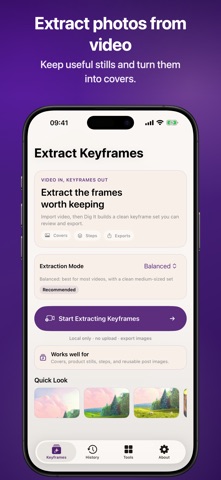
Dig It: Video Keyframes Screenshot 1 of 6
Dig It: Video Keyframes Screenshot 2 of 6
Dig It: Video Keyframes Screenshot 3 of 6
Dig It: Video Keyframes Screenshot 4 of 6
Dig It: Video Keyframes Screenshot 5 of 6
Dig It: Video Keyframes Screenshot 6 of 6
Screenshots by 培克 罗, from the the App Store listing
View on the App Store

AppBrain's verdict on Dig It: Video Keyframes

Rating on App Store
5.00
1 ratings
Last updated
November 11, 2026
Size
6.54 MB

It doesn't have enough ratings yet to judge what users think.

Official page on the App Store

About Dig It: Video Keyframes

Dig It: Video Keyframes is a photo & video app developed by 培克 罗.

User Ratings

Dig It: Video Keyframes is rated 5.00 out of 5 stars. The rating is based on one rating ratings.

App Information

Dig It: Video Keyframes is freely available from the App Store. The app size is 6.54 MB. The latest version available is 1.4.5. The last update was on November 11, 2026.

Technical Requirements

The app has a content rating of Everyone. The app has been available on the App Store since July 2024.

Dig It: Video Keyframes is made and published by 培克 罗. AppBrain is an independent app data site and isn't affiliated with 培克 罗. The app name, icon, screenshots and description belong to 培克 罗 and are shown as published on the App Store.

Description by 培克 罗 (from the App Store)
Turn a moment in your video into a photo, cover image or illustrated step. Dig It extracts keyframes so you can review the useful frames together and export the ones you choose.

Make a video or GIF from selected frames
Select 2–60 extracted frames and export a silent MP4 or animated GIF. Preview the sequence, set how long each frame stays on screen, reverse the order and choose whether your GIF loops. The result plays the selected still images in sequence, keeps their aspect ratio and does not upscale them.

Choose the frames worth keeping
Import a local video and choose Balanced, Cover or Steps mode. Review timestamps, compare results, select useful images and remove unwanted frames.

Make covers and visual overviews
Crop a cover and export it as PNG or JPEG, with an optional JPEG size limit. Arrange selected frames with timestamps in an automatically paginated A4 or Letter PDF contact sheet.

Save results for later
Tap Save to keep the full result set in History and reopen it later. Export selected stills as PNG for tutorial notes, product listings, presentations or reference boards.

Local video processing
Extraction runs on your device without uploading the video to a server. Available frames and image detail depend on your source video.

More video tools
Trim or compress video, extract audio, or turn images into a video. These utilities are available in Tools.
Show more Show less

More data about Dig It: Video Keyframes

Price Free
Rating 5.00 based on a single rating
Ranking Not ranked
Version 1.4.5
App size 6.54 MB
Suitable for Everyone

Share Dig It: Video Keyframes

User feedback
Ratings and reviews on the App Store

Comments on Dig It: Video Keyframes for iOS

We don't have enough comments to show example comments. Please check back later.

Safety and technology
Found in the app by AppBrain
Price
Free
App size
6.54 MB
Content rating
Everyone

Technologies used by Dig It: Video Keyframes

Changelog of Dig It: Video Keyframes

Updates seen on the App Store
Version
1.4.5
Launched
July 2024

No changelog data

Alternatives
Similar apps and more from 培克 罗

Alternatives to Dig It: Video Keyframes

Video to Photo - Vid2Pix Bulk icon Video to Photo - Vid2Pix Bulk
kim seong-yeon
3.0
Free
2 ratings
Grabby - video to photo icon Grabby - video to photo
Chipp Studio OU
0.0
Free
Frame Picker – Video to Photo icon Frame Picker – Video to Photo
krysoft s. r. o.
5.0
Free
1 ratings
Video Trimmer - with seconds icon Video Trimmer - with seconds
Kinue Akagi
1.0
Free
1 ratings
F8 Frame: Photo Borders icon F8 Frame: Photo Borders
江宾 武
5.0
Free
3 ratings
SlideStream icon SlideStream
ritterfeld.com
4.0
Free
1 ratings
Grab Photo,Capture Video Frame icon Grab Photo,Capture Video Frame
Kishwar Sultana
0.0
Free
Files: browser smart icon Files: browser smart
Depax
3.0
Free
2 ratings

More from 培克 罗

Infinity Maze icon Infinity Maze
培克 罗
4.5
Free
4 ratings
Infinity Sudoku 9x9 icon Infinity Sudoku 9x9
培克 罗
5.0
Free
3 ratings
Secret Video Message icon Secret Video Message
培克 罗
5.0
Free
1 ratings
OnePreview: File Viewer icon OnePreview: File Viewer
培克 罗
5.0
Free
1 ratings
TactiBeat: Haptic Music icon TactiBeat: Haptic Music
培克 罗
5.0
Free
1 ratings
Little Nature icon Little Nature
培克 罗
5.0
Free
1 ratings
QR Tools: QR Code Reader icon QR Tools: QR Code Reader
培克 罗
5.0
Free
1 ratings
Schulte Grid - Printable icon Schulte Grid - Printable
培克 罗
5.0
Free
1 ratings
Rankings
App Store top charts

App Store Rankings for Dig It: Video Keyframes

This app is not ranked
About the app and developer

Developer information for 培克 罗

培克 罗

Address:

Frequently asked questions about Dig It: Video Keyframes

Is Dig It: Video Keyframes free?

Yes. Dig It: Video Keyframes is free on the App Store.

Is Dig It: Video Keyframes still available?

Yes. Dig It: Video Keyframes is on the App Store, and the last update we saw was on November 11, 2026.

How large is Dig It: Video Keyframes?

Dig It: Video Keyframes is 6.54 MB.

Is Dig It: Video Keyframes suitable for children?

App Store rates the content of Dig It: Video Keyframes as suitable for everyone.

How do people rate Dig It: Video Keyframes?

Dig It: Video Keyframes has one rating of 5.00 stars on the App Store.

Who made Dig It: Video Keyframes?

Dig It: Video Keyframes was developed by 培克 罗. It is listed in the photo & video category on the App Store.

What are the best alternatives to Dig It: Video Keyframes?

People looking at Dig It: Video Keyframes also look at these photo & video apps: Video to Photo - Vid2Pix Bulk, Grabby - video to photo, Frame Picker – Video to Photo, Video Trimmer - with seconds, F8 Frame: Photo Borders.

Apps other people are watching Popular Photo & Video Apps Top new apps Today's trending apps Price drops on Google Play
Video to Photo - Vid2Pix Bulk icon Video to Photo - Vid2Pix Bulk
Grabby - video to photo icon Grabby - video to photo
Frame Picker – Video to Photo icon Frame Picker – Video to Photo
Video Trimmer - with seconds icon Video Trimmer - with seconds
F8 Frame: Photo Borders icon F8 Frame: Photo Borders
SlideStream icon SlideStream
Grab Photo,Capture Video Frame icon Grab Photo,Capture Video Frame
Files: browser smart icon Files: browser smart
Overview Alternatives Reviews Rankings Technology
AppBrain Intelligence premium content

Subscribe now to get full and unlimited access to AppBrain Intelligence. You'll have access to:

  • App Intelligence dashboard (performance timeline, competitor comparison, country rankings, insight cards)
  • Detailed ranking data per app
  • Full timeline per developer
  • Device market shares data per country
  • Unlimited keyword tracking
  • AI assistant access via MCP (Claude, Cursor or any MCP client)
1 Month

$75/mo
(billed every month)

SAVE 0%
Subscribe
3 Months

$65/mo
($195 billed every 3 months)

SAVE 13%
Subscribe
1 Year

$57.50/mo
($690 billed every year)

SAVE 23%
Subscribe
Each subscription will automatically renew 3 days before the expiration date for the same time period. Subscriptions can be cancelled at any time before the renewal.

AppBrain is an app data site, we track rankings, ratings, installs for all apps and games on Google Play and the App Store. AppBrain doesn't host app files or APKs, all install links go directly to the official store. All trademarks are owned by their respective owners.

More apps

  • Top Android apps being viewed
  • QB Clash: Quarterback Football
  • Drop the Item
  • MoviePlace Downloader

App statistics

  • Android statistics
  • Google Play Developer stats
  • Trending Android Apps
  • Trending iOS apps
  • Top popular Apps
  • Buy the best Android phone
  • Buy & sell app businesses

About AppBrain

  • Contact
  • Privacy
  • Documentation
  • DMCA takedowns
  • Blog
  • Monetization tips: Understanding your eCPM
© 2010-2026 - AppBrain