

Schulte Grid - Printable is made and published by 培克 罗. AppBrain is an independent app data site and isn't affiliated with 培克 罗. The app name, icon, screenshots and description belong to 培克 罗 and are shown as published on the App Store.
AppBrain's verdict
- Last updated
- September 2, 2026
Rankings
App Store top chartsApp Store Rankings for Schulte Grid - Printable
Competitors
Similar apps and more from 培克 罗Alternatives to Schulte Grid - Printable



More from 培克 罗


Releases
Updates seen on the App Store- Version
- 1.5.0
- Launched
- July 2024
No changelog data
User feedback
Ratings and reviews on the App StoreComments on Schulte Grid - Printable for iOS
We don't have enough comments to show example comments. Please check back later.
Technology
Found in the app by AppBrain- Price
- Free
- App size
- 10.9 MB
- Content rating
- Everyone
Technologies used by Schulte Grid - Printable
About the app and developer
About Schulte Grid - Printable
Schulte Grid - Printable is an education app developed by 培克 罗.
What is the rating of Schulte Grid - Printable?
Schulte Grid - Printable has no ratings yet.
Is Schulte Grid - Printable free?
Schulte Grid - Printable is free. The app size is 10.95 MB. The latest version available is 1.5.0. The last update was on September 2, 2026.
What are the requirements for Schulte Grid - Printable?
The app has a content rating of Everyone. The app has been available on the App Store since July 2024.
Developer information for 培克 罗
Address:
Store listing
By 培克 罗, from the App Store


Description by 培克 罗 Written by the developer, not by AppBrain. Click to read.
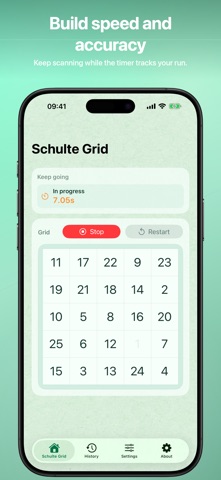
If you want to get into the zone before work, or do a short practice session between studying, reading, or exam prep, Schulte Grid lets you start right away. Choose the grid size that fits your session, then tap the numbers in order to complete a clear, effective focus exercise.
Best for:
• A quick focus warm-up before work
• A short attention reset during study or reading breaks
• Training visual search, reaction speed, and concentration
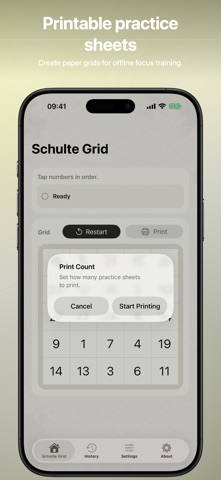
• Printable practice at home, in class, or at the office
Features:
• 3×3, 4×4, 5×5, and 6×6 grid sizes for different practice levels
• Timer, restart, and history records to track progress
• Printable pages for offline practice
• Support for iPhone, iPad, and Mac
No complicated rules. No extra setup. Just a lightweight, practical tool that helps you get your focus back.