

OnePreview: File Viewer
OnePreview: File Viewer is made and published by 培克 罗. AppBrain is an independent app data site and isn't affiliated with 培克 罗. The app name, icon, screenshots and description belong to 培克 罗 and are shown as published on the App Store.
AppBrain's verdict
- Rating on App Store
- 5.00
- 1 ratings
- Last updated
- October 22, 2026
It doesn't have enough ratings yet to judge what users think.
Rankings
App Store top chartsApp Store Rankings for OnePreview: File Viewer
Competitors
Similar apps and more from 培克 罗Alternatives to OnePreview: File Viewer


More from 培克 罗


Releases
Updates seen on the App Store- Version
- 1.4.6
- Launched
- March 2026
No changelog data
User feedback
Ratings and reviews on the App StoreComments on OnePreview: File Viewer for iOS
We don't have enough comments to show example comments. Please check back later.
Technology
Found in the app by AppBrain- Price
- Free
- App size
- 8.88 MB
- Content rating
- Everyone
Technologies used by OnePreview: File Viewer
About the app and developer
About OnePreview: File Viewer
OnePreview: File Viewer is a productivity app developed by 培克 罗.
User Ratings
OnePreview: File Viewer is rated 5.00 out of 5 stars. The rating is based on one rating ratings.
App Information
OnePreview: File Viewer is freely available from the App Store. The app size is 8.88 MB. The latest version available is 1.4.6. The last update was on October 22, 2026.
Technical Requirements
The app has a content rating of Everyone. The app has been available on the App Store since March 2026.
Developer information for 培克 罗
Address:
Frequently asked questions about OnePreview: File Viewer
Is OnePreview: File Viewer free?
Yes. OnePreview: File Viewer is free on the App Store.
Is OnePreview: File Viewer still available?
Yes. OnePreview: File Viewer is on the App Store, and the last update we saw was on October 22, 2026.
How large is OnePreview: File Viewer?
OnePreview: File Viewer is 8.88 MB.
Is OnePreview: File Viewer suitable for children?
App Store rates the content of OnePreview: File Viewer as suitable for everyone.
How do people rate OnePreview: File Viewer?
OnePreview: File Viewer has one rating of 5.00 stars on the App Store.
Who made OnePreview: File Viewer?
OnePreview: File Viewer was developed by 培克 罗. It is listed in the productivity category on the App Store.
What are the best alternatives to OnePreview: File Viewer?
People looking at OnePreview: File Viewer also look at these productivity apps: Markdown Viewer Editor, 露娜笔记, 安禾日历, Rclone GUI, Raw Text Editor.
Store listing
By 培克 罗, from the App Store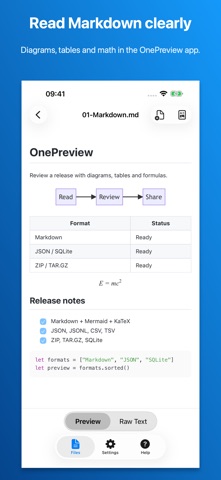



Description by 培克 罗 Written by the developer, not by AppBrain. Click to read.
READ MARKDOWN, DIAGRAMS AND MATH
View GitHub-style Markdown with tables, task lists and highlighted code. Switch between rendered content and source. Mermaid diagrams and KaTeX formulas use bundled rendering assets.
EXPORT MARKDOWN TO PDF
Open a standard Markdown file (.md or .markdown) in OnePreview to create an A4 PDF report. Check the actual PDF preview, with continued table headers, wrapped code, Mermaid diagrams and KaTeX formulas, then save it using the system file interface. Document content is processed on your device.
INSPECT DATA, CODE AND ARCHIVES
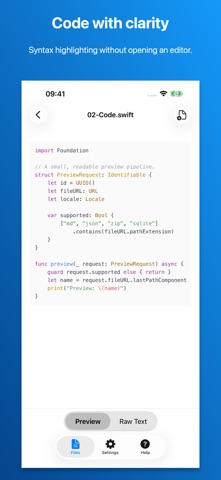
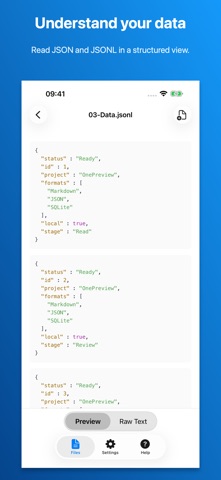
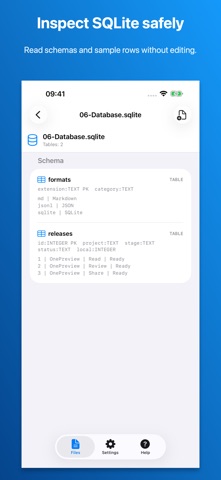
Read structured data and source code, inspect SQLite schemas and sample rows without editing the database, and see the folder hierarchy inside ZIP and TAR.GZ archives before extracting.
SUPPORTED FORMATS
Markdown (.md, .markdown), MDX, TextBundle, TextPack, JSON, JSONL, YAML, XML, CSV, TSV, TOML, ENV, INI, properties, Apple property lists (plist), SQLite (.sqlite, .sqlite3, .db), source code, plain text, logs, ZIP, TAR.GZ and TGZ. Syntax highlighting supports languages including Swift, Python, JavaScript, TypeScript, Java, C/C++, Objective-C, Ruby, Rust and Shell.
OPEN YOUR FILES
Tap Open File in OnePreview, or long-press a supported document in Files, choose Open With, then select OnePreview. A normal tap in Files may use Apple's built-in preview; OnePreview does not replace every system preview on iPhone or iPad. Try the sample folder from the home screen to explore supported formats.