

Clipboard: Copy Paste Widget
Clipboard: Copy Paste Widget is made and published by Louis Valli. AppBrain is an independent app data site and isn't affiliated with Louis Valli. The app name, icon, screenshots and description belong to Louis Valli and are shown as published on the App Store.
AppBrain's verdict
- Last updated
- October 16, 2026
Rankings
App Store top chartsApp Store Rankings for Clipboard: Copy Paste Widget
Competitors
Similar apps and more from Louis ValliAlternatives to Clipboard: Copy Paste Widget




More from Louis Valli


Releases
Updates seen on the App Store- Version
- 1.2.1
- Launched
- February 2026
No changelog data
User feedback
Ratings and reviews on the App StoreComments on Clipboard: Copy Paste Widget for iOS
We don't have enough comments to show example comments. Please check back later.
Technology
Found in the app by AppBrain- Price
- Free
- App size
- 4.31 MB
- Content rating
- Everyone
Technologies used by Clipboard: Copy Paste Widget
About the app and developer
About Clipboard: Copy Paste Widget
Clipboard: Copy Paste Widget is an utilities app developed by Louis Valli.
What is the rating of Clipboard: Copy Paste Widget?
Clipboard: Copy Paste Widget has no ratings yet.
Is Clipboard: Copy Paste Widget free?
Clipboard: Copy Paste Widget is free. The app size is 4.31 MB. The latest version available is 1.2.1. The last update was on October 16, 2026.
What are the requirements for Clipboard: Copy Paste Widget?
The app has a content rating of Everyone. The app has been available on the App Store since February 2026.
Developer information for Louis Valli
Address:
Store listing
By Louis Valli, from the App Store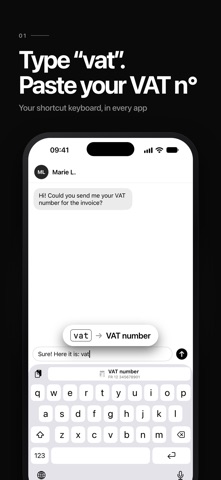


Description by Louis Valli Written by the developer, not by AppBrain. Click to read.
Clipboard keeps all the texts you use every day — IBAN, addresses, email replies, links, codes, phone numbers — and copies them in ONE tap. Right from the app, or straight from your Home Screen widget.
YOUR SHORTCUT KEYBOARD (NEW)
Add the Clipboard keyboard and switch to it with the globe key. Give a clip a shortcut word like “vat”: type it, tap the suggestion, and the word is replaced with your full VAT number (Pro). It works in WhatsApp, Mail, Messages, Safari and any other app. You can also paste any saved clip straight from the keyboard, for free.
Full Access is only used to read the clips saved on your iPhone. Nothing you type is recorded, stored or sent.
COPY IN ONE TAP
Tap a clip and it's copied. Paste it anywhere: Messages, WhatsApp, Mail, Safari, Notes, forms… No more digging through old notes or emails.
INTERACTIVE HOME SCREEN WIDGETS
Your favorite clips live on your Home Screen. Tap a clip in the widget: it's copied instantly. Small, medium and large sizes.
ORGANIZED YOUR WAY
• Categories: Work, Personal, Code, Links, Social, Finance…
• Emojis and colors for every clip
• Pin the essentials to the top
• Instant search
• List or grid view
PRIVATE CLIPS WITH FACE ID
Protect sensitive content — passwords, bank details, access codes — behind Face ID.
EVERY TYPE OF CONTENT
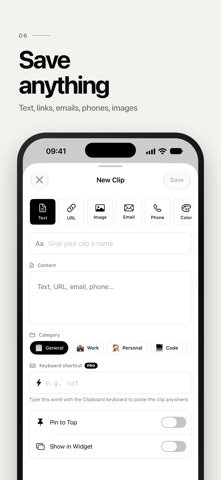
Text, links, emails, phone numbers, colors and images.
USAGE STATISTICS
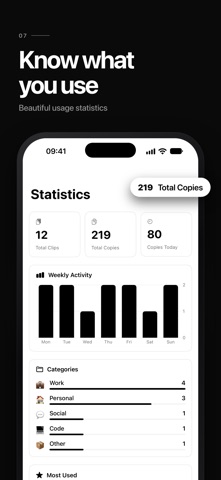
See your most copied clips, your weekly activity and your top categories.
DESIGNED FOR iOS
Clean native design, light & dark mode, haptic feedback, 34 languages.
PERFECT FOR
• Freelancers & sales: quote templates, IBAN, signatures
• Customer support: canned replies
• Developers: snippets, commands, API endpoints
• Social media: hashtags, bios, links
• Everyone: address, phone number, Wi-Fi password, promo codes
CLIPBOARD PRO
Unlock unlimited clips, keyboard shortcuts, advanced widgets, full customization and detailed statistics. Monthly, yearly or lifetime.
Payment is charged to your Apple ID account. Subscriptions renew automatically unless cancelled at least 24 hours before the end of the current period. Manage them in your App Store account settings.
Terms of Use (EULA): https://www.apple.com/legal/internet-services/itunes/dev/stdeula/
Privacy Policy: https://louisvalli.be/clipboardpro