


AppBrain's verdict
- Rating on App Store
- 5.00
- 1 ratings
- Last updated
- November 24, 2026
- Size
- 42.7 MB
It doesn't have enough ratings yet to judge what users think.
User feedback
Ratings and reviews on the App StoreComments on Clipboard Manager - Copy Paste for iOS
We don't have enough comments to show example comments. Please check back later.
Store listing
By Provelopers, from the App StoreDescription by Provelopers Written by the developer, not by AppBrain. Click to read.
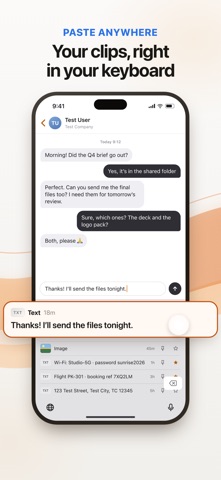
Clipboard Manager remembers what you copy so you can paste it back later, from a keyboard that works in any app. No more copying something twice because you lost the first one.
THE KEYBOARD IS THE POINT
Switch to the Clipboard keyboard in any app and your history is right there. Tap a clip to insert it. No app switching, no losing your place in what you were writing.
SYNC BETWEEN YOUR DEVICES
Sign in and what you copy on one device appears on the others within seconds — iPhone, Android, Mac and Windows. Copy a link at your desk, paste it into a message on the bus. Sync is optional; the app works fully without an account.
WHAT YOU GET
• Your recent clips, searchable
• Filter by text, links or images
• Pin the ones you use constantly so they never age out
• Favorites and snippets for the text you retype all day
• Choose how much to keep: 50, 100, 200 or 500 clips
• A built-in QR and barcode scanner — whatever the code holds is saved as a clip
• Light and dark, with a keyboard that matches
HONEST ABOUT TWO THINGS
The keyboard needs Full Access, because iOS will not let a keyboard read the clipboard or your saved history without it. No keystrokes are recorded and nothing is logged — the keyboard reads the clipboard only while it is on screen.
And iOS does not allow any keyboard to insert an image directly. Tapping an image clip copies it, and you paste it with a long press. That is a limit of iOS rather than of this app, and we would rather say so here than have you discover it later.
GETTING STARTED
Settings › General › Keyboard › Keyboards › Add New Keyboard › Clipboard, then turn on Allow Full Access. The app walks you through it.
Safety and technology
Found in the app by AppBrain- Price
- Free
- App size
- 42.7 MB
- Content rating
- Everyone
Technologies used by Clipboard Manager - Copy Paste
Releases
Updates seen on the App Store- Version
- 1.6
- Launched
- April 2025
No changelog data
Alternatives
Similar apps and more from ProvelopersAlternatives to Clipboard Manager - Copy Paste


More from Provelopers


Rankings
App Store top chartsApp Store Rankings for Clipboard Manager - Copy Paste
About the app and developer
About Clipboard Manager - Copy Paste
Clipboard Manager - Copy Paste is a productivity app developed by Provelopers.
What is the rating of Clipboard Manager - Copy Paste?
Clipboard Manager - Copy Paste is rated 5.00 out of 5 stars, based on one rating ratings.
Is Clipboard Manager - Copy Paste free?
Clipboard Manager - Copy Paste is free. The app size is 42.70 MB. The latest version available is 1.6. The last update was on November 24, 2026.
What are the requirements for Clipboard Manager - Copy Paste?
The app has a content rating of Everyone. The app has been available on the App Store since April 2025.
Clipboard Manager - Copy Paste is made and published by Provelopers. AppBrain is an independent app data site and isn't affiliated with Provelopers. The app name, icon, screenshots and description belong to Provelopers and are shown as published on the App Store.
Developer information for Provelopers
Address: