

Clipy - Clipboard Sync
Clipy - Clipboard Sync is made and published by Matthew Swartz. AppBrain is an independent app data site and isn't affiliated with Matthew Swartz. The app name, icon, screenshots and description belong to Matthew Swartz and are shown as published on the App Store.
AppBrain's verdict
New- Rating on App Store
- 5.00
- 1 ratings
- Last updated
- September 27, 2026
Clipy - Clipboard Sync came out 49 days ago. It doesn't have enough ratings yet to judge what users think.
Rankings
App Store top chartsApp Store Rankings for Clipy - Clipboard Sync
Competitors
Similar apps and more from Matthew SwartzAlternatives to Clipy - Clipboard Sync


More from Matthew Swartz


Releases
Updates seen on the App Store- Version
- 1.1
- Launched
- September 2026
No changelog data
User feedback
Ratings and reviews on the App StoreComments on Clipy - Clipboard Sync for iOS
We don't have enough comments to show example comments. Please check back later.
Technology
Found in the app by AppBrain- Price
- Free
- App size
- 1.77 MB
- Content rating
- Everyone
Technologies used by Clipy - Clipboard Sync
About the app and developer
About Clipy - Clipboard Sync
Clipy - Clipboard Sync is a productivity app developed by Matthew Swartz.
User Ratings
Clipy - Clipboard Sync is rated 5.00 out of 5 stars. The rating is based on one rating ratings.
App Information
Clipy - Clipboard Sync is freely available from the App Store. The app size is 1.77 MB. The latest version available is 1.1. The last update was on September 27, 2026.
Technical Requirements
The app has a content rating of Everyone. The app has been available on the App Store since September 2026.
Developer information for Matthew Swartz
Address:
Frequently asked questions about Clipy - Clipboard Sync
Is Clipy - Clipboard Sync free?
Yes. Clipy - Clipboard Sync is free on the App Store.
Is Clipy - Clipboard Sync still available?
Yes. Clipy - Clipboard Sync is on the App Store, and the last update we saw was on September 27, 2026.
How large is Clipy - Clipboard Sync?
Clipy - Clipboard Sync is 1.77 MB.
Is Clipy - Clipboard Sync suitable for children?
App Store rates the content of Clipy - Clipboard Sync as suitable for everyone.
How do people rate Clipy - Clipboard Sync?
Clipy - Clipboard Sync has one rating of 5.00 stars on the App Store.
Who made Clipy - Clipboard Sync?
Clipy - Clipboard Sync was developed by Matthew Swartz. It is listed in the productivity category on the App Store.
What are the best alternatives to Clipy - Clipboard Sync?
People looking at Clipy - Clipboard Sync also look at these productivity apps: Yank Clipboard Manager, Mustodo: simple daily todo, Systems: Checklists, beorg: To-Do List & Agenda, Clipboard Manager: Quick Paste.
Store listing
By Matthew Swartz, from the App Store


Description by Matthew Swartz Written by the developer, not by AppBrain. Click to read.
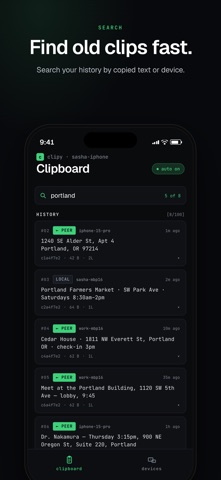
Clipy gives your iPhone and Mac a searchable history of recent copied text, plus a simple way to send clips directly to trusted Apple devices nearby. No account. No cloud. Just the text you need, ready to use again.
CLIPBOARD HISTORY
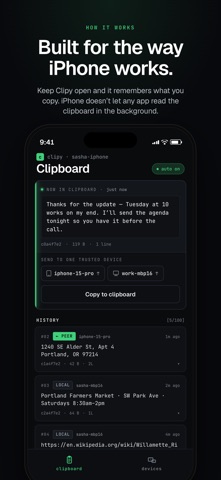
Keep up to 100 recent text clips, newest first. See where a clip came from, then copy it back whenever you need it.
NEARBY SHARING
Connect trusted Apple devices on your local network and send your latest clip directly between them. Sessions are verified and encrypted, with no cloud account required.
FAST SEARCH
Search your history by copied text or source device so old addresses, links, notes, code snippets, and messages are easy to find.
BUILT FOR MAC
Clipy can automatically capture copied text on Mac and keeps recent clips close at hand from the menu bar, so you can search, copy, and send without breaking your flow.
BUILT FOR iPHONE
Keep Clipy open while you copy to build your clipboard history. iPhone does not allow apps to continuously read the clipboard in the background, so Clipy works within Apple’s privacy model instead of trying to work around it.
PRIVATE BY DESIGN
Clipy is designed around local storage and direct nearby sharing rather than a cloud clipboard account.
Copy something useful. Find it later. Send it where you need it.