



AppBrain's verdict
- Last updated
- September 3, 2026
- Size
- 7.47 MB
User feedback
Ratings and reviews on the App StoreComments on clipboood - Auto Clipboard for iOS
We don't have enough comments to show example comments. Please check back later.
Store listing
By MASARU MIYAKE, from the App StoreDescription by MASARU MIYAKE Written by the developer, not by AppBrain. Click to read.
"Tired of constantly switching back and forth between apps just to copy and paste?"
clipboood frees you from daily copy-paste frustration with a simple, powerful background clipboard manager.
Unlike traditional clipboard apps, there's no need to switch back to the app every time you copy something.
Just tap once inside the app or from the iOS Control Center. After that, simply copy text as you normally would, and clipboood automatically saves your history in the background.
■ Key Features
[Background Auto-Save]
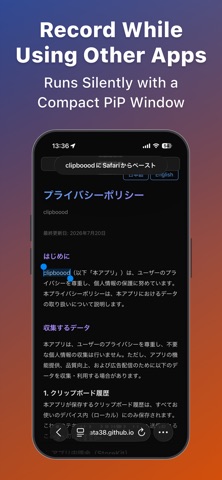
Tap “Start Auto Save” at the top of the app, or in Control Center. Powered by Picture-in-Picture (PiP), your clipboard history is captured in real-time while you work across other apps.
[One-Tap Re-Copy]
Tap any saved item to instantly bring it back to your clipboard.
Quickly recall URLs, messages, code snippets, and notes.
[Favorites & Easy Reordering]
Swipe right on any clip to move it to your Favorites. Drag and drop to reorder anytime.
Perfect for email templates, hashtag sets, and AI prompts.
[Fast Keyword Search]
Find what you need instantly. Search through your history and favorites with keyword matching.
[Privacy First]
Auto-save only runs when you activate it. All data is saved strictly on your device and is never sent to external servers.
■ How It Works (3 Easy Steps)
1. Tap “Start Auto Save” at the top of the app, or use Control Center.
2. Copy text naturally in Safari, Notes, or any other app.
3. Open clipboood and tap to copy again!
■ Premium Plan (One-Time Purchase / No Subscription)
Pay once to unlock lifetime access with no recurring fees:
- Remove all ads
- Expand history limit up to 100 items
- Unlock Favorites & Drag-and-Drop Reordering (up to 100 items)
Safety and technology
Found in the app by AppBrain- Price
- Free
- App size
- 7.47 MB
- Content rating
- Everyone
Technologies used by clipboood - Auto Clipboard
Releases
Updates seen on the App Store- Version
- 2.5
- Launched
- March 2026
No changelog data
Alternatives
Similar apps and more from MASARU MIYAKEAlternatives to clipboood - Auto Clipboard


More from MASARU MIYAKE


Rankings
App Store top chartsApp Store Rankings for clipboood - Auto Clipboard
About the app and developer
About clipboood - Auto Clipboard
clipboood - Auto Clipboard is a productivity app developed by MASARU MIYAKE.
User Ratings
The app has no ratings yet.
App Information
clipboood - Auto Clipboard is freely available from the App Store. The app size is 7.47 MB. The latest version available is 2.5. The last update was on September 3, 2026.
Technical Requirements
The app has a content rating of Everyone. The app has been available on the App Store since March 2026.
clipboood - Auto Clipboard is made and published by MASARU MIYAKE. AppBrain is an independent app data site and isn't affiliated with MASARU MIYAKE. The app name, icon, screenshots and description belong to MASARU MIYAKE and are shown as published on the App Store.
Developer information for MASARU MIYAKE
Address:
Frequently asked questions about clipboood - Auto Clipboard
Is clipboood - Auto Clipboard free?
Yes. clipboood - Auto Clipboard is free on the App Store.
Is clipboood - Auto Clipboard still available?
Yes. clipboood - Auto Clipboard is on the App Store, and the last update we saw was on September 3, 2026.
How large is clipboood - Auto Clipboard?
clipboood - Auto Clipboard is 7.47 MB.
Is clipboood - Auto Clipboard suitable for children?
App Store rates the content of clipboood - Auto Clipboard as suitable for everyone.
Who made clipboood - Auto Clipboard?
clipboood - Auto Clipboard was developed by MASARU MIYAKE. It is listed in the productivity category on the App Store.
What are the best alternatives to clipboood - Auto Clipboard?
People looking at clipboood - Auto Clipboard also look at these productivity apps: LIKE SHOP, あさなび, Plantodo - 日常を最適化する管理アプリ, QR会計, ClipTap: Text Snippet Keyboard.