

ClipDrop is made and published by Pawan Kumar Dixit. AppBrain is an independent app data site and isn't affiliated with Pawan Kumar Dixit. The app name, icon, screenshots and description belong to Pawan Kumar Dixit and are shown as published on the App Store.
AppBrain's verdict
- Last updated
- April 16, 2026
- Size
- 4.75 MB
User feedback
Ratings and reviews on the App StoreComments on ClipDrop for iOS
We don't have enough comments to show example comments. Please check back later.
Store listing
By Pawan Kumar Dixit, from the App Store

Description by Pawan Kumar Dixit Written by the developer, not by AppBrain. Click to read.
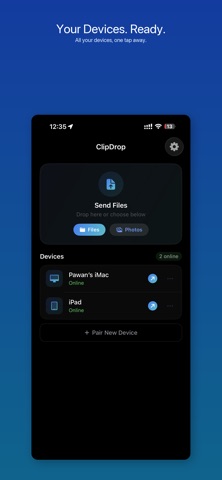
No complicated setup. No failed transfers. Open ClipDrop on any two of your devices and they find each other immediately. Drag a file, tap share, or drop it on the floating overlay — it arrives on the other side in seconds.
HOW IT WORKS
ClipDrop pairs your devices automatically through iCloud. Once you sign in with the same Apple Account on any combination of iPhone, iPad, and Mac, your devices recognize each other with zero configuration. Transfers happen over your local network, device to device. Your files never leave your network and never touch a server.
KEY FEATURES
• Instant device discovery — your devices find each other automatically via iCloud, no pairing required
• Send multiple files at once — each file transfers individually, no zipping or waiting
• Share extension — send from any app with one tap
• Floating overlay on Mac — drag any file onto the always-on drop target to send instantly
• Drag to menu bar — drop files on the menu bar icon to start a transfer
• Rich notification previews — see images, documents, and links right in the notification
• Auto-save photos to your Camera Roll
• Custom save folders on Mac
• Sounds and haptic feedback for every transfer
• Works with everything — photos, videos, documents, links, text, archives
BUILT FOR PRIVACY
Every transfer happens directly between your devices over your local network. Nothing is uploaded to the cloud. Nothing is stored on a server. Nothing is tracked. The only data that leaves your device is the file itself — and it only goes to the device you chose.
DESIGNED TO DISAPPEAR
ClipDrop is a utility. Fast, invisible, and reliable. No accounts, no subscriptions, no setup wizards. Install on two or more devices, and it works. That's the whole point.
Safety and technology
Found in the app by AppBrain- Price
- Free
- App size
- 4.75 MB
- Content rating
- Everyone
Technologies used by ClipDrop
Releases
Updates seen on the App Store- Version
- 1.1
- Launched
- April 2026
No changelog data
Alternatives
Similar apps and more from Pawan Kumar DixitAlternatives to ClipDrop


More from Pawan Kumar Dixit


Rankings
App Store top chartsApp Store Rankings for ClipDrop
About the app and developer
About ClipDrop
ClipDrop is an utilities app developed by Pawan Kumar Dixit.
User Ratings
The app has no ratings yet.
App Information
ClipDrop is freely available from the App Store. The app size is 4.75 MB. The latest version available is 1.1. The last update was on April 16, 2026.
Technical Requirements
The app has a content rating of Everyone. The app has been available on the App Store since April 2026.
Developer information for Pawan Kumar Dixit
Address:
Frequently asked questions about ClipDrop
Is ClipDrop free?
Yes. ClipDrop is free on the App Store.
Is ClipDrop still available?
Yes. ClipDrop is on the App Store, and the last update we saw was on April 16, 2026.
How large is ClipDrop?
ClipDrop is 4.75 MB.
Is ClipDrop suitable for children?
App Store rates the content of ClipDrop as suitable for everyone.
Who made ClipDrop?
ClipDrop was developed by Pawan Kumar Dixit. It is listed in the utilities category on the App Store.
What are the best alternatives to ClipDrop?
People looking at ClipDrop also look at these utilities apps: Studio Softbox Light - Lumet, Swipe Photo Clean, Cleaner Kiki: Storage Cleanup, QR Code Reader & Bar Scanner, Imgs2PDF - Image to PDF.