

Cloak: App Locker
Cloak: App Locker is made and published by Ailton Vieira Pinto Filho. AppBrain is an independent app data site and isn't affiliated with Ailton Vieira Pinto Filho. The app name, icon, screenshots and description belong to Ailton Vieira Pinto Filho and are shown as published on the App Store.
AppBrain's verdict
- Rating on App Store
- 4.83
- 12 ratings
- Last updated
- May 25, 2026
It doesn't have enough ratings yet to judge what users think.
Rankings
App Store top chartsApp Store Rankings for Cloak: App Locker
Competitors
Similar apps and more from Ailton Vieira Pinto FilhoAlternatives to Cloak: App Locker


More from Ailton Vieira Pinto Filho


Releases
Updates seen on the App Store- Version
- 1.6.0
- Launched
- December 2025
No changelog data
User feedback
Ratings and reviews on the App StoreComments on Cloak: App Locker for iOS
We don't have enough comments to show example comments. Please check back later.
Technology
Found in the app by AppBrain- Price
- Free
- App size
- 35.7 MB
- Content rating
- Everyone
Technologies used by Cloak: App Locker
About the app and developer
About Cloak: App Locker
Cloak: App Locker is a productivity app developed by Ailton Vieira Pinto Filho.
What is the rating of Cloak: App Locker?
Cloak: App Locker is rated 4.83 out of 5 stars, based on 12 ratings.
Is Cloak: App Locker free?
Cloak: App Locker is free. The app size is 35.67 MB. The latest version available is 1.6.0. The last update was on May 25, 2026.
What are the requirements for Cloak: App Locker?
The app has a content rating of Everyone. The app has been available on the App Store since December 2025.
Developer information for Ailton Vieira Pinto Filho
Address:
Store listing
By Ailton Vieira Pinto Filho, from the App Store



Description by Ailton Vieira Pinto Filho Written by the developer, not by AppBrain. Click to read.
Create Modes that lock selected apps by place, schedule, or a manual switch. When you need access again, pause with one tap and let Cloak resume on your terms.
HOW IT WORKS
- Pick the apps you want controlled
- Create a Mode (Work, Focus, Personal, Travel…)
- Choose when it runs: trusted areas, restricted areas, schedule, or manual
TWO LOCK STYLES
- Basic Lock: apps stay visible but won’t open while a mode is active
- Advanced Lock: uses system behavior to make selected apps unavailable while active (iOS may adjust Home Screen layout when apps return)
TRUSTED AREAS, RESTRICTED AREAS & SCHEDULES
- Pause inside trusted places and lock again when you leave
- Lock inside restricted areas (for specific places you choose)
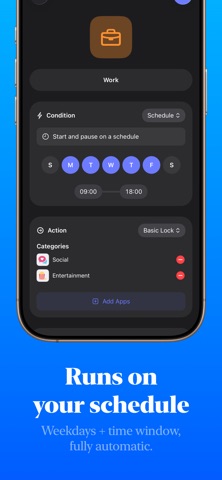
- Run on a repeating schedule (weekdays + time window)
PAUSE WHEN YOU NEED TO
- Pause for 15 minutes
- Pause until you leave (temporary location hold)
- Pause until you resume manually
LOCK SCREEN STATUS
- See whether Cloak is active or paused
- View a countdown when paused (Live Activity) and resume quickly
NOTES & REQUIREMENTS
- Cloak uses Apple Screen Time controls to apply locks. You’ll be asked to grant Screen Time permission during setup.
- Location-based modes require location permission. iOS limits region monitoring (typically up to 20 areas per app).
- App selection limits can apply depending on the lock style and Apple system behavior.
Terms of Use: https://www.apple.com/legal/internet-services/itunes/dev/stdeula/