

Clock Widget - Custom themes
Clock Widget - Custom themes is made and published by Tien Long Nguyen. AppBrain is an independent app data site and isn't affiliated with Tien Long Nguyen. The app name, icon, screenshots and description belong to Tien Long Nguyen and are shown as published on the App Store.
AppBrain's verdict
Established- Rating on App Store
- 4.07
- 29 ratings
- Last updated
- April 30, 2021
It doesn't have enough ratings yet to judge what users think.
Rankings
App Store top chartsApp Store Rankings for Clock Widget - Custom themes
Competitors
Similar apps and more from Tien Long NguyenAlternatives to Clock Widget - Custom themes


More from Tien Long Nguyen


Releases
Updates seen on the App Store- Version
- 1.0
- Launched
- April 2021
No changelog data
User feedback
Ratings and reviews on the App StoreComments on Clock Widget - Custom themes for iOS
We don't have enough comments to show example comments. Please check back later.
Technology
Found in the app by AppBrain- Price
- Free
- App size
- 102.7 MB
- Content rating
- Everyone
Technologies used by Clock Widget - Custom themes
About the app and developer
About Clock Widget - Custom themes
Clock Widget - Custom themes is a graphics & design app developed by Tien Long Nguyen.
What is the rating of Clock Widget - Custom themes?
Clock Widget - Custom themes is rated 4.07 out of 5 stars, based on 29 ratings.
Is Clock Widget - Custom themes free?
Clock Widget - Custom themes is free. The app size is 102.68 MB. The latest version available is 1.0. The last update was on April 30, 2021.
What are the requirements for Clock Widget - Custom themes?
The app has a content rating of Everyone. The app has been available on the App Store since April 2021.
Developer information for Tien Long Nguyen
Address:
Frequently asked questions about Clock Widget - Custom themes
Is Clock Widget - Custom themes free?
Yes. Clock Widget - Custom themes is free on the App Store.
Is Clock Widget - Custom themes still available?
Yes. Clock Widget - Custom themes is on the App Store, and the last update we saw was on April 30, 2021.
How large is Clock Widget - Custom themes?
Clock Widget - Custom themes is 102.68 MB.
Is Clock Widget - Custom themes suitable for children?
App Store rates the content of Clock Widget - Custom themes as suitable for everyone.
How do people rate Clock Widget - Custom themes?
Clock Widget - Custom themes scores 4.07 out of 5 stars, from 29 ratings on the App Store.
Who made Clock Widget - Custom themes?
Clock Widget - Custom themes was developed by Tien Long Nguyen. It is listed in the graphics & design category on the App Store.
What are the best alternatives to Clock Widget - Custom themes?
People looking at Clock Widget - Custom themes also look at these graphics & design apps: My widget clock +, Clock Widget with Seconds Live, Simple Clocks: Clock Widgets, Widgets Studio, Themery - Widget & Icon Themes.
Store listing
By Tien Long Nguyen, from the App Store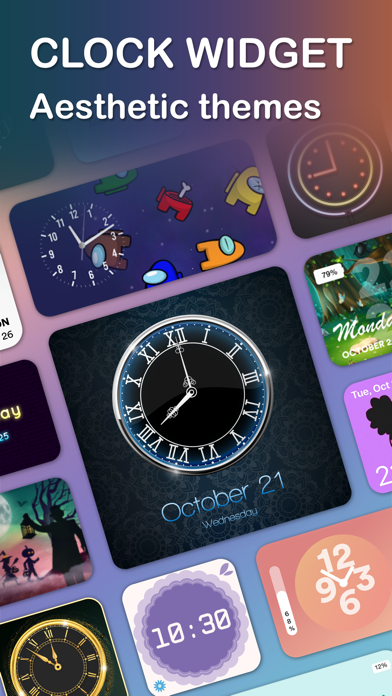


Description by Tien Long Nguyen Written by the developer, not by AppBrain. Click to read.
Customize as easily as you desire
The application is designed for you to customize the size, background, text color, and fonts to suit your home screen.
- Three widget sizes: Small - Medium - Large
- Diverse layout design, background & text color options
For example, your home screen now is girly pink and you want to decorate it with a cute pink clock. With the Clock widget app, you can easily customize the clock for yourself.
Set your photo as clock wallpaper
It's fun and engaging to use your own pictures, your family, your kids ... as the wallpaper for your clock. It is like a photo widget.
Or you can choose a favorite photo on a certain subject such as a movie, flowers, dogs ... to create a clock. Very easy. The clock widget app has many special styles to customize to your desire.
A lot of clock designs to choose
As you know, in the world there are many styles of watches to suit individual tastes. With this app, we try to bring a variety of watch styles to choose from. Includes Digital clock, Flip clock, Analog clock, Face clock, desk clock, photo clock ...
Many sets of themes, icons, wallpapers
In addition to the super beautiful widget clock patterns, our app offers users theme - icon - wallpaper design themes to help decorate your phone eye-catching, your style.
Start personalizing your Clock Widget – Theme & Icon NOW!
• Subscribed user has unlimited access
• Unsubscribed user can only use free features
• Payment will be charged to iTunes Account at confirmation of purchase.
• Subscription automatically renews unless auto-renew is turned off at least 24-hours before the end of the current period.
• The account will be charged for renewal within 24-hours prior to the end of the current period, and identify the cost of the renewal.
• Subscriptions may be managed by the user and auto-renewal may be turned off by going to the user’s Account Settings after purchase.
*Term: https://activeuser.co/term/clock_term.txt
*Privacy policy: https://activeuser.co/term/clock_policy.txt