



AppBrain's verdict
- Rating on App Store
- 3.00
- 1 ratings
- Last updated
- March 18, 2026
- Size
- 31.8 MB
It doesn't have enough ratings yet to judge what users think.
User feedback
Ratings and reviews on the App StoreComments on clux - Remote SSH Terminal for iOS
We don't have enough comments to show example comments. Please check back later.
Store listing
By Yuki Kuwahara, from the App StoreDescription by Yuki Kuwahara Written by the developer, not by AppBrain. Click to read.
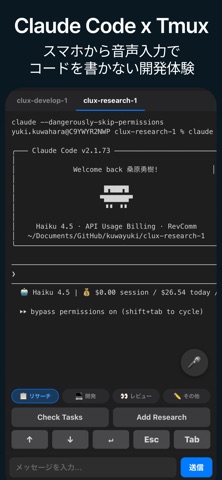
clux is a remote SSH terminal app for controlling AI coding tools (like Claude Code) on your PC from your iPhone or iPad. Connect to Mac, Windows, or Linux via SSH and operate in real time through tmux sessions.
VIBE CODING, FROM ANYWHERE
In the age of AI coding, you don't need to sit at your desk to build software. With clux, you can give AI instructions from your bed, your couch, or on the train — just by speaking.
Send commands directly to Claude Code or any terminal-based AI coding tool running on your PC, see results in real time, and give the next instruction. Development never stops, even when you're away from your computer.
KEY FEATURES
Remote AI Coding
Control Claude Code, GitHub Copilot CLI, Cursor, and other terminal-based AI coding tools from your iPhone or iPad. Send instructions, review output, and follow up — all from your mobile device.
Voice-Powered Commands
Give AI instructions using your voice instead of a keyboard. "Create a PR", "Run the tests" — just speak and the command is sent. Perfect for vibe coding while lying in bed.
tmux Session Management
Run multiple AI tasks in parallel. Organize sessions by work type — Research, Development, Review — and switch between them with a single tap. Let AI handle multiple jobs at once.
ANSI Color Terminal
Full 16-color ANSI support. See Claude Code's colorful output exactly as it appears on your desktop, providing a terminal experience comparable to your PC.
Automatic Git Worktree
Automatically create a Git worktree for each task. AI can develop multiple features in parallel, each in its own isolated branch.
Customizable Quick Actions
Send common AI instructions like "Implement this", "Create a PR", or "Review this" with one tap. Fully customizable per work type.
PERFECT FOR
- Letting AI write code while you relax in bed
- Checking AI-generated PRs during your commute
- Monitoring AI build progress from the couch
- Managing multiple AI tasks while you're out
SETUP (3 STEPS)
1. Enable SSH on your PC (Mac: Remote Login, Windows: OpenSSH Server)
2. Enter your PC's address and login credentials in clux
3. Test the connection and you're done
An in-app setup guide walks you through every step.
PRIVACY AND SECURITY
- SSH credentials are encrypted and stored on-device
- No communication with external servers
- All operations stay within your local network
With clux, AI coding is always at your fingertips.
Safety and technology
Found in the app by AppBrain- Price
- Free
- App size
- 31.8 MB
- Content rating
- Everyone
Technologies used by clux - Remote SSH Terminal
Releases
Updates seen on the App Store- Version
- 1.0
- Launched
- March 2026
No changelog data
Alternatives
Similar apps and more from Yuki KuwaharaAlternatives to clux - Remote SSH Terminal


More from Yuki Kuwahara


Rankings
App Store top chartsApp Store Rankings for clux - Remote SSH Terminal
About the app and developer
About clux - Remote SSH Terminal
clux - Remote SSH Terminal is an overall app developed by Yuki Kuwahara.
What is the rating of clux - Remote SSH Terminal?
clux - Remote SSH Terminal is rated 3.00 out of 5 stars, based on one rating ratings.
Is clux - Remote SSH Terminal free?
clux - Remote SSH Terminal is free. The app size is 31.85 MB. The latest version available is 1.0. The last update was on March 18, 2026.
What are the requirements for clux - Remote SSH Terminal?
The app has a content rating of Everyone. The app has been available on the App Store since March 2026.
clux - Remote SSH Terminal is made and published by Yuki Kuwahara. AppBrain is an independent app data site and isn't affiliated with Yuki Kuwahara. The app name, icon, screenshots and description belong to Yuki Kuwahara and are shown as published on the App Store.
Developer information for Yuki Kuwahara
Address:
Frequently asked questions about clux - Remote SSH Terminal
Is clux - Remote SSH Terminal free?
Yes. clux - Remote SSH Terminal is free on the App Store.
Is clux - Remote SSH Terminal still available?
Yes. clux - Remote SSH Terminal is on the App Store, and the last update we saw was on March 18, 2026.
How large is clux - Remote SSH Terminal?
clux - Remote SSH Terminal is 31.85 MB.
Is clux - Remote SSH Terminal suitable for children?
App Store rates the content of clux - Remote SSH Terminal as suitable for everyone.
How do people rate clux - Remote SSH Terminal?
clux - Remote SSH Terminal has one rating of 3.00 stars on the App Store.
Who made clux - Remote SSH Terminal?
clux - Remote SSH Terminal was developed by Yuki Kuwahara. It is listed in the overall category on the App Store.
What are the best alternatives to clux - Remote SSH Terminal?
People looking at clux - Remote SSH Terminal also look at these overall apps: Veelops, NomadFlowCode, amux, MiniVibe, ClawTab.