

Coast: Macros & Trackpad
Coast: Macros & Trackpad is made and published by LeShan Chen. AppBrain is an independent app data site and isn't affiliated with LeShan Chen. The app name, icon, screenshots and description belong to LeShan Chen and are shown as published on the App Store.
AppBrain's verdict
- Last updated
- September 10, 2026
- Size
- 27.1 MB
User feedback
Ratings and reviews on the App StoreComments on Coast: Macros & Trackpad for iOS
We don't have enough comments to show example comments. Please check back later.
Store listing
By LeShan Chen, from the App Store

Description by LeShan Chen Written by the developer, not by AppBrain. Click to read.
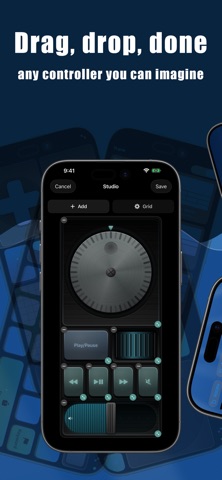
Build your own decks of controls: buttons, sliders, dials, jog wheels, and joysticks, placed exactly where you want them. Open a full-screen trackpad with a keyboard. Or point the phone at your desk and it moves the cursor like an optical mouse. Everything talks to your Mac over your own Wi-Fi, and nothing leaves your network.
CONTROL DECKS YOU DESIGN
Lay out screens of controls yourself: buttons, sliders, a jog wheel, a D-pad, a numpad, gesture pads, and about forty more widgets. Make a deck for Photoshop, a deck for editing, a deck for your studio. Decks can open automatically when their Mac app comes to the front.
A REAL TRACKPAD AND KEYBOARD
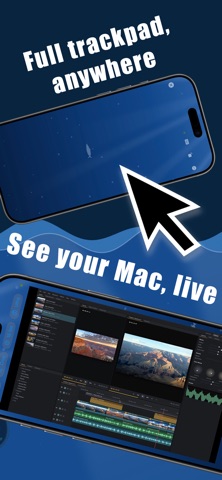
A full-screen pointer with a remote keyboard, whenever you need it.
COAST PRO
One in-app purchase unlocks the full toolkit:
- Macros: chain Mac actions with real logic, if/else, loops, and waits, into a single tap
- Screen mirror: your Mac, live on your phone
- Drawing and a laser pointer for presenting
- Air mouse and a 3D wand for orbiting 3D viewports
- The Apple Watch app
- iCloud sync across your devices
PRIVATE BY DESIGN
Coast runs over your local Wi-Fi. Pointer movement, screens, and controls stay on your own network, and are never stored or sent to us.
Coast needs its free companion app running on your Mac. Download it at coast.masn.studio.
Safety and technology
Found in the app by AppBrain- Price
- Free
- App size
- 27.1 MB
- Content rating
- Everyone
Technologies used by Coast: Macros & Trackpad
Releases
Updates seen on the App Store- Version
- 1.4
- Launched
- July 2026
No changelog data
Alternatives
Similar apps and more from LeShan ChenAlternatives to Coast: Macros & Trackpad


Rankings
App Store top chartsApp Store Rankings for Coast: Macros & Trackpad
About the app and developer
About Coast: Macros & Trackpad
Coast: Macros & Trackpad is an utilities app developed by LeShan Chen.
User Ratings
The app has no ratings yet.
App Information
Coast: Macros & Trackpad is freely available from the App Store. The app size is 27.06 MB. The latest version available is 1.4. The last update was on September 10, 2026.
Technical Requirements
The app has a content rating of Everyone. The app has been available on the App Store since July 2026.
Developer information for LeShan Chen
Address:
Frequently asked questions about Coast: Macros & Trackpad
Is Coast: Macros & Trackpad free?
Yes. Coast: Macros & Trackpad is free on the App Store.
Is Coast: Macros & Trackpad still available?
Yes. Coast: Macros & Trackpad is on the App Store, and the last update we saw was on September 10, 2026.
How large is Coast: Macros & Trackpad?
Coast: Macros & Trackpad is 27.06 MB.
Is Coast: Macros & Trackpad suitable for children?
App Store rates the content of Coast: Macros & Trackpad as suitable for everyone.
Who made Coast: Macros & Trackpad?
Coast: Macros & Trackpad was developed by LeShan Chen. It is listed in the utilities category on the App Store.
What are the best alternatives to Coast: Macros & Trackpad?
People looking at Coast: Macros & Trackpad also look at these utilities apps: Docksy: Macro Deck, CommandDeck: Remote for Mac, DND Timer, Pulse for Mac, SnapSilo: Screenshot Saver.