


AppBrain's verdict
- Last updated
- July 18, 2026
- Size
- 12.1 MB
User feedback
Ratings and reviews on the App StoreComments on CommandDeck: Remote for Mac for iOS
We don't have enough comments to show example comments. Please check back later.
Store listing
By Rassul Kainazarov, from the App StoreDescription by Rassul Kainazarov Written by the developer, not by AppBrain. Click to read.
Your iPhone and Mac talk to each other directly on your Wi-Fi. Commands do not travel through our servers. Pairing is a one-time 6-digit PIN shown on your Mac.
WHAT YOU CAN DO FOR FREE
• Pair your iPhone with your Mac
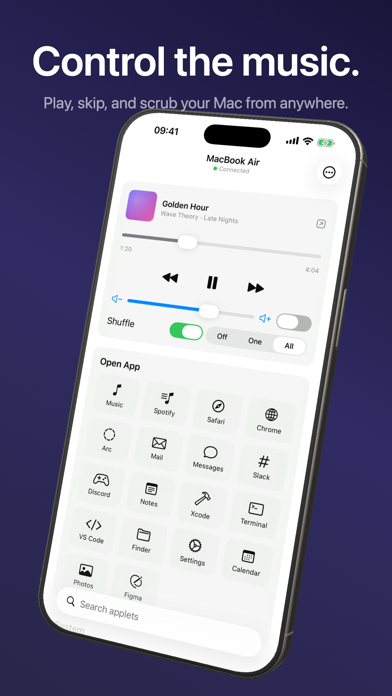
• Try basic volume and media controls
• Confirm that CommandDeck works on your own network before upgrading
COMMANDDECK PRO
Pro unlocks the full Mac remote:
• Volume — set or mute your Mac's output from your phone
• Media — play, pause, skip, seek, shuffle, and repeat in the apps you already use
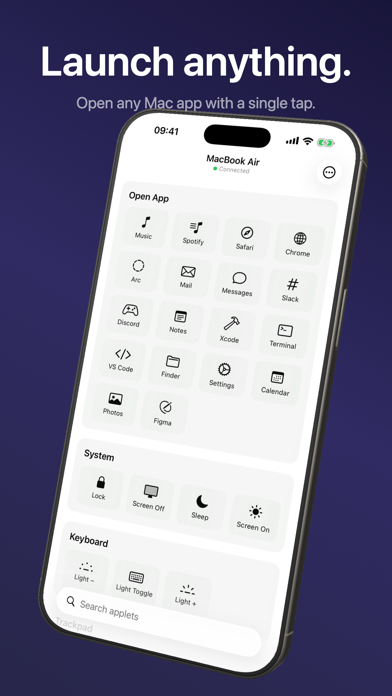
• Apps — launch your Mac apps with a tap
• Keep awake — stop your Mac from sleeping while it works
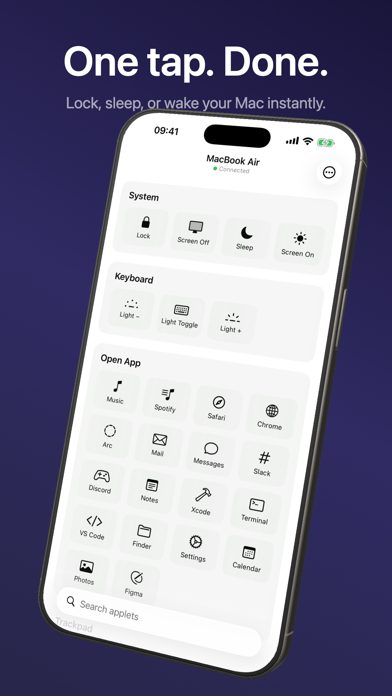
• Lock screen, display sleep/wake, Shortcuts, and more system controls
• Widgets and extras — run Mac actions from your iPhone faster
• More controls — add new ones anytime with community packages
COMMUNITY PACKAGES
Controls are modular. Beyond the built-ins, you can install community packages to add new buttons, toggles, and sliders — no app update required. Browse and add them right from the app.
PRICING
Start with basic controls for free. CommandDeck Pro includes a 7-day free trial, then $29.99/year or $2.99/month. A one-time $79.99 lifetime unlock is also available. No ads, no account sign-up.
PRIVATE BY DESIGN
Everything runs on your local network. Your Mac and iPhone connect directly; control commands stay on your Wi-Fi and are not routed through us. No account required, nothing to sign up for.
REQUIREMENTS
• An iPhone and a Mac on the same local network
• The free CommandDeck Mac app (menu-bar app — a quick free download)
• That's the entire install — every control, including lock screen, sleep, media keys, Shortcuts, and scripts, works right away, no separate helper app needed
CommandDeck has no ads and no AI — it just controls your Mac.
Download CommandDeck for Mac: https://commanddeck.meoa.space/download
Terms of Use: https://commanddeck.meoa.space/terms
Safety and technology
Found in the app by AppBrain- Price
- Free
- App size
- 12.1 MB
- Content rating
- Everyone
Technologies used by CommandDeck: Remote for Mac
Releases
Updates seen on the App Store- Version
- 1.0.4
- Launched
- June 2026
No changelog data
Alternatives
Similar apps and more from Rassul KainazarovAlternatives to CommandDeck: Remote for Mac


More from Rassul Kainazarov

Rankings
App Store top chartsApp Store Rankings for CommandDeck: Remote for Mac
About the app and developer
About CommandDeck: Remote for Mac
CommandDeck: Remote for Mac is an utilities app developed by Rassul Kainazarov.
User Ratings
The app has no ratings yet.
App Information
CommandDeck: Remote for Mac is freely available from the App Store. The app size is 12.11 MB. The latest version available is 1.0.4. The last update was on July 18, 2026.
Technical Requirements
The app has a content rating of Everyone. The app has been available on the App Store since June 2026.
CommandDeck: Remote for Mac is made and published by Rassul Kainazarov. AppBrain is an independent app data site and isn't affiliated with Rassul Kainazarov. The app name, icon, screenshots and description belong to Rassul Kainazarov and are shown as published on the App Store.
Developer information for Rassul Kainazarov
Address: