

Remote Mouse for Mac
Remote Mouse for Mac is made and published by joon kwang kim. AppBrain is an independent app data site and isn't affiliated with joon kwang kim. The app name, icon, screenshots and description belong to joon kwang kim and are shown as published on the App Store.
AppBrain's verdict
- Last updated
- August 27, 2026
- Size
- 5.52 MB
User feedback
Ratings and reviews on the App StoreComments on Remote Mouse for Mac for iOS
We don't have enough comments to show example comments. Please check back later.
Store listing
By joon kwang kim, from the App Store



Description by joon kwang kim Written by the developer, not by AppBrain. Click to read.
Remote Mouse for Mac lets you control your Mac using the device in your hand — just like a Magic Trackpad, with no cables and no extra mouse. From the couch, during a presentation, or in bed, move your Mac's cursor freely from anywhere.
■ Just Like a Real Trackpad
· Tap to click, two-finger tap to right-click
· Two-finger scroll
· Three-finger drag and double-tap drag
· Adjust tracking speed and scroll sensitivity to your liking
It feels exactly like a Magic Trackpad.
■ Connect Without Cables
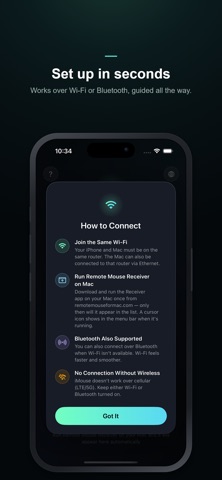
On the same Wi-Fi, your Mac is discovered automatically and shown in the list. One tap connects. No Wi-Fi? It connects over Bluetooth too.
■ Multiple Macs at Once
Home and office, MacBook and Mac mini — every Mac running the Receiver appears in the list, so you can pick and connect to any of them.
■ Secure by Design
When your iPhone connects, your Mac must approve it. No one can access your Mac without permission.
■ A Refined Experience
A neon glow blooms with every touch, wrapped in a design like no other. Available in Korean, English, Japanese, and Chinese, following your device language automatically.
■ Getting Started
1. Install this app.
2. Run the free Receiver on your Mac (download from remotemouseformac.com).
3. Pick your Mac in the app, approve it, and it becomes a trackpad instantly.
Note: To control your Mac's cursor, you need to run the free Receiver app on your Mac once. After the first launch, it starts automatically at login.
Safety and technology
Found in the app by AppBrain- Price
- Free
- App size
- 5.52 MB
- Content rating
- Everyone
Technologies used by Remote Mouse for Mac
Releases
Updates seen on the App Store- Version
- 1.0.3
- Launched
- July 2026
No changelog data
Alternatives
Similar apps and more from joon kwang kimAlternatives to Remote Mouse for Mac


Rankings
App Store top chartsApp Store Rankings for Remote Mouse for Mac
About the app and developer
About Remote Mouse for Mac
Remote Mouse for Mac is an utilities app developed by joon kwang kim.
User Ratings
The app has no ratings yet.
App Information
Remote Mouse for Mac is freely available from the App Store. The app size is 5.52 MB. The latest version available is 1.0.3. The last update was on August 27, 2026.
Technical Requirements
The app has a content rating of Everyone. The app has been available on the App Store since July 2026.
Developer information for joon kwang kim
Address:
Frequently asked questions about Remote Mouse for Mac
Is Remote Mouse for Mac free?
Yes. Remote Mouse for Mac is free on the App Store.
Is Remote Mouse for Mac still available?
Yes. Remote Mouse for Mac is on the App Store, and the last update we saw was on August 27, 2026.
How large is Remote Mouse for Mac?
Remote Mouse for Mac is 5.52 MB.
Is Remote Mouse for Mac suitable for children?
App Store rates the content of Remote Mouse for Mac as suitable for everyone.
Who made Remote Mouse for Mac?
Remote Mouse for Mac was developed by joon kwang kim. It is listed in the utilities category on the App Store.
What are the best alternatives to Remote Mouse for Mac?
People looking at Remote Mouse for Mac also look at these utilities apps: Air Voice Boost Pro : Hearing, DueSnap: Expiry Date Tracker, BabelVoice - Speech to Text, Padme - Custom keypad for Mac, FrameClip.