




AppBrain's verdict
- Last updated
- August 18, 2026
- Size
- 12.6 MB
User feedback
Ratings and reviews on the App StoreComments on Coding Keyboard for iOS
We don't have enough comments to show example comments. Please check back later.
Store listing
By Chi On Ho, from the App StoreDescription by Chi On Ho Written by the developer, not by AppBrain. Click to read.
In landscape and on iPad, the top four rows are identical to a full-size ANSI keyboard, key for key: backtick left of the 1, brackets right of the P, backslash above return, caps lock where caps lock goes. If you type on a desktop keyboard, you already know this layout.
Why
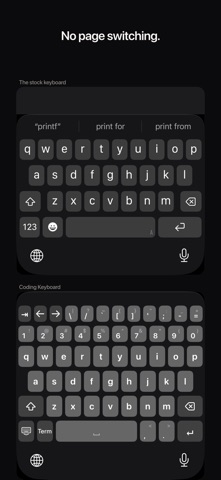
The stock iPhone keyboard hides the braces, square brackets, backslash, pipe, backtick and tilde behind two levels of page switching, and has no Tab key at all. iPad fares better, but only on the largest screens — on an 11-inch iPad the system keyboard has no number row, no brackets, no backslash, and no arrow keys either. That is fine for prose and miserable for code, SSH sessions, and config files.
This one puts them all on the first layer. Every key prints its shifted value, so ! @ # $ % ^ & * ( ) and the braces, pipe, tilde, underscore, plus, colon, quote, question mark and angle brackets are all one modifier away.
Terminal mode
A terminal does not receive key events — the PTY sees a byte stream. Terminal mode sends the bytes a real keyboard would have produced, so a shell cannot tell the difference.
It adds esc, ctrl and opt keys and a full set of cursor keys, and rewires the rest. Return sends CR rather than a newline. Ctrl plus a letter sends the C0 byte, so Ctrl-C is 0x03, Ctrl-D is 0x04, Ctrl-R is 0x12. Option prefixes with ESC, the way Meta is spelled everywhere. The arrow and Home/End keys send their ANSI escape sequences.
Ctrl and opt latch like Shift — tap, hold, or double-tap to lock — and stack with it and with each other.
This works wherever the host app forwards inserted text to its terminal. The app includes an echo terminal — a real VT100 emulator with no shell behind it — so you can see exactly what each key sends before you rely on it anywhere else.
Turn it on with the term key in landscape, or by long-pressing Tab in portrait.
Portrait
A compact 10 by 6 layout for thumbs. The number row is always visible, and Tab and the cursor keys sit in the top row.
The shift key
Three states, matching a physical keyboard more closely than iOS does.
Tap — shifts the next character.
Double tap — locks until you press shift again.
Press and hold — shifts while held.
Shift engages on finger-down rather than on lift, so holding shift with one thumb and typing with the other works the way it does on a real keyboard: the first keystroke is already capitalized.
Where it works
Anywhere iOS shows a keyboard. Terminal clients, git clients, editors, note apps, browsers, chat windows, search fields.
Privacy
The keyboard does not request Full Access. Without it, iOS grants a keyboard extension no network capability at all — it cannot send keystrokes anywhere because it cannot send anything anywhere. That is enforced by the operating system, not promised in a policy.
No data is collected. The keyboard extension has no analytics, no crash reporting, and no third-party SDKs. The source is on GitHub under the MIT license.
What it doesn't do
No autocorrect, predictive text, or swipe typing.
No emoji key — the globe key switches back to your usual keyboard.
No haptic feedback. iOS only permits it with Full Access, which this keyboard does not request.
US ASCII layout only.
Setup
Settings, then General, Keyboard, Keyboards, Add New Keyboard, Coding Keyboard. Then long-press the globe key on any keyboard to switch to it.
Safety and technology
Found in the app by AppBrain- Price
- Free
- App size
- 12.6 MB
- Content rating
- Everyone
Technologies used by Coding Keyboard
Releases
Updates seen on the App Store- Version
- 1.0.2
- Launched
- August 2026
No changelog data
Alternatives
Similar apps and more from Chi On HoAlternatives to Coding Keyboard


Rankings
App Store top chartsApp Store Rankings for Coding Keyboard
About the app and developer
About Coding Keyboard
Coding Keyboard is an utilities app developed by Chi On Ho.
User Ratings
The app has no ratings yet.
App Information
Coding Keyboard is freely available from the App Store. The app size is 12.56 MB. The latest version available is 1.0.2. The last update was on August 18, 2026.
Technical Requirements
The app has a content rating of Everyone. The app has been available on the App Store since August 2026.
Coding Keyboard is made and published by Chi On Ho. AppBrain is an independent app data site and isn't affiliated with Chi On Ho. The app name, icon, screenshots and description belong to Chi On Ho and are shown as published on the App Store.
Developer information for Chi On Ho
Address: