

CoffeaNote: Coffee Brew Timer
CoffeaNote: Coffee Brew Timer is made and published by Akihiro Suzuki. AppBrain is an independent app data site and isn't affiliated with Akihiro Suzuki. The app name, icon, screenshots and description belong to Akihiro Suzuki and are shown as published on the App Store.
AppBrain's verdict
- Last updated
- September 17, 2026
Rankings
App Store top chartsApp Store Rankings for CoffeaNote: Coffee Brew Timer
Competitors
Similar apps and more from Akihiro SuzukiAlternatives to CoffeaNote: Coffee Brew Timer


Releases
Updates seen on the App Store- Version
- 1.4.0
- Launched
- July 2026
No changelog data
User feedback
Ratings and reviews on the App StoreComments on CoffeaNote: Coffee Brew Timer for iOS
We don't have enough comments to show example comments. Please check back later.
Technology
Found in the app by AppBrain- Price
- Free
- App size
- 9.00 MB
- Content rating
- Everyone
Technologies used by CoffeaNote: Coffee Brew Timer
About the app and developer
About CoffeaNote: Coffee Brew Timer
CoffeaNote: Coffee Brew Timer is a food & drink app developed by Akihiro Suzuki.
What is the rating of CoffeaNote: Coffee Brew Timer?
CoffeaNote: Coffee Brew Timer has no ratings yet.
Is CoffeaNote: Coffee Brew Timer free?
CoffeaNote: Coffee Brew Timer is free. The app size is 9.00 MB. The latest version available is 1.4.0. The last update was on September 17, 2026.
What are the requirements for CoffeaNote: Coffee Brew Timer?
The app has a content rating of Everyone. The app has been available on the App Store since July 2026.
Developer information for Akihiro Suzuki
Address:
Store listing
By Akihiro Suzuki, from the App Store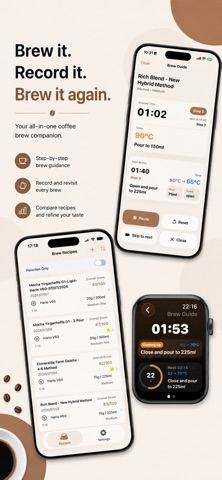




Description by Akihiro Suzuki Written by the developer, not by AppBrain. Click to read.
"That cup last week was perfect. How did I brew it?"
Every extraction has countless variables: dose, grind size, water temperature, pour timing. Log them in CoffeaNote, and your best recipes are always ready to brew again. Keep tasting notes over time and refine your own perfect cup.
◆ Made for you if…
- You jot down your brewing recipe every time
- You forget the conditions behind your best cups
- You like comparing recipes across different beans
- You want precise pour timing while you brew
◆ Recipe logging
Record bean details (roast level, origin, and more), dose, grind size, water temperature, and every pour step. Each step can include time, water amount, temperature, valve actions (for immersion/switch drippers), and memos. After brewing, save your impressions as tasting notes with ratings. It also supports AeroPress and French Press, so you can record events like press and crust break. AeroPress also supports invert-style recipes.
◆ Brew Guide — brew exactly as written
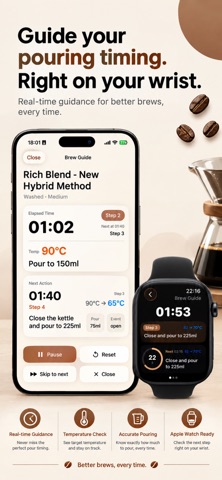
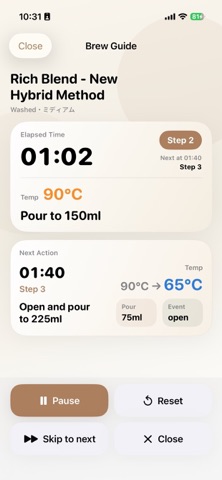
A timer guides you through your recipe, second by second.
- Advance notice before each step (adjustable)
- Sound and vibration alerts
- Elapsed time and total water at a glance
- Record your actual brew time when you finish
◆ Now on Apple Watch
Check recipes and run Brew Guide right from your wrist. It syncs automatically with your iPhone, and starting, pausing, or skipping a step on either device updates the other in real time.
◆ QR Code Recipe Sharing
Share and exchange recipes between CoffeaNote users with a QR code. Share your recipes with fellow coffee lovers.
◆ Recipe Comparison
View two recipes side by side and spot the differences in grind, temperature, and pour steps — so you know exactly what changed the taste.
◆ Copy for AI
Copy a recipe and its tasting notes as AI-ready text. Paste it into your favorite AI tool to get brewing advice.
◆ Bean Photo Auto-Fill
On Apple Intelligence–compatible devices, CoffeaNote can read the text on your coffee bag's packaging and fill in the bean details for you.
◆ iCloud Sync (Premium)
Automatically sync recipes between iPhone and iPad. Moving to a new device is easy, too.
◆ Free features
Recipe logging, tasting notes, Recipe Comparison, and Copy for AI are free and unlimited. Brew Guide is available for your 10 most recently added recipes.
◆ Premium (monthly subscription)
Unlock Brew Guide for all recipes and iCloud Sync. See the in-app purchase screen for pricing.
- Subscriptions renew automatically unless canceled at least 24 hours before the end of the period
- Payment is charged to your App Store account
- You can manage or cancel anytime in your App Store account settings
Terms of Use: https://www.apple.com/legal/internet-services/itunes/dev/stdeula/
Privacy Policy: https://nezuzuapps.github.io/CoffeaNote/privacy_en.html
Make every cup better than the last — one brew at a time, with CoffeaNote.