It doesn't have enough ratings yet to judge what users think.
Cola Mobile: Keep Work Moving is made and published by
MARSWAVE PTE. LTD.
AppBrain is an independent app data site and isn't affiliated with MARSWAVE PTE. LTD.
The app name, icon, screenshots and description belong to MARSWAVE PTE. LTD. and are shown as
published on the App Store.
About Cola Mobile: Keep Work Moving
Cola Mobile: Keep Work Moving is a productivity app developed by MARSWAVE PTE. LTD.
What is the rating of Cola Mobile: Keep Work Moving?
Cola Mobile: Keep Work Moving is rated 5.00 out of 5 stars, based on one rating ratings.
Is Cola Mobile: Keep Work Moving free?
Cola Mobile: Keep Work Moving is free. The app size is 40.92 MB. The latest version available is 1.0.5. The last update was on September 22, 2026.
What are the requirements for Cola Mobile: Keep Work Moving?
The app has a content rating of Everyone. The app has been available on the App Store since June 2026.
Description by MARSWAVE PTE. LTD.(from the App Store)
An idea comes up after you have left your desk. A screenshot or document is already on your phone. A long task is still running on your computer.
Cola is an AI with a soul, living on your Mac or Windows computer. You can chat with it, give it context and files, and let it move your tasks forward on the desktop.
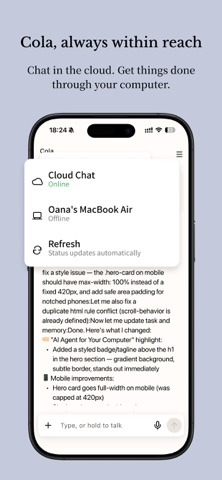
Cola Mobile is the phone connection to that workspace. It does not replace the desktop app. It helps you send instructions, add files, check progress, and get notified when your desktop Cola is done.
Cola Mobile keeps you connected to Cola without making you go back to your Mac or PC. Open the app, choose your online Cola desktop, send a message, attach what you have, and follow the result from your phone.
It is built for the everyday moments when work should keep moving: on the train, between meetings, on the couch, or right before you close your laptop for the night.
KEY FEATURES
SEND TASKS WHEN THEY COME TO MIND Turn quick thoughts into Cola tasks from your phone. Send a new request, add missing details, continue a conversation, or stop a task if it is going the wrong way.
ADD THE FILE THAT IS ALREADY ON YOUR PHONE Attach a PDF, screenshot, photo, note, log, or camera capture. Cola Mobile passes it to Cola on your computer so the task has the context it needs.
FOLLOW PROGRESS WITHOUT SITTING AT YOUR DESK See live replies, task status, errors, completion, and generated files from your selected Chat session.
SPEAK INSTEAD OF TYPE Use system speech recognition to put your thought into the prompt box. Review or edit the transcript before sending.
GET A TAP WHEN IT IS DONE When a task started from your phone finishes, receive a notification and jump back to the right device and session.
KEEP RECENT WORK HANDY Recently synced messages and downloaded files are cached on this phone for quick review. Search the session history that has already been synced to this device.
BUILT AROUND YOUR COMPUTER Cola continues to work on your online desktop. Your desktop app keeps the local session history, files, tools, and task results, while your phone gives you a fast way to hand off ideas and check back later.
WHO IS COLA MOBILE FOR?
Cola Mobile is for people who use Cola on macOS or Windows and want to:
- Capture ideas before they disappear. - Send phone files, screenshots, or photos into a Cola task. - Check long-running work without staying at the desk. - Add one more instruction when something comes to mind. - Get notified when a task is finished. - Keep computer work moving while life moves around it.
IMPORTANT
Cola Mobile requires a Cola account and an online Cola desktop app on macOS or Windows. When no desktop device is online, the app may only show local content already cached on this phone.
Cola Mobile does not run tasks independently on the phone and does not use cloud conversation history sync.
Download Cola Mobile and let your computer keep working, even when you step away.
Each subscription will automatically renew 3 days before the expiration date for
the same time period. Subscriptions can be cancelled at any time before the renewal.