

Color Screen:From Button/Clock
Color Screen:From Button/Clock is made and published by MINERVA K.K. AppBrain is an independent app data site and isn't affiliated with MINERVA K.K. The app name, icon, screenshots and description belong to MINERVA K.K. and are shown as published on the App Store.
AppBrain's verdict
- Rating on App Store
- 2.00
- 4 ratings
- Last updated
- July 5, 2024
- Size
- 45.1 MB
It doesn't have enough ratings yet to judge what users think.
User feedback
Ratings and reviews on the App StoreComments on Color Screen:From Button/Clock for iOS
We don't have enough comments to show example comments. Please check back later.
Store listing
By MINERVA K.K., from the App Store


Description by MINERVA K.K. Written by the developer, not by AppBrain. Click to read.
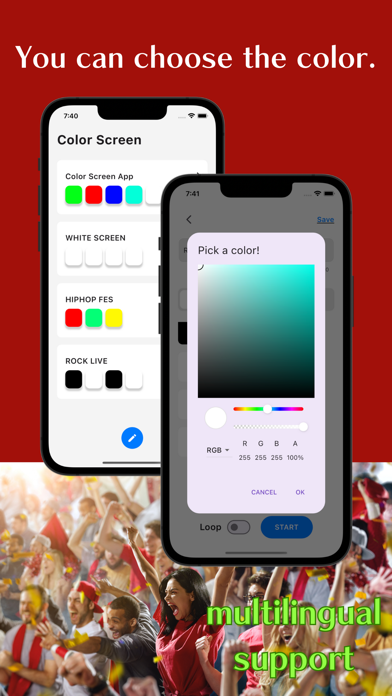
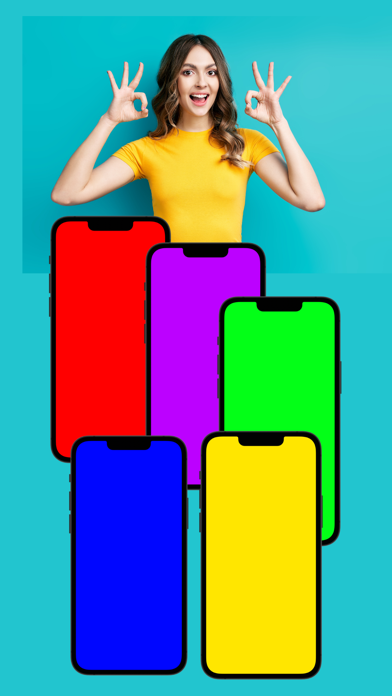
With this application, you can display screens of various colors.
1. order
2. time
3. number of times
You can set these to display a color screen. Therefore, it will be able to be used in various scenes.
■Functions of the color screen application
1. display in order:.
Users can set the order of colors to be displayed. For example, red, blue, and green can be set to be displayed in that order.
2. display by time: The user can set the time to display each color on the screen.
The user can set the length of time each color is displayed on the screen. For example, red can be displayed for 5 seconds, blue for 3 seconds, and green for 10 seconds.
3. frequency setting: The user can set the number of times the screen is displayed.
The user can set the number of times the screen will be repeated. For example, it can be set to repeat 3 times.
4. color screen display method: The user can set the number of times the screen will be displayed.
The color screen application allows the user to choose how to display the screen in two different colors.
- Button press: The user presses a button to display the next color screen. This method allows the user to switch between colors at his/her own timing.
- At a set time: The user sets the display time for each color, and when the time is up, the next color screen is automatically displayed. In this way, the user does not have to manually press a button, and the screen will automatically switch to the next color at the specified time.
5. loop function: The color screen application has a loop function.
The color screen application has a loop function. The screen can be repeated a user-defined number of times. If the loop function is turned on, the color screen will be displayed until the application is closed.
A color screen application with this kind of functionality can be used in a variety of situations.
■Use Cases for Color Screen App
1. live concert venue:.
The Color Screen App can be used to enhance the production of a live concert venue. For example, specific colors or color sequences can be set to match the artist's music, and the color screens can be displayed as part of the performance or performance to create a visual effect.
2. school festivals:.
Using a color screen application in a booth or on stage at a cultural festival can create an eye-catching effect for the audience. Specific colors and color changes can be used to create a more vivid impression for performances and exhibits.
3. videos such as TikTok:.
Videos shot with color screen applications can attract attention on social networking platforms. By combining specific color screens or color changes, videos can be produced with creative effects and visual appeal to capture viewers' attention.
4. illumination:.
Color screen applications can be used to create illuminations. Connecting a color screen app to the lighting system of a building or park and lighting it up with a specified color or color pattern can create a special atmosphere and standout effect.
5. appeals and Morse code:.
The color screen app can be used to appeal to a message or symbol. Specific colors or color sequences can be set to display prominently or create Morse code-like light patterns for an effective means of communication.
6. dance and entertainment effects:.
Color screen applications can be used to create dance performances and entertainment shows. Color changes in time with music and rhythm can visually support dancers' movements and performers' performances, making the show more attractive.
■Intended Users
1. event organizers
People involved in the planning and production of events such as live concerts, festivals, cultural festivals, etc.
2. performers/artists:.
Performers such as dancers, musicians, theatrical groups, etc.
3. visual artists:.
Creators of visual art and installations.
4. creators and content producers for TikTok, YouTube, etc.
Safety and technology
Found in the app by AppBrain- Price
- Free
- App size
- 45.1 MB
- Content rating
- Everyone
Technologies used by Color Screen:From Button/Clock
Releases
Updates seen on the App Store- Version
- 1.0.2
- Launched
- June 2023
No changelog data
Alternatives
Similar apps and more from MINERVA K.K.






Rankings
App Store top chartsApp Store Rankings for Color Screen:From Button/Clock
About the app and developer
About Color Screen:From Button/Clock
Color Screen:From Button/Clock is a lifestyle app developed by MINERVA K.K.
What is the rating of Color Screen:From Button/Clock?
Color Screen:From Button/Clock is rated 2.00 out of 5 stars, based on 4 ratings.
Is Color Screen:From Button/Clock free?
Color Screen:From Button/Clock is free. The app size is 45.10 MB. The latest version available is 1.0.2. The last update was on July 5, 2024.
What are the requirements for Color Screen:From Button/Clock?
The app has a content rating of Everyone. The app has been available on the App Store since June 2023.
Developer information for MINERVA K.K.
Address:
Frequently asked questions about Color Screen:From Button/Clock
Is Color Screen:From Button/Clock free?
Yes. Color Screen:From Button/Clock is free on the App Store.
Is Color Screen:From Button/Clock still available?
Yes. Color Screen:From Button/Clock is on the App Store, and the last update we saw was on July 5, 2024.
How large is Color Screen:From Button/Clock?
Color Screen:From Button/Clock is 45.10 MB.
Is Color Screen:From Button/Clock suitable for children?
App Store rates the content of Color Screen:From Button/Clock as suitable for everyone.
How do people rate Color Screen:From Button/Clock?
Color Screen:From Button/Clock scores 2.00 out of 5 stars, from 4 ratings on the App Store.
Who made Color Screen:From Button/Clock?
Color Screen:From Button/Clock was developed by MINERVA K.K. It is listed in the lifestyle category on the App Store.
What are the best alternatives to Color Screen:From Button/Clock?
People looking at Color Screen:From Button/Clock also look at these lifestyle apps: Color Light - Lamp, Japa+, Bluetooth-RGB, Barbearia Rusticana, Pompoar.