

Binary Calculator & Converter
Binary Calculator & Converter is made and published by MINERVA K.K. AppBrain is an independent app data site and isn't affiliated with MINERVA K.K. The app name, icon, screenshots and description belong to MINERVA K.K. and are shown as published on the App Store.
AppBrain's verdict
- Rating on App Store
- 1.50
- 2 ratings
- Last updated
- August 18, 2025
- Size
- 29.7 MB
It doesn't have enough ratings yet to judge what users think.
User feedback
Ratings and reviews on the App StoreComments on Binary Calculator & Converter for iOS
We don't have enough comments to show example comments. Please check back later.
Store listing
By MINERVA K.K., from the App Store


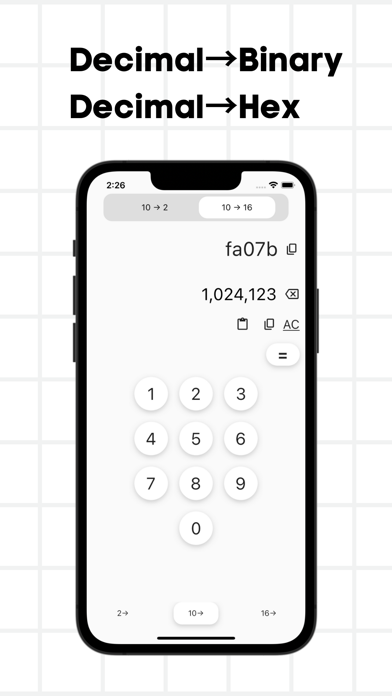

Description by MINERVA K.K. Written by the developer, not by AppBrain. Click to read.
The app supports the following three decimal formats:
1. Binary: This is a decimal number format that uses only two numbers, 0 and 1. For example, a number like "101011" is a binary number.
2. Decimal: This is the normal representation of numbers and uses digits from 0 to 9. For example, "42" is a decimal number.
3. Hexadecimal: This is a hexadecimal system that uses numbers from 0 to 9 and letters from A to F. For example, "2A" or "F" is a hexadecimal number. For example, a number like "2A" or "FF" is a hexadecimal number.
This application allows you to convert the above decimal formats to each other. For example, you can convert from binary to decimal, hexadecimal to binary, or decimal to hexadecimal.
It is very simple to use. Simply enter the number you wish to convert and select the decimal format you wish to use. The app instantly displays the conversion results.
The "Decimal Converter App" is a useful tool in programming, digital electronics, mathematics, and other related fields.
Anyone can easily use it, from beginners to advanced users.
If you need help converting numbers to decimal numbers, please use the "Decimal Number Converter App".
■Details of the functions of the Decimal Conversion App
1. binary to decimal conversion:.
- The user enters a binary number.
- The app converts the number to decimal and displays the result.
2. Binary to hexadecimal conversion: The user enters a binary number.
- The user enters a binary number.
- The app converts the number to hexadecimal and displays the result.
3. Decimal to Binary: The user enters a decimal number.
- The user enters a decimal number.
- The app converts the number to binary and displays the result.
4. Decimal to Hex: The user enters a decimal number.
- The user enters a decimal number.
- The app converts the number to hexadecimal and displays the result.
5. Hex to binary conversion: The user enters a hexadecimal number.
- The user enters a hexadecimal number.
- The app converts the number to binary and displays the result.
6. Hex to decimal conversion: The user enters a hexadecimal number.
- The user enters a hexadecimal number.
- The app converts the number to decimal and displays the result.
This decimal converter application is designed to provide a simple and easy-to-use interface that allows users to easily perform decimal conversions of numbers. All the user has to do is enter the number to be converted, select the appropriate conversion mode, and the app instantly displays the conversion results.
The app is a useful tool in programming, digital electronics, mathematics, and related fields. Decimal conversions are important in a variety of applications, including bit operations, data processing, data display and conversion, encryption, and more.
These are the details of the functions of the decimal conversion application. If necessary, we would be happy to provide specific usage and operation instructions.
■ Use Cases
Some of the use cases of the decimal conversion application are shown below.
1. programming:.
- While developing a program, you may need to convert a number expressed in binary or hexadecimal to a decimal number. This application can be used to quickly perform the decimal conversion of a number.
Binary numbers are used in computers and machine logic circuits, while hexadecimal numbers are used in assembler and other machine languages.
2. digital electronics:.
- Binary and hexadecimal numbers are commonly used in the design of digital circuits and microprocessors. This application can be used to perform decimal conversions in circuit design and data analysis.
If you have needs related to the representation and conversion of numbers, this application can help you perform decimal conversions efficiently.
Safety and technology
Found in the app by AppBrain- Price
- Free
- App size
- 29.7 MB
- Content rating
- Everyone
Technologies used by Binary Calculator & Converter
Releases
Updates seen on the App Store- Version
- 1.0.4
- Launched
- June 2023
No changelog data
Alternatives
Similar apps and more from MINERVA K.K.Alternatives to Binary Calculator & Converter


More from MINERVA K.K.







Rankings
App Store top chartsApp Store Rankings for Binary Calculator & Converter
About the app and developer
About Binary Calculator & Converter
Binary Calculator & Converter is a productivity app developed by MINERVA K.K.
What is the rating of Binary Calculator & Converter?
Binary Calculator & Converter is rated 1.50 out of 5 stars, based on 2 ratings.
Is Binary Calculator & Converter free?
Binary Calculator & Converter is free. The app size is 29.74 MB. The latest version available is 1.0.4. The last update was on August 18, 2025.
What are the requirements for Binary Calculator & Converter?
The app has a content rating of Everyone. The app has been available on the App Store since June 2023.
Developer information for MINERVA K.K.
Address: