





AppBrain's verdict
- Last updated
- October 30, 2026
- Size
- 12.5 MB
User feedback
Ratings and reviews on the App StoreComments on ColorCalendar - Color Planner for iOS
We don't have enough comments to show example comments. Please check back later.
Store listing
By Matthias Golla, from the App StoreDescription by Matthias Golla Written by the developer, not by AppBrain. Click to read.
ColorCalendar works directly with the calendars you already have (iCloud, Google, Exchange, CalDAV, subscribed calendars) – nothing moves, everything stays in sync.
AS FAST AS YOU THINK
• Create events in natural language: “tomorrow 3pm dentist” – done.
• Repeating events, too: “rehearsal every Monday 7pm” or “every first Wednesday of the month until December”.
• Six views, one swipe: day, 2-day, week, month, list, year.
• Fluid 120 Hz scrolling and pinch-zoom – built like a system app.
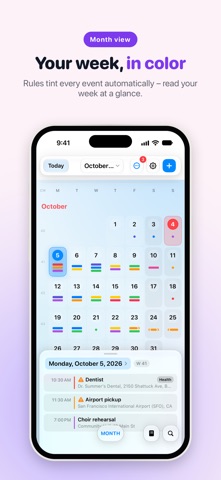
• Month view with a pull-up day panel: overview on top, details below.
COLOR WITH A SYSTEM
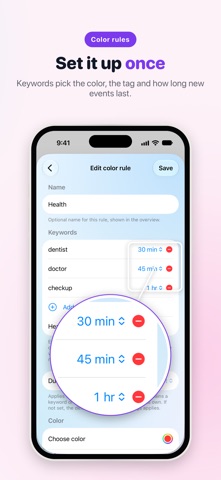
• Color rules: keyword → color, applied automatically to every matching event.
• Exact matches, word boundaries, or smart similarity – your choice.
• Custom colors for single events or whole series, too.
ALWAYS IN SIGHT
• Widgets for your Home and Lock Screen.
• Apple Watch app with complications – your next events on your wrist.
• Event details with map preview and travel time.
FOR FULL CONTROL: COLORCALENDAR PRO
• Unlimited color rules (3 are free).
• “Time to leave” alerts with live travel time to your destination.
• Edit subscribed calendars: mirroring makes read-only calendars editable.
• Duplicate manager: detect and merge duplicate events across calendars.
• Smart location suggestions from your event history.
• Event attachments, plus backup & export.
ColorCalendar Pro is €9.99 per year after a 14-day free trial. One purchase covers iPhone, iPad, and Mac (Universal Purchase). The subscription renews automatically and can be cancelled anytime in Settings. Without Pro, ColorCalendar remains a fully capable free calendar – all views, all your events, natural language input, and 3 color rules included.
MORE TO COME
ColorCalendar is under active development and the next versions are already in the works. Feature requests and bug reports are genuinely welcome – they go straight into the plan.
YOUR DATA IS YOURS
ColorCalendar collects no data. Your events stay in your calendar accounts; your settings sync only through your personal iCloud key-value storage. No accounts, no tracking, no ads.
Privacy policy: https://matthiasgolla.de/apps/colorcalendar/datenschutz
Terms of use: https://www.apple.com/legal/internet-services/itunes/dev/stdeula/
Safety and technology
Found in the app by AppBrain- Price
- Free
- App size
- 12.5 MB
- Content rating
- Everyone
Technologies used by ColorCalendar - Color Planner
Releases
Updates seen on the App Store- Version
- 1.3.5
- Launched
- August 2026
No changelog data
Alternatives
Similar apps and more from Matthias GollaAlternatives to ColorCalendar - Color Planner


More from Matthias Golla

Rankings
App Store top chartsApp Store Rankings for ColorCalendar - Color Planner
About the app and developer
About ColorCalendar - Color Planner
ColorCalendar - Color Planner is a productivity app developed by Matthias Golla.
What is the rating of ColorCalendar - Color Planner?
ColorCalendar - Color Planner has no ratings yet.
Is ColorCalendar - Color Planner free?
ColorCalendar - Color Planner is free. The app size is 12.52 MB. The latest version available is 1.3.5. The last update was on October 30, 2026.
What are the requirements for ColorCalendar - Color Planner?
The app has a content rating of Everyone. The app has been available on the App Store since August 2026.
ColorCalendar - Color Planner is made and published by Matthias Golla. AppBrain is an independent app data site and isn't affiliated with Matthias Golla. The app name, icon, screenshots and description belong to Matthias Golla and are shown as published on the App Store.
Developer information for Matthias Golla
Address:
Frequently asked questions about ColorCalendar - Color Planner
Is ColorCalendar - Color Planner free?
Yes. ColorCalendar - Color Planner is free on the App Store.
Is ColorCalendar - Color Planner still available?
Yes. ColorCalendar - Color Planner is on the App Store, and the last update we saw was on October 30, 2026.
How large is ColorCalendar - Color Planner?
ColorCalendar - Color Planner is 12.52 MB.
Is ColorCalendar - Color Planner suitable for children?
App Store rates the content of ColorCalendar - Color Planner as suitable for everyone.
Who made ColorCalendar - Color Planner?
ColorCalendar - Color Planner was developed by Matthias Golla. It is listed in the productivity category on the App Store.
What are the best alternatives to ColorCalendar - Color Planner?
People looking at ColorCalendar - Color Planner also look at these productivity apps: Sorted AI, Peal: Alarm for Appointments, Polygenda – Calendar Week+Year, Caffeinated Calendar, Calendar Widgets Suite.