

Peal: Alarm for Appointments
Peal: Alarm for Appointments is made and published by Kornelius Brunner. AppBrain is an independent app data site and isn't affiliated with Kornelius Brunner. The app name, icon, screenshots and description belong to Kornelius Brunner and are shown as published on the App Store.
AppBrain's verdict
- Last updated
- October 5, 2026
Rankings
App Store top chartsApp Store Rankings for Peal: Alarm for Appointments
Competitors
Similar apps and more from Kornelius BrunnerAlternatives to Peal: Alarm for Appointments




More from Kornelius Brunner

Releases
Updates seen on the App Store- Version
- 1.3.1
- Launched
- September 2026
No changelog data
User feedback
Ratings and reviews on the App StoreComments on Peal: Alarm for Appointments for iOS
We don't have enough comments to show example comments. Please check back later.
Technology
Found in the app by AppBrain- Price
- Free
- App size
- 2.82 MB
- Content rating
- Everyone
Technologies used by Peal: Alarm for Appointments
About the app and developer
About Peal: Alarm for Appointments
Peal: Alarm for Appointments is a productivity app developed by Kornelius Brunner.
User Ratings
The app has no ratings yet.
App Information
Peal: Alarm for Appointments is freely available from the App Store. The app size is 2.82 MB. The latest version available is 1.3.1. The last update was on October 5, 2026.
Technical Requirements
The app has a content rating of Everyone. The app has been available on the App Store since September 2026.
Developer information for Kornelius Brunner
Address:
Store listing
By Kornelius Brunner, from the App Store




Description by Kornelius Brunner Written by the developer, not by AppBrain. Click to read.
What rings and what stays quiet is free to set: per calendar, per keyword, per participant, per appointment, plus lead time and quiet hours.
WHY A NOTIFICATION IS NOT ENOUGH
Calendar notifications are quiet by design. They arrive while the device is face down, during a Focus session, or in a stack of twenty others. For most appointments that is fine. For the call with your customer, the doctor, the interview, it is not.
THE CALENDARS YOU ALREADY HAVE
iCloud, Google, Outlook, Exchange, work accounts: whatever your iPhone already syncs. No new login, no account with us, no server, none of your appointments on someone else's machine. Your calendar is read on the device.
YOU DECIDE WHAT RINGS
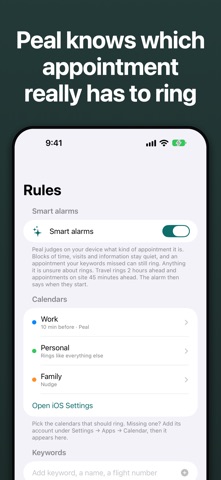
Per calendar: let work ring, leave the family calendar quiet.
Per keyword: anything with "interview" or a particular name.
Per participant: by name or email address.
One appointment at a time, with a switch on the row.
Switch one on by hand, and the next one with that title rings too.
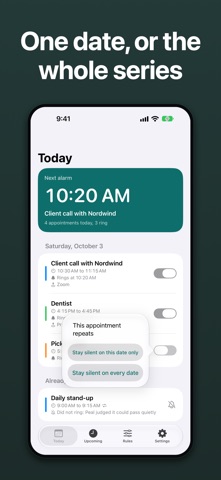
Repeating appointments: this date, or the whole series.
All of that is free.
LEAD TIME AND QUIET HOURS
Set how long before the start it should ring. Quiet hours keep the night silent.
THE NEXT ALARM ON THE LOCK SCREEN
A widget shows what rings next, on the Home Screen and the Lock Screen. An hour before an alarm, a countdown appears on the Lock Screen and in the Dynamic Island. "Don't ring" switches an alarm off right there.
ON YOUR WRIST AND ON IPAD
The alarm rings on a paired Apple Watch too, with no second app to install. Peal runs on iPhone and iPad.
BUILT TO KEEP UP
Peal notices appointments added while it was closed and re-checks itself overnight on the charger. A Shortcut keeps it current even if you never open the app.
WHAT PEAL DID
Once an appointment has passed, the log says whether the alarm rang, whether you confirmed it, or which rule kept it quiet. If none was ever set, it says that too.
PRIVACY
No analytics. No crash SDK. No network requests of Peal's own. Nothing is collected.
PEAL PLUS
Smart alarms. Apple Intelligence, on your device, works out what kind of appointment it is. Blocks of time, visits and information stay quiet, and an appointment your keywords missed can still ring.
With smart alarms, travel rings 2 hours ahead and appointments on site 45 minutes ahead.
A title, a person or a kind of appointment you keep switching off stays quiet.
A different alarm tone, and its own tone per calendar, so you know what it is without looking.
Pause every alarm until a date you choose, or pause a single calendar.
A lead time per calendar: 5 minutes for work, 30 for private.
Weekdays per calendar, so the work calendar rings Monday to Friday only.
Ring for repeating appointments only, or for one-off ones only.
Ring again, a second button on the alarm that pushes it back a few minutes.
A lead time for one appointment, for this date or the whole series.
Only vibrate when an alarm falls inside another appointment.
Requires iOS 26. Runs on iPhone and iPad.
Terms of Use (EULA): https://www.apple.com/legal/internet-services/itunes/dev/stdeula/
Privacy Policy: https://kornelius.org/peal/privacy/