

ColumnCalendar and Memo
ColumnCalendar and Memo is made and published by Shigeo Fukuda. AppBrain is an independent app data site and isn't affiliated with Shigeo Fukuda. The app name, icon, screenshots and description belong to Shigeo Fukuda and are shown as published on the App Store.
AppBrain's verdict
EstablishedLoved by users- Rating on App Store
- 4.91
- 107 ratings
- Last updated
- December 29, 2025
Users love it: 4.9 stars from 107 ratings.
Rankings
App Store top chartsApp Store Rankings for ColumnCalendar and Memo
Competitors
Similar apps and more from Shigeo FukudaAlternatives to ColumnCalendar and Memo







More from Shigeo Fukuda







Releases
Updates seen on the App Store- Version
- 1.43
- Launched
- September 2017
No changelog data
User feedback
Ratings and reviews on the App StoreComments on ColumnCalendar and Memo for iOS
We don't have enough comments to show example comments. Please check back later.
Technology
Found in the app by AppBrain- Price
- Free
- App size
- 56.2 MB
- Content rating
- Everyone
Technologies used by ColumnCalendar and Memo
About the app and developer
About ColumnCalendar and Memo
ColumnCalendar and Memo is a productivity app developed by Shigeo Fukuda.
What is the rating of ColumnCalendar and Memo?
ColumnCalendar and Memo is rated 4.91 out of 5 stars, based on 110 ratings.
Is ColumnCalendar and Memo free?
ColumnCalendar and Memo is free. The app size is 56.21 MB. The latest version available is 1.43. The last update was on December 29, 2025.
What are the requirements for ColumnCalendar and Memo?
The app has a content rating of Everyone. The app has been available on the App Store since September 2017.
Developer information for Shigeo Fukuda
Address:
Frequently asked questions about ColumnCalendar and Memo
Is ColumnCalendar and Memo free?
Yes. ColumnCalendar and Memo is free on the App Store.
Is ColumnCalendar and Memo still available?
Yes. ColumnCalendar and Memo is on the App Store, and the last update we saw was on December 29, 2025.
How large is ColumnCalendar and Memo?
ColumnCalendar and Memo is 56.21 MB.
Is ColumnCalendar and Memo suitable for children?
App Store rates the content of ColumnCalendar and Memo as suitable for everyone.
How do people rate ColumnCalendar and Memo?
ColumnCalendar and Memo scores 4.91 out of 5 stars, from 107 ratings on the App Store.
Who made ColumnCalendar and Memo?
ColumnCalendar and Memo was developed by Shigeo Fukuda. It is listed in the productivity category on the App Store.
What are the best alternatives to ColumnCalendar and Memo?
People looking at ColumnCalendar and Memo also look at these productivity apps: Vertical Planner:Calendar,Todo, Simple Calendar・Schedule app, Refills Lite, HomeScreen Calendar Widget, Daily Notes.
Store listing
By Shigeo Fukuda, from the App Store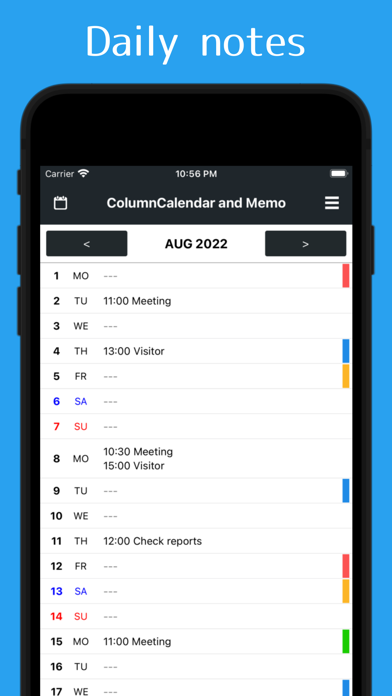




Description by Shigeo Fukuda Written by the developer, not by AppBrain. Click to read.
You can also use it as a schedule book, such as writing down the meeting schedule!
Main Functions
- There is a memo function that can be written by each day
- Memo can switch between simple display of headings only and full text display
- 5 sticky notes can be attached as marks for each date. Convenient for shift management and so on!
- Sticky notes can be selected from casual type of landmark type and button type that can write down letters
- Three calendars can be switched for different purposes, such as for work or private use
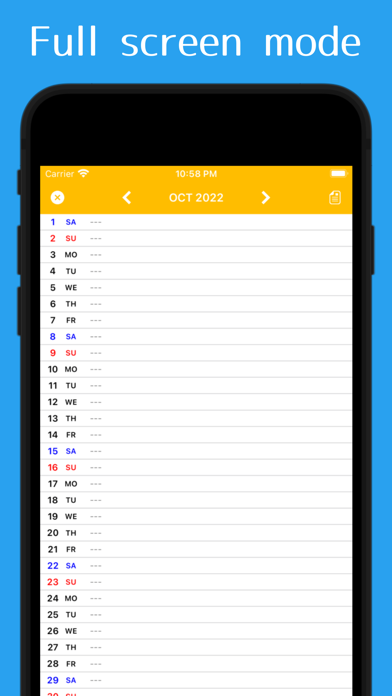
Full screen mode which can display all day without scroll from 1st to end!
It is also useful to take screenshots of full screen mode and share the schedule to family etc!
If you are using a memo as a diary, and you want to show only the sticky note to the other people, only the memo will be hidden if you tap the icon in the upper right of the screen.
* Full screen mode is for viewing only. Please edit the memo from the normal mode.
* If you want to delete the already entered memo, please long press the prescribed line.
"ColumnCalendar and Memo" can be used for free at all.