






AppBrain's verdict
Established- Rating on App Store
- 4.38
- 16 ratings
- Last updated
- October 24, 2025
- Size
- 14.4 MB
It doesn't have enough ratings yet to judge what users think.
User feedback
Ratings and reviews on the App StoreComments on Vertical Planner:Calendar,Todo for iOS
We don't have enough comments to show example comments. Please check back later.
Store listing
By Unitac, from the App StoreDescription by Unitac Written by the developer, not by AppBrain. Click to read.
・You can also sync with Google Calendar via your iPhone calendar!
・ToDo, memo, diary, picture and more!
・The half organizer functions can be viewed simultaneously with the calendar in half-view.
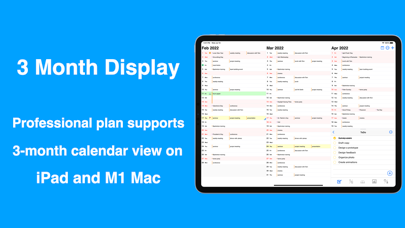
・The "Professional" plan supports 3 month calendar view on iPad and Mac!
After 10 years, the successor to the popular "vertical calendar" app for iPhone is finally here!
By making the most of the iPhone's large screen, we have achieved an overwhelming amount of functionality.
You can change the background color and set the icons so you can visually grasp the schedule.
In the day view, events are displayed with checkboxes, so you can manage to-dos on a daily basis. Locations and memos are also displayed, and if a location has been registered, a map can be displayed.
Vertical Calendar 2 has the daily planner functions that is optimized for the iPhone's vertical screen.
In developing this app, we wanted to incorporate as many of the advantages of a paper daily planner as possible.
One of the features of a paper daily planner is that you can look at your schedule while simultaneously viewing your notes or checking your to-dos.
We developed the half-view function so that you can see this kind of information other than the schedule at the same time.
The daily planner function can be displayed in half-view at the bottom of the calendar, allowing you to check your schedule and to-dos at the same time, just like a paper daily planner.
The following functions can be realized as daily planner functions.
・The To-Do List feature allows you to manage To-Dos that are not tied to dates.
・The note function allows you to display the note you always want to see along with the calendar.
・The diary function marks the dates you write in your diary, making it easy to keep a diary.
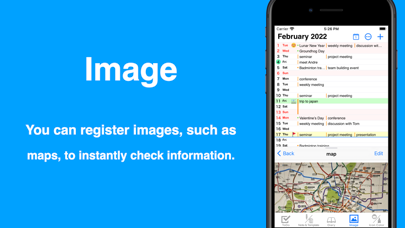
In addition, paper daily planner is highly customizable by allowing you to paste necessary information such as bus schedules and extension numbers. “Vertical Calendar 2” is equipped with an image function to realize such high customizability of the organizer.
By taking a picture of the information you need and registering the image, you can check the information immediately, allowing you to access the information as quickly as with a paper daily planner. Of course, you can also check your schedule while looking at your family photos by displaying them in half view.
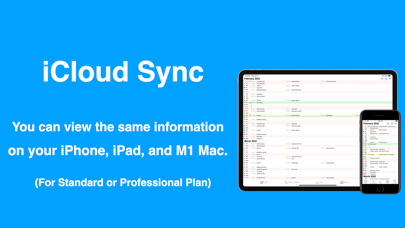
Vertical Calendar 2 also works on iPad and M1 Mac, and supports Slide Over on iPad, which is great for quick schedule checking. If you choose the "Standard" plan, you can use iCloud to sync your data across multiple devices.
I hope that "Vertical Calendar 2" will be useful in your life.
Function introduction
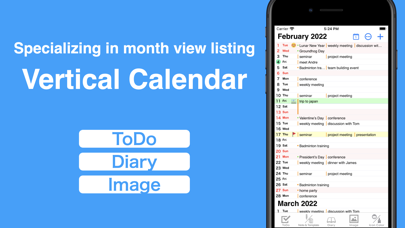
1、Manage your schedule with a vertical calendar
・Scrollable up and down
・Drag and drop to move appointments.
・Schedule management with icons
・Background color of the day can be changed.
・Background color of holidays can be changed.
2, 1day display
・List type display with high visibility
・Checkboxes are added to the day's schedule so that you can manage the day's to-dos.
3, daily planner function
・You can check your schedule and to-dos at the same time in Half View.
・The half-view allows you to check your schedule and notes at the same time.
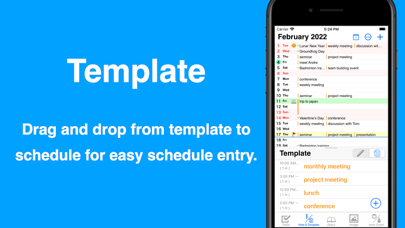
・Drag and drop Regular appointments into the calendar with the template function.
・It's easy to keep a diary because you can see at a glance on the calendar the days you kept a diary.
・The image function allows you to register route maps, etc. for use as an appendix to your daily planner.
4, 3 months display
・Professional" plan supports three-month view on iPad and M1 Mac
・The three-month display on the large screen provides an unparalleled overview, so you can check your long-term schedule at a glance.
terms of service : https://verticalcalendar2.ever.jp/use/
Safety and technology
Found in the app by AppBrain- Price
- Free
- App size
- 14.4 MB
- Content rating
- Everyone
Technologies used by Vertical Planner:Calendar,Todo
Releases
Updates seen on the App Store- Version
- 1.18
- Launched
- July 2021
No changelog data
Alternatives
Similar apps and more from UnitacAlternatives to Vertical Planner:Calendar,Todo


More from Unitac

Rankings
App Store top chartsApp Store Rankings for Vertical Planner:Calendar,Todo
About the app and developer
About Vertical Planner:Calendar,Todo
Vertical Planner:Calendar,Todo is a productivity app developed by Unitac.
User Ratings
Vertical Planner:Calendar,Todo is rated 4.38 out of 5 stars. The rating is based on 16 ratings.
App Information
Vertical Planner:Calendar,Todo is freely available from the App Store. The app size is 14.43 MB. The latest version available is 1.18. The last update was on October 24, 2025.
Technical Requirements
The app has a content rating of Everyone. The app has been available on the App Store since July 2021.
Vertical Planner:Calendar,Todo is made and published by Unitac. AppBrain is an independent app data site and isn't affiliated with Unitac. The app name, icon, screenshots and description belong to Unitac and are shown as published on the App Store.
Developer information for Unitac
Address: