



AppBrain's verdict
- Last updated
- November 18, 2026
- Size
- 2.30 MB
User feedback
Ratings and reviews on the App StoreComments on Compare Video & Photo—Sidefold for iOS
We don't have enough comments to show example comments. Please check back later.
Store listing
By SEMIH YAMAC, from the App StoreDescription by SEMIH YAMAC Written by the developer, not by AppBrain. Click to read.
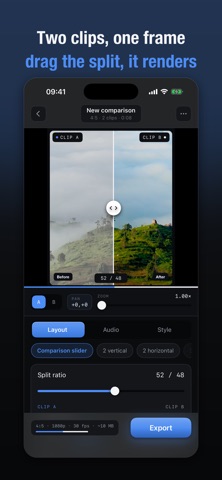
• A comparison slider whose divider is part of the exported video, with four motions: static, an opening sweep, a full wipe, or back and forth
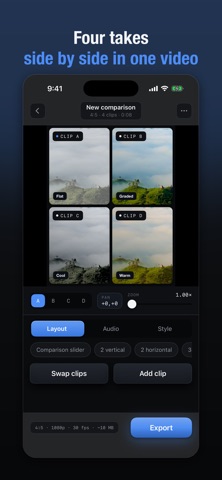
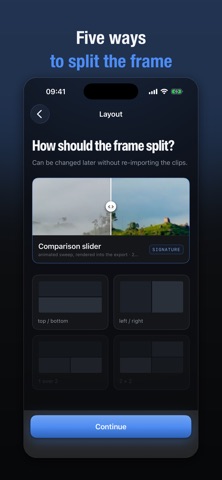
• Five layouts: the slider, two stacked, two side by side, one over two, and a 2×2 grid
• Video and photo in the same frame, so a still can be compared against a clip
• Automatic alignment by sound, which finds where two recordings share audio and sets the offset for you
• Trimming, framing and audio level for each clip separately
• A freeze frame at the end, so the comparison holds for a second or two after the clips finish
• Your own logo in a corner, rendered into the exported video
• No account, no servers, no analytics, no advertising
FREE
Three exports a day, every layout, every style preset, trimming, per-clip framing and audio. No watermark on any export, at any resolution.
PRO
Removes the daily limit and unlocks 4K, 60 fps, ProRes 422 output, automatic alignment by sound, and your own logo in the frame.
Available as a yearly subscription or a one-time lifetime purchase.
LAYOUTS
The comparison slider is the signature: one clip over another, divided by a line you place anywhere between 15% and 85%. The divider can hold still, open once at the start, wipe all the way across, or sweep back and forth on a loop you set.
The other four are fixed splits — two stacked, two side by side, one over two, and a 2×2 grid — for two, three or four clips.
Labels sit in the corner you choose and are rendered into the video, so "Before" and "After" survive the export.
STYLE
Twelve presets, from a bare edge to a bordered card. Each one sets line thickness and colour, corner radius, margin, edge softness, shadow depth, border and background in one tap, and every value stays adjustable afterwards.
Backgrounds can be a solid colour, a gradient or a blur of the footage itself.
AUDIO
Each clip keeps its own level and mute. Alignment by sound compares the two waveforms and reports how confident it is; the offset can also be stepped by hand, one frame at a time.
TRIMMING
Set an in-point and a length for each clip. Trimming is separate from sync offset: sync is a fine adjustment in frames, trimming is choosing which seconds to compare.
FRAMING
Pan and zoom each clip inside its own cell, up to 3×. What you see in the preview is what the encoder writes — the preview runs through the same engine as the export.
EXPORT
9:16, 1:1, 4:5 or 16:9. Up to 4K, at 24, 30 or 60 frames per second, in H.264 or ProRes 422. Finished videos are saved to your photo library and can be shared straight from the app.
SUBSCRIPTION
Subscriptions renew automatically unless cancelled at least 24 hours before the end of the period. Payment is charged to your Apple Account. Manage or cancel in Settings.
PRIVACY
Your clips are not uploaded. The app does not read your photo library; it receives only the items you select in the system picker, and asks for photo permission only to save finished videos back. It makes no network requests of its own.
Terms of Use (EULA): https://www.apple.com/legal/internet-services/itunes/dev/stdeula/
Privacy Policy: https://common-tuna-240.notion.site/Sidefold-Privacy-Policy-3d6e3b91ac0080cabb5fdd64537e0f72
Safety and technology
Found in the app by AppBrain- Price
- Free
- App size
- 2.30 MB
- Content rating
- Everyone
Technologies used by Compare Video & Photo—Sidefold
Releases
Updates seen on the App Store- Version
- 1.3
- Launched
- September 2026
No changelog data
Alternatives
Similar apps and more from SEMIH YAMACAlternatives to Compare Video & Photo—Sidefold


More from SEMIH YAMAC


Rankings
App Store top chartsApp Store Rankings for Compare Video & Photo—Sidefold
About the app and developer
About Compare Video & Photo—Sidefold
Compare Video & Photo—Sidefold is a photo & video app developed by SEMIH YAMAC.
What is the rating of Compare Video & Photo—Sidefold?
Compare Video & Photo—Sidefold has no ratings yet.
Is Compare Video & Photo—Sidefold free?
Compare Video & Photo—Sidefold is free. The app size is 2.30 MB. The latest version available is 1.3. The last update was on November 18, 2026.
What are the requirements for Compare Video & Photo—Sidefold?
The app has a content rating of Everyone. The app has been available on the App Store since September 2026.
Compare Video & Photo—Sidefold is made and published by SEMIH YAMAC. AppBrain is an independent app data site and isn't affiliated with SEMIH YAMAC. The app name, icon, screenshots and description belong to SEMIH YAMAC and are shown as published on the App Store.
Developer information for SEMIH YAMAC
Address: