

Compress Photos Size Image
Compress Photos Size Image is made and published by Dzine Media. AppBrain is an independent app data site and isn't affiliated with Dzine Media. The app name, icon, screenshots and description belong to Dzine Media and are shown as published on the App Store.
AppBrain's verdict
- Rating on App Store
- 4.50
- 4 ratings
- Last updated
- November 22, 2025
- Size
- 32.3 MB
It doesn't have enough ratings yet to judge what users think.
User feedback
Ratings and reviews on the App StoreComments on Compress Photos Size Image for iOS
We don't have enough comments to show example comments. Please check back later.
Store listing
By Dzine Media, from the App Store



Description by Dzine Media Written by the developer, not by AppBrain. Click to read.
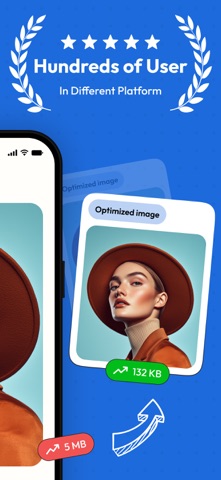
Need to resize images instantly and easily? Our image resizer is the perfect tool for both general users and professionals. It doesn’t matter whether you want to resize a single image or a complete batch of photos in one go; you can rely on our image editor. This app offers everything you need to make image editing convenient and customizable.
Key Features of Image Resizer
Resize Images with Ease
Users can easily resize a single or a complete batch of images in just a few clicks. You can easily adjust dimensions to your preferred size or select from predefined options for instant results.
Quality Adjustment
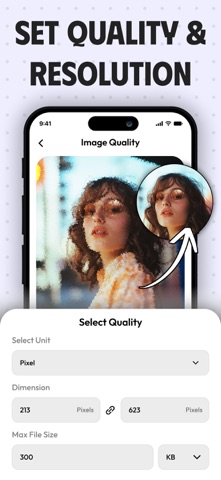
Easily customize and personalize your images with our adjustable quality settings. Users can easily reduce file size to make their images more shareable or to enhance clarity for better detail.
Metadata Editing
You can also modify metadata like date, time, title, author, description, and even GPS data without any hassle. This makes our app ideal for photographers, creators, or anyone who needs to manage image information.
File Name Customization
The image resizer application can also allow you to rename your resized images in batches with the premium version of the app. This way, you can easily organize and categorize images in your gallery effortlessly.
Batch Processing
Users of our app can easily edit and resize multiple images at once, which makes it great for users with large collections of photos to manage.
Free Options Offered by Image Resizer
The image resize comes with a basic version. The free features of our app include:
• Resize and adjust the quality of a single image.
• Batch-resizing for multiple photos.
• Edit image metadata (title, description, date, etc.).
• Save and share your resized images.
• It has a simple user interface with easy navigation and editing tools.
Premium Features (Unlock with Subscription/Payment)
• Rename multiple image files in bulk within seconds.
• Get access to additional resizing features and quality enhancement options.
• Access to advanced metadata editing options.
• No ads for a better view and usability experience.
Control Your Images with the Image Size App
• Crop your pictures in standard and inverse cropping modes by using pixels, inches, and even percentages.
• Adjust the size and position of the crop frame using touch gestures or by entering specific ratio values.
• Rotate your images quickly and smoothly with a 0-360○ range.
• Change the crop ratio using the customizable presets by long-pressing the long-press ratio button.
• Adjust the crop position along with the image size in the correction mode.
• View details of the cropped image, including size, position, rotation, and file size.
Why Choose Photo Resizer?
It doesn’t matter whether you are resizing photos for social media posts, reducing size for email images, or simply editing photos for your projects or a blog site, our image resizer makes it simple and easy for users to modify their visuals quickly.
With both free and premium features, our all-in-one image resizer is an ideal and flexible solution for those who want more control over their photos.
Subscription Terms
Our image resizer, as mentioned before, comes with a freemium model. Users can get the weekly plan or the annual plan and enjoy full access till the expiry of their subscription.
Payment will be charged to your Apple account upon purchase confirmation and will automatically renew at the selected duration and price unless auto-renewal is turned off before the current period ends.
You cannot cancel the current subscription during the active period, but you can manage your subscription and/or turn off auto-renewal in your Apple Account Settings after purchase.
Privacy Policy: https://www.trostun.com/privacy-policy/
Support URL:https://www.trostun.com/contact-us/
Terms of Use: https://www.trostun.com/terms-of-use/
Safety and technology
Found in the app by AppBrain- Price
- Free
- App size
- 32.3 MB
- Content rating
- Everyone
Technologies used by Compress Photos Size Image
Releases
Updates seen on the App Store- Version
- 1.0.5
- Launched
- March 2025
No changelog data
Alternatives
Similar apps and more from Dzine MediaAlternatives to Compress Photos Size Image



More from Dzine Media



Rankings
App Store top chartsApp Store Rankings for Compress Photos Size Image
About the app and developer
About Compress Photos Size Image
Compress Photos Size Image is a photo & video app developed by Dzine Media.
User Ratings
Compress Photos Size Image is rated 4.50 out of 5 stars. The rating is based on 4 ratings.
App Information
Compress Photos Size Image is freely available from the App Store. The app size is 32.29 MB. The latest version available is 1.0.5. The last update was on November 22, 2025.
Technical Requirements
The app has a content rating of Everyone. The app has been available on the App Store since March 2025.
Developer information for Dzine Media
Address:
Frequently asked questions about Compress Photos Size Image
Is Compress Photos Size Image free?
Yes. Compress Photos Size Image is free on the App Store.
Is Compress Photos Size Image still available?
Yes. Compress Photos Size Image is on the App Store, and the last update we saw was on November 22, 2025.
How large is Compress Photos Size Image?
Compress Photos Size Image is 32.29 MB.
Is Compress Photos Size Image suitable for children?
App Store rates the content of Compress Photos Size Image as suitable for everyone.
How do people rate Compress Photos Size Image?
Compress Photos Size Image scores 4.50 out of 5 stars, from 4 ratings on the App Store.
Who made Compress Photos Size Image?
Compress Photos Size Image was developed by Dzine Media. It is listed in the photo & video category on the App Store.
What are the best alternatives to Compress Photos Size Image?
People looking at Compress Photos Size Image also look at these photo & video apps: Photo Resizer - Photo Resize, PhotoResizing - Resize Image, Size Image, Image Resizer - Photo Compress, PhotoSlim - Reduce Photo Size.