



AppBrain's verdict
- Last updated
- September 10, 2026
- Size
- 16.0 MB
User feedback
Ratings and reviews on the App StoreComments on Convert PDF to Word: DOCX for iOS
We don't have enough comments to show example comments. Please check back later.
Store listing
By Augustin Villetard, from the App StoreDescription by Augustin Villetard Written by the developer, not by AppBrain. Click to read.
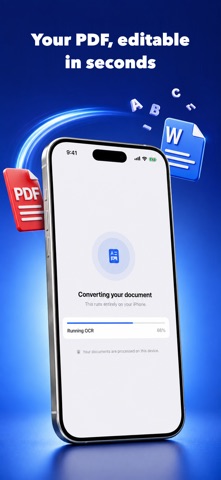
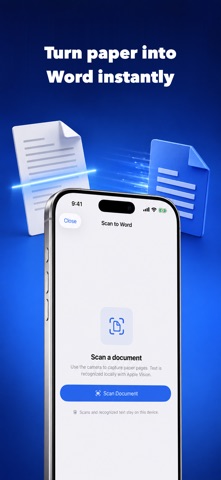
PDF to Word pulls the text out of a PDF and writes it into a .docx file you can open and edit anywhere. Scanned pages and photos of paper run through on-device text recognition first, so a document that started life on paper comes back as text you can change.
EVERYTHING HAPPENS ON YOUR DEVICE
Your documents are never uploaded. Text extraction, OCR and Word generation all run on your iPhone, so contracts, invoices, statements and anything else you would rather not hand to a server stay with you. No account, no login, no cloud sync.
WHAT YOU CAN DO
Convert a PDF to an editable .docx in a couple of taps.
Read scanned PDFs and photographed pages with on-device text recognition.
Scan paper straight from the camera and get a Word file back.
Import from Files, Mail, Safari or any app that can share a PDF.
Keep every converted document in one library you can search, rename and reshare.
Export to Files, send by mail or message, or open in your word processor.
BUILT FOR REAL DOCUMENTS
Multi-page reports, forms, statements and long scans are processed page by page with progress you can watch. Text recognition handles the languages your device supports, including documents that mix more than one.
STRAIGHT ABOUT WHAT IT DOES
Conversion extracts the text of your PDF. It does not rebuild the original page design, so what you get is clean editable content rather than a copy of the source layout.
SUBSCRIPTION
PDF to Word Pro is an auto-renewing subscription offered as a weekly or a yearly plan. Payment is charged to your Apple Account at confirmation of purchase. The subscription renews automatically unless it is turned off at least 24 hours before the end of the current period, and it can be managed or cancelled in your Apple Account settings.
Privacy Policy: https://pdf-to-word-landing.avilletardpiano.workers.dev/privacy
Terms of Use: https://pdf-to-word-landing.avilletardpiano.workers.dev/terms
Safety and technology
Found in the app by AppBrain- Price
- Free
- App size
- 16.0 MB
- Content rating
- Everyone
Technologies used by Convert PDF to Word: DOCX
Releases
Updates seen on the App Store- Version
- 1.0
- Launched
- September 2026
No changelog data
Alternatives
Similar apps and more from Augustin VilletardAlternatives to Convert PDF to Word: DOCX


More from Augustin Villetard


Rankings
App Store top chartsApp Store Rankings for Convert PDF to Word: DOCX
About the app and developer
About Convert PDF to Word: DOCX
Convert PDF to Word: DOCX is a productivity app developed by Augustin Villetard.
User Ratings
The app has no ratings yet.
App Information
Convert PDF to Word: DOCX is freely available from the App Store. The app size is 15.98 MB. The latest version available is 1.0. The last update was on September 10, 2026.
Technical Requirements
The app has a content rating of Everyone. The app has been available on the App Store since September 2026.
Convert PDF to Word: DOCX is made and published by Augustin Villetard. AppBrain is an independent app data site and isn't affiliated with Augustin Villetard. The app name, icon, screenshots and description belong to Augustin Villetard and are shown as published on the App Store.
Developer information for Augustin Villetard
Address:
Frequently asked questions about Convert PDF to Word: DOCX
Is Convert PDF to Word: DOCX free?
Yes. Convert PDF to Word: DOCX is free on the App Store.
Is Convert PDF to Word: DOCX still available?
Yes. Convert PDF to Word: DOCX is on the App Store, and the last update we saw was on September 10, 2026.
How large is Convert PDF to Word: DOCX?
Convert PDF to Word: DOCX is 15.98 MB.
Is Convert PDF to Word: DOCX suitable for children?
App Store rates the content of Convert PDF to Word: DOCX as suitable for everyone.
Who made Convert PDF to Word: DOCX?
Convert PDF to Word: DOCX was developed by Augustin Villetard. It is listed in the productivity category on the App Store.
What are the best alternatives to Convert PDF to Word: DOCX?
People looking at Convert PDF to Word: DOCX also look at these productivity apps: PDF to Word Converter: Papyr, PDF to Word - docx, PDF to Word: Converter & OCR, keyboard typing test Practice, Zangy - AI Phone Reminders.