AppBrain
AppBrain
  • Apps
  • Apps being viewed right now Trending apps today Most popular apps All-time most installed apps Top rated apps iPhone and iPad apps
  • Intelligence ▾
    Intelligence overview → Track any Android app or your whole market
    Track & analyze
    Keyword Tracker & OptimizerTrack & improve Play rankings App Performance ReportOne-off PDF for any app StatisticsFree Android & Play market stats
    Promote your app
    Featured Apps App Links
  • Intelligence
  • Pricing
  • Dashboard
  • Sign up
  • Log in
App Store Apps > Productivity > PDF to Word: Converter & OCR
App profile & analytics · Productivity · Data updated 2026-10-13
PDF to Word: Converter & OCR icon

PDF to Word: Converter & OCR

by App Harbour ApS · Free · Version 1.0.10
Availability On the App Store since June 2026 ↗
Rating on App Store
–
Rating
–
0 reviews
Best rank
–
not in the top lists
Last updated
August 18, 2026
1.0.10

PDF to Word: Converter & OCR is made and published by App Harbour ApS. AppBrain is an independent app data site and isn't affiliated with App Harbour ApS. The app name, icon, screenshots and description belong to App Harbour ApS and are shown as published on the App Store.

About PDF to Word: Converter & OCR

PDF to Word: Converter & OCR is a productivity app developed by App Harbour ApS.

What is the rating of PDF to Word: Converter & OCR?

PDF to Word: Converter & OCR has no ratings yet.

Is PDF to Word: Converter & OCR free?

PDF to Word: Converter & OCR is free. The app size is 1.01 MB. The latest version available is 1.0.10. The last update was on August 18, 2026.

What are the requirements for PDF to Word: Converter & OCR?

The app has a content rating of Everyone. The app has been available on the App Store since June 2026.

Description by App Harbour ApS (from the App Store)
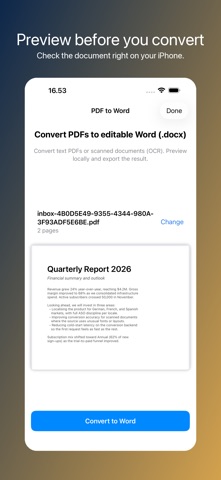
Convert any PDF into an editable Word document in seconds — keep your formatting, scan text from photos, and pick up editing where the PDF left off.

PDF to Word turns any document — text PDFs, scanned pages, contracts, reports, recipes, syllabi — into a clean, editable .docx file you can open in Microsoft Word, Apple Pages, Google Docs, or anything else that reads it.

WHY USE PDF TO WORD
• True PDF-to-Word conversion — not a screenshot, not a flat re-export. The output is fully editable, with paragraphs, bullets, headings, tables, and embedded images intact.
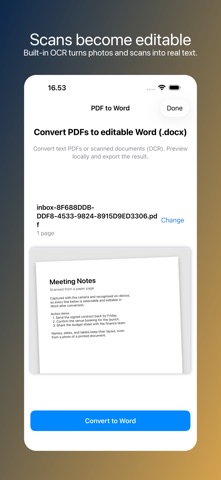
• OCR for scanned PDFs — turn photographed pages into searchable, editable text without retyping a single word.
• Professional engine — your file is processed through the same technology used by desktop PDF tools, not a cheap open-source copy. Tables stay aligned. Columns stay in columns.
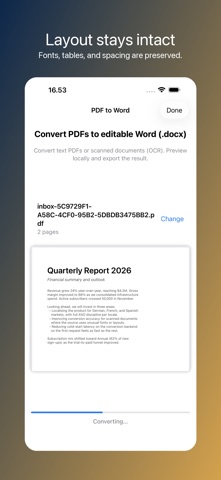
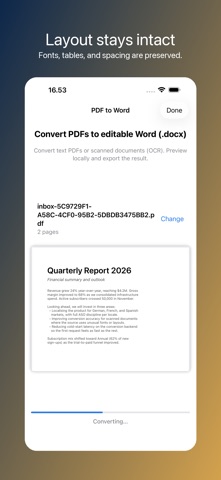
• Formatting preserved — fonts, spacing, bullet lists, numbered lists, headings, and image placement come through cleanly so you can pick up editing instead of starting over.
• iPhone, iPad, anywhere — pull a PDF from email, Files, Messages, Safari, or any share sheet. No desktop needed.
• Private by design — no accounts, no email signup, no tracking. Files are processed for the conversion and discarded immediately after.
• Share-ready — drop the converted .docx straight into Word, Pages, Google Docs, Drive, Dropbox, or any app that handles Word documents.

HOW IT WORKS
1. Pick a PDF from Files, Mail, Messages, Safari, or anywhere a share sheet lives.
2. Preview the document locally to make sure it's the right one.
3. Tap Convert to Word. The file is sent through the secure conversion engine — about ten seconds for a typical page.
4. Get an editable .docx back, ready to share or open in your favourite editor.

OCR — TURN SCANS INTO EDITABLE TEXT
If your PDF is a scan (a photo of paper, not a real document), the OCR engine reads the text out of the image so you can edit it as words instead of pixels. Works on receipts, contracts, handwritten forms, old reports, library books — anywhere paper got turned into a PDF.

GREAT FOR
• Editing PDFs from work email
• Updating contracts, agreements, and forms
• Translating scanned documents
• Pulling tables and charts out of research reports
• Repurposing chapters of e-books and syllabi
• Cleaning up the messy output of older OCR tools
• Adapting templates someone sent
• Saving important paper documents as searchable Word files

PRICING
Free: convert a PDF and preview the result on your device.
Weekly Premium: download and share editable Word files (.docx), up to 300 pages per file.
Annual Premium: best value, up to 500 pages per file.

FAIR USE
Downloading the converted Word file requires a subscription. To keep the service sustainable, premium use has a generous fair-use cap: 30 conversions per 7 days (Weekly) and 150 per 30 days (Annual). Per-file page limits: 300 (Weekly), 500 (Annual).

SUBSCRIPTION TERMS
This app offers a weekly subscription and an annual subscription. Payment is charged to your Apple ID at confirmation of purchase. Subscriptions automatically renew unless cancelled at least 24 hours before the end of the current period. Manage or cancel subscriptions in your Apple ID Account Settings. Restore purchases from the app settings.

Terms of Use (EULA): https://www.apple.com/legal/internet-services/itunes/dev/stdeula/
Show more Show less

Screenshots

PDF to Word: Converter & OCR Screenshot 1 of 10
PDF to Word: Converter & OCR Screenshot 2 of 10
PDF to Word: Converter & OCR Screenshot 3 of 10
PDF to Word: Converter & OCR Screenshot 4 of 10
PDF to Word: Converter & OCR Screenshot 5 of 10
PDF to Word: Converter & OCR Screenshot 6 of 10
PDF to Word: Converter & OCR Screenshot 7 of 10
PDF to Word: Converter & OCR Screenshot 8 of 10
PDF to Word: Converter & OCR Screenshot 9 of 10
PDF to Word: Converter & OCR Screenshot 10 of 10
Screenshots by App Harbour ApS, from the the App Store listing
Official page on the App Store

More from App Harbour ApS

ID Scanner: Bar Age Verify icon ID Scanner: Bar Age Verify
App Harbour ApS
4.0
Free
5 ratings
Blood Pressure Log: Tracker icon Blood Pressure Log: Tracker
App Harbour ApS
5.0
Free
2 ratings
Noise Log: Neighbor Complaint icon Noise Log: Neighbor Complaint
App Harbour ApS
3.0
Free
2 ratings
Video to MP3: MP4 Converter icon Video to MP3: MP4 Converter
App Harbour ApS
3.0
Free
2 ratings
Hypermobility & hEDS Exercises icon Hypermobility & hEDS Exercises
App Harbour ApS
4.0
Free
1 ratings
Rent Manager: Landlord Tracker icon Rent Manager: Landlord Tracker
App Harbour ApS
5.0
Free
1 ratings
Quit Vaping: Nicotine Free icon Quit Vaping: Nicotine Free
App Harbour ApS
5.0
Free
1 ratings
Fasting Tracker: 16:8 Timer icon Fasting Tracker: 16:8 Timer
App Harbour ApS
5.0
Free
1 ratings

Changelog of PDF to Word: Converter & OCR

No changelog data

Developer information for App Harbour ApS

App Harbour ApS

Address:

Share PDF to Word: Converter & OCR

Comments on PDF to Word: Converter & OCR for iOS

We don't have enough comments to show example comments. Please check back later.

App Store Rankings for PDF to Word: Converter & OCR

This app is not ranked

Technologies used by PDF to Word: Converter & OCR

Price drops on Google Play Popular Productivity Apps Apps other people are watching Today's trending apps Top new apps
More hot apps 🔥
Overview Reviews Rankings Technology
AppBrain Intelligence premium content

Subscribe now to get full and unlimited access to AppBrain Intelligence. You'll have access to:

  • App Intelligence dashboard (performance timeline, competitor comparison, country rankings, insight cards)
  • Detailed ranking data per app
  • Full timeline per developer
  • Device market shares data per country
  • Unlimited keyword tracking
1 Month

$75/mo
(billed every month)

SAVE 0%
Subscribe
3 Months

$65/mo
($195 billed every 3 months)

SAVE 13%
Subscribe
1 Year

$57.50/mo
($690 billed every year)

SAVE 23%
Subscribe
Each subscription will automatically renew 3 days before the expiration date for the same time period. Subscriptions can be cancelled at any time before the renewal.

AppBrain is an app data site, we track rankings, ratings, installs for all apps and games on Google Play and the App Store. AppBrain doesn't host app files or APKs, all install links go directly to the official store. All trademarks are owned by their respective owners.

More apps

  • Top Android apps being viewed
  • SparcFun
  • One4KLWP Ultimate
  • BPN Maestro

App statistics

  • Android statistics
  • Google Play Developer stats
  • Trending Android Apps
  • Trending iOS apps
  • Top popular Apps
  • Buy the best Android phone
  • Buy & sell app businesses

About AppBrain

  • Contact
  • Privacy
  • Documentation
  • DMCA takedowns
  • Articles
  • Blog
  • Monetization tips: Understanding your eCPM
© 2010-2026 - AppBrain