

ConvertHub: Any File & Format
ConvertHub: Any File & Format is made and published by 邵雄 李. AppBrain is an independent app data site and isn't affiliated with 邵雄 李. The app name, icon, screenshots and description belong to 邵雄 李 and are shown as published on the App Store.
AppBrain's verdict
Loved by users- Rating on App Store
- 4.65
- 123 ratings
- Last updated
- October 15, 2026
Users love it: 4.7 stars from 123 ratings.
Rankings
App Store top chartsApp Store Rankings for ConvertHub: Any File & Format
Competitors
Similar apps and more from 邵雄 李Alternatives to ConvertHub: Any File & Format


Releases
Updates seen on the App Store- Version
- 3.0
- Launched
- March 2026
No changelog data
User feedback
Ratings and reviews on the App StoreComments on ConvertHub: Any File & Format for iOS
We don't have enough comments to show example comments. Please check back later.
Technology
Found in the app by AppBrain- Price
- Free
- App size
- 205.4 MB
- Content rating
- Everyone
Technologies used by ConvertHub: Any File & Format
About the app and developer
About ConvertHub: Any File & Format
ConvertHub: Any File & Format is an utilities app developed by 邵雄 李.
User Ratings
ConvertHub: Any File & Format is rated 4.65 out of 5 stars. The rating is based on 120 ratings.
App Information
ConvertHub: Any File & Format is freely available from the App Store. The app size is 205.36 MB. The latest version available is 3.0. The last update was on October 15, 2026.
Technical Requirements
The app has a content rating of Everyone. The app has been available on the App Store since March 2026.
Developer information for 邵雄 李
Address:
Store listing
By 邵雄 李, from the App Store


Description by 邵雄 李 Written by the developer, not by AppBrain. Click to read.
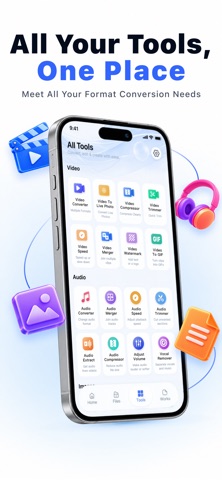
It allows for easy conversion between various formats with simple operations, and also provides practical tools such as file compression, merging, cropping, and speed adjustment to help you quickly process various files and media content.
Whether it's file processing for work or study, or video, audio, and image editing for daily life, it can handle it all with ease.
**Core Functions:**
**File Format Conversion:** Supports conversion between multiple file formats, making file use across different devices and platforms more convenient.
**Video Format Conversion:** Supports conversion between multiple video formats, and also provides video cropping and video speed adjustment functions.
**Audio Format Conversion:** Easily convert audio formats and supports adjusting audio playback speed.
**Image Format Conversion:** Supports conversion between common image formats, maintaining high-definition image quality.
**Practical Tools:**
**File Compression:** Quickly reduce file size
**File Merging and Stitching:** Integrate multiple files
**Video Cropping:** Easily trim video clips
**Video Speed Adjustment:** Freely control playback speed
**Batch Processing:** Improve work efficiency
Simple and intuitive interface, easy operation, one-click conversion. Suitable for office work, study, content creation, and daily document processing.
-Payment will be charged to iTunes Account at confirmation of purchase.
-Subscriptions automatically renew unless auto-renew is turned off at least 24-hours before the end of the current period.
-Account will be charged for renewal within 24-hours prior to the end of the current period, and identify the cost of the renewal.
-Subscriptions may be managed by the user and auto-renewal may be turned off by going to the user's Account Settings after purchase.
Privacy Policy: http://saxdev.com/file/privacy.html
Terms of User:http://saxdev.com/file/terms.html
If you have any questions, feel free to contact us at ai_factory@126.com