COPIC Collection is made and published by
Too corporation.
AppBrain is an independent app data site and isn't affiliated with Too corporation.
The app name, icon, screenshots and description belong to Too corporation and are shown as
published on the App Store.
About COPIC Collection
COPIC Collection is an utilities app developed by Too corporation.
What is the rating of COPIC Collection?
COPIC Collection is rated 3.29 out of 5 stars, based on 130 ratings.
Is COPIC Collection free?
COPIC Collection is free. The app size is 292.82 MB. The latest version available is 3.1.5. The last update was on July 27, 2026.
What are the requirements for COPIC Collection?
The app has a content rating of Everyone. The app has been available on the App Store since April 2013.
Description by Too corporation(from the App Store)
Copic Collection is a free smartphone app that lets you efficiently manage and search Copic markers that you currently own or are planning to purchase. It also lets you search for complimentary colors, and display color drawing samples. The app has been well received by many Copic users.
How to use Copic Collection
'- Easily register products using barcodes: You can now scan barcodes to register your Copic products. For sets, you can register all Copic products included in the set by scanning the barcode on the package. You can easily view your Copic products registered on the app from a color bar list, making it easier to find the next color you may be looking for.
Register Multiliner products Copic products other than Copic markers (Multiliner Pen/Multiliner SP Pen/Copic Drawing Pen/Gasen-Fude Brush Pen) can also now be registered in your list. Multiliner Pen products can be registered by color and line width.
View suggestions with the color picker feature Do you ever find yourself wondering what color should be used to color particular areas? Copic Collection can help you with that. The app allows you to load photos, illustrations and other images from "Camera" within the app, and will display a list of recommended Copic colors that best fits a specified area of an image. If you select a color from the list and tap the star icon, the chosen color will be displayed in the "WISH LIST." You can use this feature as a memo for your next purchase.
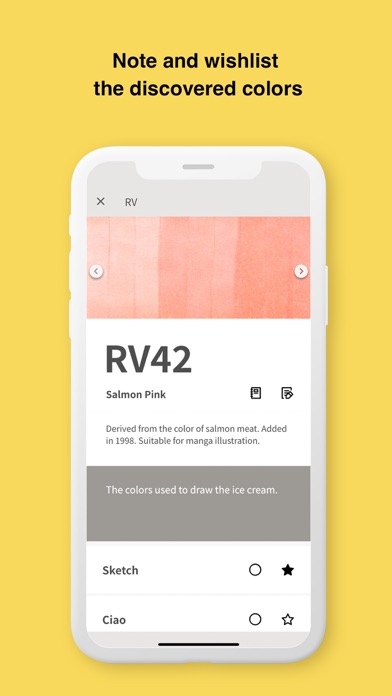
- Your own MY COLOR MEMO On the detail screen for each color, you can tap the MEMO icon to make notes about the corresponding color. For example, you can leave notes for a particular color such as "Used to color my favorite manga character" and "Color was used by a popular artist in a video."
- Tag the colors you used in a piece You can load images of artwork created with Copic markers from "Camera" within the app and add "Color Tags" that indicate the colors that were used. You can then save the image with the added color tags. You can save the image as reference for your own use, or share the image with Color Tags on social media, etc.
Each subscription will automatically renew 3 days before the expiration date for
the same time period. Subscriptions can be cancelled at any time before the renewal.