

CopyCam - Photo Overlay Camera
CopyCam - Photo Overlay Camera is made and published by Kin Chio Pang. AppBrain is an independent app data site and isn't affiliated with Kin Chio Pang. The app name, icon, screenshots and description belong to Kin Chio Pang and are shown as published on the App Store.
AppBrain's verdict
- Last updated
- October 9, 2026
Rankings
App Store top chartsApp Store Rankings for CopyCam - Photo Overlay Camera
Competitors
Similar apps and more from Kin Chio PangAlternatives to CopyCam - Photo Overlay Camera




More from Kin Chio Pang

Releases
Updates seen on the App Store- Version
- 5.6.1
- Launched
- March 2026
No changelog data
User feedback
Ratings and reviews on the App StoreComments on CopyCam - Photo Overlay Camera for iOS
We don't have enough comments to show example comments. Please check back later.
Technology
Found in the app by AppBrain- Price
- Free
- App size
- 5.85 MB
- Content rating
- Everyone
Technologies used by CopyCam - Photo Overlay Camera
About the app and developer
About CopyCam - Photo Overlay Camera
CopyCam - Photo Overlay Camera is a photo & video app developed by Kin Chio Pang.
User Ratings
The app has no ratings yet.
App Information
CopyCam - Photo Overlay Camera is freely available from the App Store. The app size is 5.85 MB. The latest version available is 5.6.1. The last update was on October 9, 2026.
Technical Requirements
The app has a content rating of Everyone. The app has been available on the App Store since March 2026.
Developer information for Kin Chio Pang
Address:
Store listing
By Kin Chio Pang, from the App Store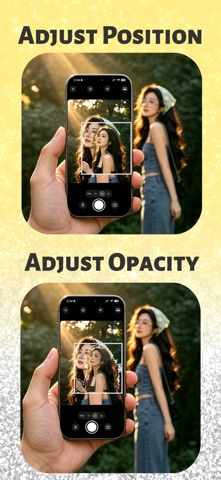


Description by Kin Chio Pang Written by the developer, not by AppBrain. Click to read.
PERFECT FOR
• Travel recreations: found a photo you love? Line up the same pose and angle on location.
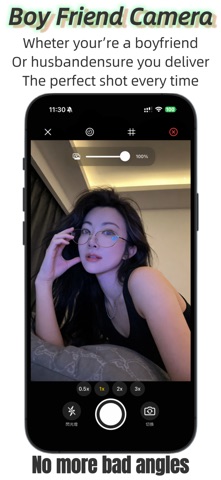
• The boyfriend perspective: load your partner's favorite reference photo and nail their framing every time.
• Progress shots: align before and after photos for fitness, skincare or home projects.
• Learning composition: use great photos as live guides and train your eye.
FEATURES
• Photo overlay on the live camera preview
• Drag, scale and rotate the reference layer with simple gestures
• Opacity slider for precise alignment
• Outline mode for easy pose matching
• Line / Outline mode for precise edge alignment and pose matching
• The overlay never appears in your final photo
• No account, no ads, works offline
How It Works
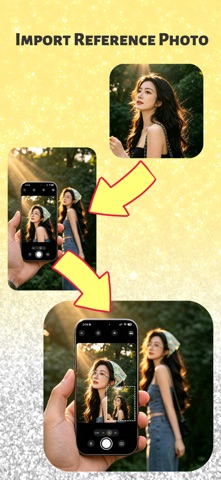
1. Import a reference photo from your library.
2. Move, scale and adjust its opacity over the live camera view.
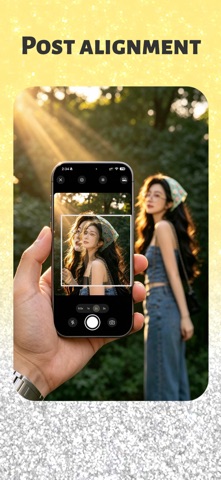
3. Align the scene with the overlay and take the shot.
PRIVATE BY DESIGN
Everything happens on your device. Your photos never leave your phone.
Terms of Use: https://www.apple.com/legal/internet-services/itunes/dev/stdeula/
Privacy Policy: https://gist.github.com/Hantarksla/398e37f18db1f8c3f5fd8051e6ad5078