Count 'm down is a productivity app developed by Twitched.
User Ratings
Count 'm down is rated 5.00 out of 5 stars. The rating is based on 2 ratings.
App Information
Count 'm down is freely available from the App Store. The app size is 43.07 MB. The latest version available is 7.2.1. The last update was on October 24, 2026.
Technical Requirements
The app has a content rating of Everyone. The app has been available on the App Store since April 2016.
Description by Twitched(from the App Store)
Your travel buddy for every countdown.
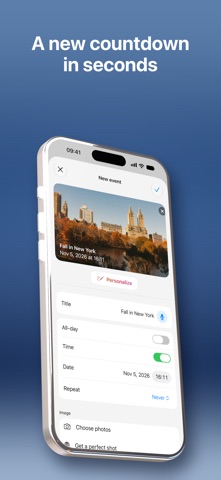
Count 'm down turns “how many days until…” into part of the fun. Whether it's a big trip, a wedding, moving day, or getting home for the holidays — set the moment, and we'll help you get there.
Start with 3 free events and use the app fully from day one. Add a personal photo or color, share your countdowns with others, and keep everything in sync across your devices.
• Generate a complete trip in seconds: a personalized checklist, weather forecast, and day-by-day timeline, all from one tap. • Scan flight tickets, hotel bookings, and rental car confirmations with Visual Intelligence — saved to your event automatically. • Every event gets its own Timeline, so you always know what's next. • Live Activities keep your next countdown on your Lock Screen and Dynamic Island. • Add widgets to your Home Screen to keep every countdown in view.
Everything you need to make your countdowns more exciting: clean, stylish, and completely yours.
Unlimited Count 'm down
• Choose a monthly or yearly plan (auto-renewable) • New subscribers get a reduced rate for the first year on the yearly plan • Prices are shown in the app before you confirm and may vary by region
With Unlimited Count 'm down, you get access to: • Unlimited event creation • AI-generated trip planning — a checklist, weather forecast, and timeline in one tap • Flight status tracking • Hotel and rental car details, saved automatically • Weather information for your events • The ability to edit existing events • Access to your events across multiple devices
Info: • Payment will be charged to your Apple ID account upon confirmation of purchase. • The subscription automatically renews unless canceled at least 24 hours before the end of the current period. • You can manage and cancel your subscription in your App Store account settings after purchase.
Terms of Use (EULA): https://www.apple.com/legal/internet-services/itunes/dev/stdeula/
Each subscription will automatically renew 3 days before the expiration date for
the same time period. Subscriptions can be cancelled at any time before the renewal.