

CourseDeck: AI Study Planner
CourseDeck: AI Study Planner is made and published by Evan Kim. AppBrain is an independent app data site and isn't affiliated with Evan Kim. The app name, icon, screenshots and description belong to Evan Kim and are shown as published on the App Store.
AppBrain's verdict
- Rating on App Store
- 5.00
- 2 ratings
- Last updated
- October 18, 2026
It doesn't have enough ratings yet to judge what users think.
Rankings
App Store top chartsApp Store Rankings for CourseDeck: AI Study Planner
Competitors
Similar apps and more from Evan KimAlternatives to CourseDeck: AI Study Planner


More from Evan Kim

Releases
Updates seen on the App Store- Version
- 1.0.6
- Launched
- July 2026
No changelog data
User feedback
Ratings and reviews on the App StoreComments on CourseDeck: AI Study Planner for iOS
We don't have enough comments to show example comments. Please check back later.
Technology
Found in the app by AppBrain- Price
- Free
- App size
- 27.3 MB
- Content rating
- Everyone
Technologies used by CourseDeck: AI Study Planner
About the app and developer
About CourseDeck: AI Study Planner
CourseDeck: AI Study Planner is an education app developed by Evan Kim.
What is the rating of CourseDeck: AI Study Planner?
CourseDeck: AI Study Planner is rated 5.00 out of 5 stars, based on 2 ratings.
Is CourseDeck: AI Study Planner free?
CourseDeck: AI Study Planner is free. The app size is 27.30 MB. The latest version available is 1.0.6. The last update was on October 18, 2026.
What are the requirements for CourseDeck: AI Study Planner?
The app has a content rating of Everyone. The app has been available on the App Store since July 2026.
Developer information for Evan Kim
Address:
Frequently asked questions about CourseDeck: AI Study Planner
Is CourseDeck: AI Study Planner free?
Yes. CourseDeck: AI Study Planner is free on the App Store.
Is CourseDeck: AI Study Planner still available?
Yes. CourseDeck: AI Study Planner is on the App Store, and the last update we saw was on October 18, 2026.
How large is CourseDeck: AI Study Planner?
CourseDeck: AI Study Planner is 27.30 MB.
Is CourseDeck: AI Study Planner suitable for children?
App Store rates the content of CourseDeck: AI Study Planner as suitable for everyone.
How do people rate CourseDeck: AI Study Planner?
CourseDeck: AI Study Planner scores 5.00 out of 5 stars, from 2 ratings on the App Store.
Who made CourseDeck: AI Study Planner?
CourseDeck: AI Study Planner was developed by Evan Kim. It is listed in the education category on the App Store.
What are the best alternatives to CourseDeck: AI Study Planner?
People looking at CourseDeck: AI Study Planner also look at these education apps: upnext: Student Planner, StudyFlow: College Planner, ClassDue, Student Days Planner, Syllabus Agent: AI Study Tool.
Store listing
By Evan Kim, from the App Store


Description by Evan Kim Written by the developer, not by AppBrain. Click to read.
Import a syllabus PDF, review the details, and bring your coursework into one student planner. See what's due, follow your class schedule, and focus on your next task.
LESS SETUP, MORE STUDY TIME
Use the AI syllabus scanner to find assignments, exam dates, class times, and grading details. Check and edit the results before adding them to your course.
YOUR COURSEWORK, TOGETHER
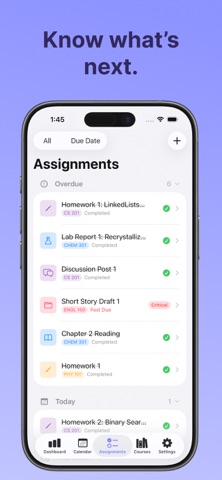
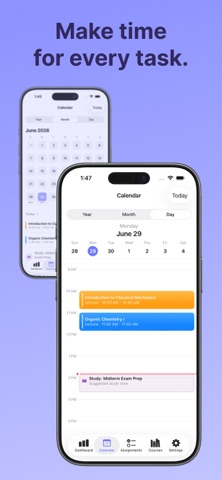
Keep classes, homework, and deadlines in one place. Browse your calendar, check upcoming assignments, and track progress as you work through the semester.
MAKE REPEAT WORK EASIER
Create daily, weekly, or every-other-week assignment batches. Duplicate an assignment or add one directly from a course or calendar day to save setup time.
FOCUS ON THE NEXT TASK
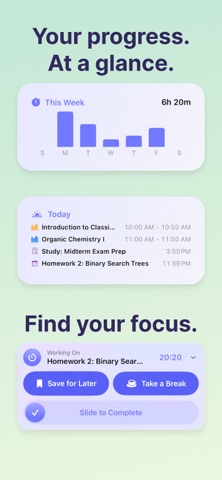
Start a focus timer from an assignment, review your session history, and follow your progress on the Lock Screen with Live Activities.
PLAN AROUND YOUR DAY
With CourseDeck Pro, get suggested study times that fit around classes and your preferred work windows. Choose session lengths and quiet hours that match how you study.
KEEP YOUR CALENDAR CONNECTED
Sync assignments and class schedules to Apple Calendar. Bring external calendar feeds into CourseDeck to see more of your schedule together.
START FREE. GET MORE WITH PRO.
Organize courses and assignments for free, with limited AI syllabus scans. CourseDeck Pro adds:
• Unlimited AI syllabus scans
• Smart work-time suggestions
• Daily Preview
• Assignment queueing
• Pomodoro mode
• Home Screen widgets
Download CourseDeck and make your next semester easier to plan.
Terms of Use: https://www.apple.com/legal/internet-services/itunes/dev/stdeula/
Privacy Policy: https://coursedeck.net/privacy-policy