AppBrain
AppBrain
  • Apps
  • Apps being viewed right now Trending apps today Most popular apps All-time most installed apps Top rated apps iPhone and iPad apps
  • Intelligence ▾
    Intelligence overview → Track any Android app or your whole market
    Track & analyze
    Keyword Tracker & OptimizerTrack & improve Play rankings App Performance ReportOne-off PDF for any app StatisticsFree Android & Play market stats
    Promote your app
    Featured Apps App Links
  • Intelligence
  • Pricing
  • Dashboard
  • Sign up
  • Log in
App Store Apps > Photo & Video > Crank: Pro Camera Reference
App profile & analytics · Photo & Video · Data updated 2026-10-23
Crank: Pro Camera Reference icon

Crank: Pro Camera Reference

by kaat media ltd · Free · Version 1.0
Availability On the App Store since April 2026 ↗
Rating on App Store
–
Rating
–
0 reviews
Best rank
–
not in the top lists
Last updated
April 23, 2026
1.0

Crank: Pro Camera Reference is made and published by kaat media ltd. AppBrain is an independent app data site and isn't affiliated with kaat media ltd. The app name, icon, screenshots and description belong to kaat media ltd and are shown as published on the App Store.

About Crank: Pro Camera Reference

Crank: Pro Camera Reference is a photo & video app developed by kaat media ltd.

User Ratings

The app has no ratings yet.

App Information

Crank: Pro Camera Reference is freely available from the App Store. The app size is 31.77 MB. The latest version available is 1.0. The last update was on April 23, 2026.

Technical Requirements

The app has a content rating of Everyone. The app has been available on the App Store since April 2026.

Description by kaat media ltd (from the App Store)
The professional technical standard for high-speed cinematography.

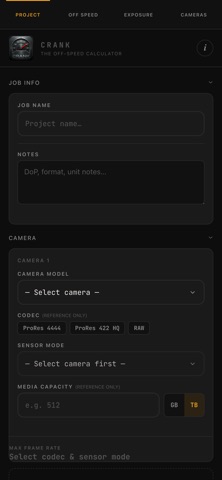
Crank is the definitive technical utility for camera departments, designed by industry professionals for DITs, ACs, and Cinematographers. Built for high-pressure environments, Crank provides absolute precision for off-speed frame rates, exposure compensation, and technical camera data—all in a sleek, offline-capable interface.

Whether you are matching motion blur between project frame rates or modeling complex ND stacks on a remote location, Crank ensures your technical decisions are made with absolute confidence.

KEY FEATURES:

1. ADVANCED OFF-SPEED ANALYTICS Eliminate technical uncertainty when shooting off-speed. Quickly determine the relationship between Sensor FPS and Project FPS.

Multiples Mode: Instantly view common speed ratios (2x, 3x, 4x, etc.).
Reverse Lookup: Find the exact sensor frame rate needed to hit a specific speed target.

2. PRECISION EXPOSURE ENGINE Master your light with dedicated exposure modeling tailored for cinematography.

Exposure Compensation: Determine T-stop adjustments when changing frame rates or shutter angles.
ND Filter Stepper: Manage neutral density stacks with ease, converting between Optical Density, ND numbers, and Stop reductions.
Visual Shutter Angle: Use the interactive visualizer to understand effective motion blur geometry and shutter speed relationships.

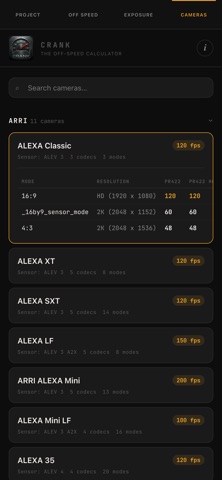
3. PROFESSIONAL CAMERA DATABASE A comprehensive, searchable library of professional camera specifications at your fingertips.

Detailed Specs: Access sensor dimensions, base ISOs, mount types, and dynamic range.
Format & Frame Rates: Check maximum frame rates across different codecs (ARRIRAW, ProRes) and resolutions.
Supported Models: Includes up-to-date data for ARRI (Alexa 35, Mini LF, etc.) and other industry-standard systems.

4. ON-SET UTILITY SUITE

Setup Card Export: Generate and share technical camera setup cards with your department via a single tap.
Job Presets: Save recurring project settings (Base FPS, ISO, Shutter) for instant recall on different shows.
Offline First: No signal? No problem. All core technical features and database tools work entirely offline.

WHY CRANK?
Crank is a specialized workflow utility. By focusing on the specific needs of the camera department, we’ve removed the clutter found in generic apps to give you the fastest, most reliable path to the technical data you need on set.

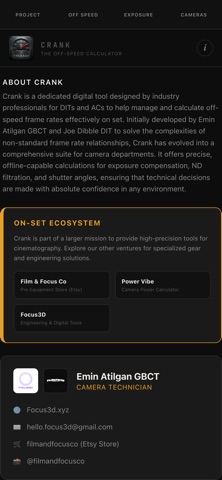
Built by Emin Atilgan GBCT and Joe Dibble DIT.
Show more Show less

More data about Crank: Pro Camera Reference

Price Free
Rating No ratings
Ranking Not ranked
Version 1.0
App size 31.8 MB
Suitable for Everyone

Screenshots

Crank: Pro Camera Reference Screenshot 1 of 6
Crank: Pro Camera Reference Screenshot 2 of 6
Crank: Pro Camera Reference Screenshot 3 of 6
Crank: Pro Camera Reference Screenshot 4 of 6
Crank: Pro Camera Reference Screenshot 5 of 6
Crank: Pro Camera Reference Screenshot 6 of 6
Screenshots by kaat media ltd, from the the App Store listing
Official page on the App Store

Changelog of Crank: Pro Camera Reference

No changelog data

Developer information for kaat media ltd

kaat media ltd

Address:

Share Crank: Pro Camera Reference

Comments on Crank: Pro Camera Reference for iOS

We don't have enough comments to show example comments. Please check back later.

App Store Rankings for Crank: Pro Camera Reference

This app is not ranked

Technologies used by Crank: Pro Camera Reference

Today's trending apps Popular Photo & Video Apps Apps other people are watching Price drops on Google Play Top new apps
More hot apps 🔥
Overview Reviews Rankings Technology
AppBrain Intelligence premium content

Subscribe now to get full and unlimited access to AppBrain Intelligence. You'll have access to:

  • App Intelligence dashboard (performance timeline, competitor comparison, country rankings, insight cards)
  • Detailed ranking data per app
  • Full timeline per developer
  • Device market shares data per country
  • Unlimited keyword tracking
1 Month

$75/mo
(billed every month)

SAVE 0%
Subscribe
3 Months

$65/mo
($195 billed every 3 months)

SAVE 13%
Subscribe
1 Year

$57.50/mo
($690 billed every year)

SAVE 23%
Subscribe
Each subscription will automatically renew 3 days before the expiration date for the same time period. Subscriptions can be cancelled at any time before the renewal.

AppBrain is an app data site, we track rankings, ratings, installs for all apps and games on Google Play and the App Store. AppBrain doesn't host app files or APKs, all install links go directly to the official store. All trademarks are owned by their respective owners. As an Amazon Associate AppBrain earns from qualifying purchases.

More apps

  • Top Android apps being viewed
  • Synthesia
  • Magic Hand Camera - Video FX
  • Speedtest by Ookla

App statistics

  • Android statistics
  • Google Play Developer stats
  • Trending Android Apps
  • Trending iOS apps
  • Top popular Apps
  • Buy the best Android phone
  • Buy & sell app businesses

About AppBrain

  • Contact
  • Privacy
  • Documentation
  • DMCA takedowns
  • Articles
  • Blog
  • Android Interstitial Ads: Best practices to optimize your app's earnings
© 2010-2026 - AppBrain