

Create and make own stickers
Create and make own stickers is made and published by Sergio Musoles Tornador. AppBrain is an independent app data site and isn't affiliated with Sergio Musoles Tornador. The app name, icon, screenshots and description belong to Sergio Musoles Tornador and are shown as published on the App Store.
AppBrain's verdict
Established- Rating on App Store
- 1.00
- 1 ratings
- Last updated
- March 24, 2024
It doesn't have enough ratings yet to judge what users think.
Rankings
App Store top chartsApp Store Rankings for Create and make own stickers
Competitors
Similar apps and more from Sergio Musoles TornadorAlternatives to Create and make own stickers






More from Sergio Musoles Tornador






Releases
Updates seen on the App Store- Version
- 1.1
- Launched
- December 2018
No changelog data
User feedback
Ratings and reviews on the App StoreComments on Create and make own stickers for iOS
We don't have enough comments to show example comments. Please check back later.
Technology
Found in the app by AppBrain- Price
- $0.99
- App size
- 15.3 MB
- Content rating
- Everyone
Technologies used by Create and make own stickers
About the app and developer
About Create and make own stickers
Create and make own stickers is an utilities app developed by Sergio Musoles Tornador.
What is the rating of Create and make own stickers?
Create and make own stickers is rated 1.00 out of 5 stars, based on one rating ratings.
Is Create and make own stickers free?
Create and make own stickers costs $0.99. The app size is 15.32 MB. The latest version available is 1.1. The last update was on March 24, 2024.
What are the requirements for Create and make own stickers?
The app has a content rating of Everyone. The app has been available on the App Store since December 2018.
Developer information for Sergio Musoles Tornador
Address:
Store listing
By Sergio Musoles Tornador, from the App Store


Description by Sergio Musoles Tornador Written by the developer, not by AppBrain. Click to read.
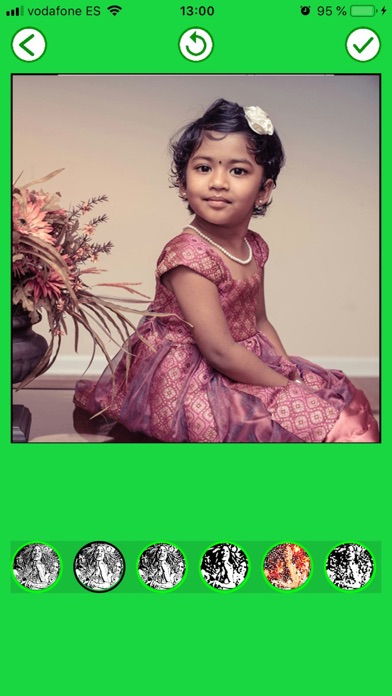
With this tool you can create your own stickers and then add them to other photos and create beautiful montages and collages.
You will simply have to remove with your fingers what you do not want from the photo, either by cropping the image or erasing the background that you do not want.
How to use:
- Apply filter to your photo.
- Cut out the part of the image you want with the scissors tool.
- Delete the part of the image you want to erase with the rubber.
- Draw on your photo with your finger.
- Resize your sticker and adjust it to the square with your fingers.
- Add stickers to your new sticker.
- Store the resulting sticker.
- You can manage your stickers and remove it if you do not like them any more.
- Create montages with your created stickers and with your photos, you will look like a professional!
- You can create stickers of what you want, of people, of landscapes, of drawings, of famous people, etc ...
- Create collages with lots of stickers, you'll have a fantastic collage!
- Share the result with your friends or save it in the phone memory.
- You can use images saved in your gallery or make the photo at the moment with the camera.
If you liked the app, do not hesitate to write a review in the App Store, and try our other applications. That will help us improve and make more applications. Thank you very much!