

SiChef - Menu planner
SiChef - Menu planner is made and published by Sergio Musoles Tornador. AppBrain is an independent app data site and isn't affiliated with Sergio Musoles Tornador. The app name, icon, screenshots and description belong to Sergio Musoles Tornador and are shown as published on the App Store.
AppBrain's verdict
- Rating on App Store
- 5.00
- 1 ratings
- Last updated
- July 17, 2023
- Size
- 38.1 MB
It doesn't have enough ratings yet to judge what users think.
User feedback
Ratings and reviews on the App StoreComments on SiChef - Menu planner for iOS
We don't have enough comments to show example comments. Please check back later.
Store listing
By Sergio Musoles Tornador, from the App Store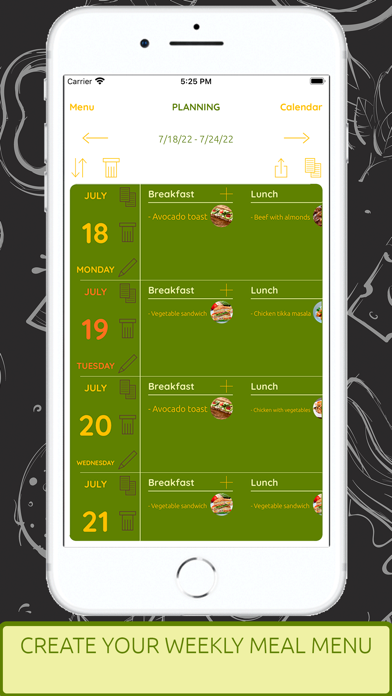



Description by Sergio Musoles Tornador Written by the developer, not by AppBrain. Click to read.
HOW IS IT USED:
- Create the weekly menu by pressing the '+' button and selecting the schedules you want for the day (you can create new schedules and reorder them).
- Click on the '+' button on the schedule and select the recipes you want to assign to that schedule.
- You can copy menus from one week to another, or from one day to another.
- You can add or remove schedules any day of the week.
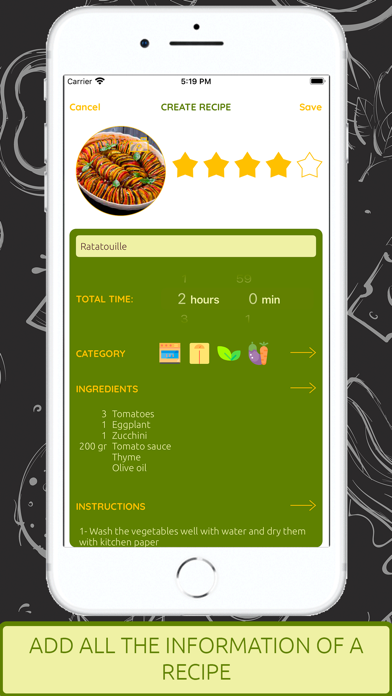
- Create your recipes, add the name, cooking time, category, ingredients, instructions, a photo, and even extra notes and a star rating.
- You can see a new recipe of the day every day, and save it in your application or share it in PDF or Text with whoever you want.
- Add the category of the recipe to later be able to filter recipes by category, or by name.
- Add ingredients to the recipe from the ingredients list of the application, you can add the amount of the ingredient needed for the recipe.
- Add the necessary instructions to prepare the recipe.
- Select a photo for the recipe, you can choose it from your gallery or take it with the camera directly.
- Create an empty shopping list and add ingredients by selecting from the ingredients list.
- Create a shopping list by selecting the weekly menu, and it will be created automatically with the ingredients of the recipes for that week.
- Create a shopping list by selecting the recipes and it will be created automatically with the ingredients of the recipes.
- Mark purchased ingredients by tapping on them, or remove them by swiping left.
- You can share your weekly menus, your recipes, or your shopping lists with whoever you want, in PDF or Text format.
- Print your weekly menus to have them visible in your kitchen.
WHY USE THIS APP?
- Save time by having the week's meals planned from the start, without having to think about what to do or what to buy for the rest of the week.
- Spend less money on the purchase since you will have the week's food prepared and the shopping list made automatically to buy only what is necessary.
- Do not waste food, since you will only have what is necessary for the week in the fridge.
- Healthier life knowing that you will have to eat every day and be able to prepare it when you can, without having to improvise or buy fast food.
- Completely free application, you only have to pay if you want to remove advertising or help the developer to improve the application.
- Available for Apple Watch and with a very useful Widget.
FEATURES:
- Create the weekly menu with the daily meals you want.
- Create the schedules you want for the day.
- See the planned meals of the week or the whole month, and the most used dishes of the month.
- Create all the recipes you want and assign them to the meals of the week.
- Filter recipes by category or by name.
- Create shopping lists and add the ingredients you want.
- Create automatic shopping lists from selected recipes, or weekly menu planning.
- Add ingredients to the list of ingredients in the application.
- Share recipes, menus, or shopping lists in PDF or text with your contacts.
- Save the recipe of the day that our chef has created to share with the users of the application, a new recipe every day.
- Use the Apple Watch application to see your weekly menu and your shopping lists whenever you want and quickly.
- Use the application Widget to see the menu of the day at a glance.
Safety and technology
Found in the app by AppBrain- Price
- Free
- App size
- 38.1 MB
- Content rating
- Everyone
Technologies used by SiChef - Menu planner
Releases
Updates seen on the App Store- Version
- 2.0
- Launched
- August 2022
No changelog data
Alternatives
Similar apps and more from Sergio Musoles TornadorAlternatives to SiChef - Menu planner







More from Sergio Musoles Tornador








Rankings
App Store top chartsApp Store Rankings for SiChef - Menu planner
About the app and developer
About SiChef - Menu planner
SiChef - Menu planner is a food & drink app developed by Sergio Musoles Tornador.
What is the rating of SiChef - Menu planner?
SiChef - Menu planner is rated 5.00 out of 5 stars, based on one rating ratings.
Is SiChef - Menu planner free?
SiChef - Menu planner is free. The app size is 38.09 MB. The latest version available is 2.0. The last update was on July 17, 2023.
What are the requirements for SiChef - Menu planner?
The app has a content rating of Everyone. The app has been available on the App Store since August 2022.
Developer information for Sergio Musoles Tornador
Address: