

CroMusic: Offline Music Player
CroMusic: Offline Music Player is made and published by 健 陆. AppBrain is an independent app data site and isn't affiliated with 健 陆. The app name, icon, screenshots and description belong to 健 陆 and are shown as published on the App Store.
AppBrain's verdict
New- Rating on App Store
- 5.00
- 2 ratings
- Last updated
- October 11, 2026
CroMusic: Offline Music Player came out 17 days ago. It doesn't have enough ratings yet to judge what users think.
Rankings
App Store top chartsApp Store Rankings for CroMusic: Offline Music Player
Competitors
Similar apps and more from 健 陆Alternatives to CroMusic: Offline Music Player


More from 健 陆


Releases
Updates seen on the App Store- Version
- 1.2
- Launched
- October 2026
No changelog data
User feedback
Ratings and reviews on the App StoreComments on CroMusic: Offline Music Player for iOS
We don't have enough comments to show example comments. Please check back later.
Technology
Found in the app by AppBrain- Price
- $1.99
- App size
- 5.18 MB
- Content rating
- Everyone
Technologies used by CroMusic: Offline Music Player
About the app and developer
About CroMusic: Offline Music Player
CroMusic: Offline Music Player is a music app developed by 健 陆.
User Ratings
CroMusic: Offline Music Player is rated 5.00 out of 5 stars. The rating is based on 2 ratings.
App Information
CroMusic: Offline Music Player costs $1.99. The app size is 5.18 MB. The latest version available is 1.2. The last update was on October 11, 2026.
Technical Requirements
The app has a content rating of Everyone. The app has been available on the App Store since October 2026.
Developer information for 健 陆
Address:
Store listing
By 健 陆, from the App Store




Description by 健 陆 Written by the developer, not by AppBrain. Click to read.
WI-FI TRANSFER
• Manage your library from a web browser on any computer on the same Wi-Fi: just open the address CroMusic shows. Nothing to install
• Drag songs onto the page to upload them, even straight into a playlist. Download songs back to your computer, or delete them
• Create, rename and delete playlists, add songs and drag them into order; your iPhone or iPad shows every change right away
CARPLAY
• Browse All Songs and your playlists on your car's display, in the same order as on your iPhone
• Every song shows its cover; choose one to play the list from there
• Now Playing with shuffle, repeat and Up Next, and your car's steering-wheel buttons work too
ALBUM ART, EVERYWHERE
• Covers embedded in your MP3, M4A/AAC and FLAC files appear on every song, on list headers and on your playlists
• The full-screen player takes on the colors of the album playing
• Artwork on the Lock Screen, in Control Center, in CarPlay and on Apple Watch
LYRICS FROM YOUR FILES
• Shows the lyrics embedded in MP3, M4A/AAC and FLAC files
• Synced (LRC) lyrics follow the music line by line; tap a line to jump to it
YOUR FILES, YOUR LIBRARY
• Plays MP3, AAC/M4A, Apple Lossless (ALAC), FLAC, WAV, AIFF and CAF
• Import many files at once from the Files app, iCloud Drive, connected storage or your computer over Wi-Fi. Your original files are never modified
• Files already in your library are skipped, so nothing is stored twice
• Tags and lyrics garbled by older Chinese, Japanese or Korean software (GBK, Big5, Shift-JIS, EUC-KR) are repaired, without rewriting your files
• Search by title, artist or album; sort by title, artist, album, time, date added or play count
• Your audio stays in the CroMusic folder in the Files app, yours to see and back up
OPTIONAL ICLOUD SYNC
• Turn on iCloud Sync and your songs, playlists and play counts follow you to iPhone, iPad and Mac
• Audio is kept in your own iCloud Drive; song info syncs through your private iCloud database
• See which songs are downloaded or still in iCloud; one that isn't here yet plays as soon as it arrives
• Download your whole library at once, or automatically. Downloaded songs keep playing even after iOS frees up storage
LISTEN YOUR WAY
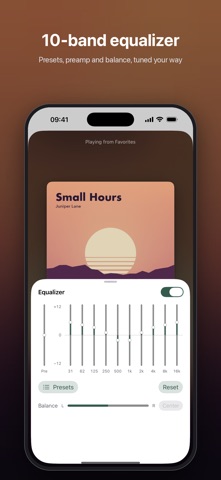
• 10-band equalizer with preamp, left/right balance and presets: Flat, Pop, Rock, Classical, Vocal and Bass Boost
• Sleep Timer: stop the music after 10 to 90 minutes, or a time you set, with a gentle fade-out
• Four play modes: Sequential, Repeat All, Repeat One and Shuffle
• A floating mini player on iPhone: press and hold, then slide to seek
• On iPad, a Mac-style column view with a player bar, or a compact layout of titles and times
• Background playback with controls on the Lock Screen, in Control Center and in the Dynamic Island, plus AirPlay
PLAYLISTS THAT KEEP UP
• Create, rename, reorder and delete playlists
• Add songs with a long press, or select several songs at once
• Drag songs into your own order; the order syncs to your other devices
APPLE WATCH
Control your iPhone's music from your wrist:
• See what's playing with its album art, play or pause, skip, and switch play modes
• Browse All Songs and your playlists, and start any list from any song
Music stays on your iPhone. The Apple Watch app requires watchOS 26 and your iPhone nearby.
PRIVACY FIRST
CroMusic collects no data. No analytics, no tracking, no sign-up. Your library stays on your devices and, if you choose, in your own iCloud account.
Please note: CroMusic plays audio files you already have. It does not stream or download music, and it can't play copy-protected (DRM) tracks.