

CRONO-MILLE-MIGLIA
CRONO-MILLE-MIGLIA is made and published by Filippo Gozza. AppBrain is an independent app data site and isn't affiliated with Filippo Gozza. The app name, icon, screenshots and description belong to Filippo Gozza and are shown as published on the App Store.
AppBrain's verdict
- Last updated
- October 25, 2026
Rankings
App Store top chartsApp Store Rankings for CRONO-MILLE-MIGLIA
Competitors
Similar apps and more from Filippo GozzaAlternatives to CRONO-MILLE-MIGLIA





More from Filippo Gozza


Releases
Updates seen on the App Store- Version
- 5.41
- Launched
- February 2015
No changelog data
User feedback
Ratings and reviews on the App StoreComments on CRONO-MILLE-MIGLIA for iOS
We don't have enough comments to show example comments. Please check back later.
Technology
Found in the app by AppBrain- Price
- Free
- App size
- 14.8 MB
- Content rating
- Everyone
Technologies used by CRONO-MILLE-MIGLIA
About the app and developer
About CRONO-MILLE-MIGLIA
CRONO-MILLE-MIGLIA is a sports app developed by Filippo Gozza.
User Ratings
The app has no ratings yet.
App Information
CRONO-MILLE-MIGLIA is freely available from the App Store. The app size is 14.84 MB. The latest version available is 5.41. The last update was on October 25, 2026.
Technical Requirements
The app has a content rating of Everyone. The app has been available on the App Store since February 2015.
Developer information for Filippo Gozza
Address:
Store listing
By Filippo Gozza, from the App Store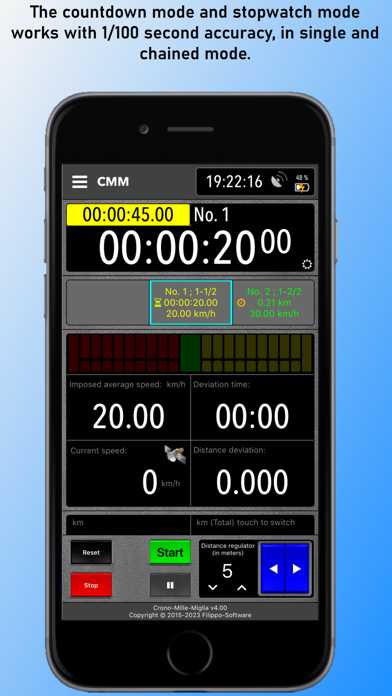


Description by Filippo Gozza Written by the developer, not by AppBrain. Click to read.
This app is the only stopwatch for classic and sport oldtimer uniformity rally.
In a single app, the 7 most important applications for oldtimer rally are included:
1. Synchronized clock
2. a stopwatch with a split-precision of 1/100 second
3. countdown with a Split-precision of 1/100 second
with Beep or Speech in 3 languages (de, en, it)
4. trip-/twinmaster
5. speedmeter that shows you the average speed of the test
6. Speedpilot
7. Speedometer
1. Synchronized clock
The clock can be synchronized with GPS, atomic time or manual.
2. Stoppuhr-Modus
The stopwatch has the splitting function: each time you press the start-button, the stopwatch stops and starts all over again to count.
The result is recorded in a window and can be viewed afterwards.
You can also activate a beep for every second - it also works with a headset.
The reset-button resets the window with the results.
3. Countdown-Modus
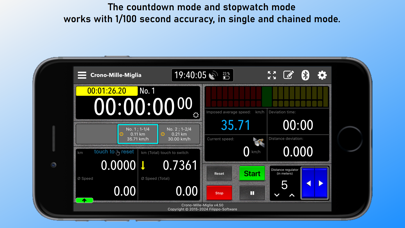
The countdown with 1/100 second accuracy, works at single and concatenated mode.
When you insert the time of the tests, you can define that the departure occurs automatically or manually.
Each time you press the start-button, the current countdown stops and the next one starts.
The result is recorded in a window and can be viewed afterwards.
The reset-button resets the results-window and reactivates the stored times.
You can enter different stages with different sectors so that the concatenated mode only from sector to sector.
After the last sector, the timer stops and the green button is disabled.
To reactivate the "Start" you press the "Stop".
4. Trip-/Twinmaster
The trip-/twinmaster, operating with activated GPS, indicates the speed of the entire mileage and trip odometer at every meter exactly (you can reset it with by touching the text "touch to reset").
In the countdown-mode is the text "touch to reset" invisible.
5. Speedmeter
The speedmeter can show you the average speed of navigation
from the 1st start and also from the current.
6. Speedpilot
Speedpilot indicates the average speed not only with nummeri but visually with a progress indicator.
7. Speedometer
Displays the current speed .
* GPS/GNSS
This app uses GNSS if it is supported by the device.
GNSS is a collective term for the use of existing global satellite systems such as: GPS, GLONASS, Galileo, Beidou.
* Distance measurement with wheel sensor (sensor-kit) or GPS
The app can evaluate / measure the distance traveled with a wheel sensor or with GPS.
Please note that GPS can only provide reliable measurements on open terrain.
Therefore, please do not write any negative reviews if the app cannot provide reliable measurements in such cases.
For this reason I recommend the use of a wheel sensor (sensor kit) for mountain areas.
You use for the Start, the green software button "Start".
For the start can be used of an external Bluetooth-device.
Further information at: https://filippo-software.de
* A full version can be purchased via the In-App Purchase option.
There are 3 subscriptions to choose from:
- Full-version for 1 year
- Full-version for 6 months
- Full-version for 1 month
* Note! The subscriptions are not renewed automatically.
After the expiration, the limitation of the free version will be applied again.
* Please take note:
Since GPS is only available on iOS devices (iPhone and iPad) with a phone function, the app can only be used with this devices.
* Limitation in the free version:
The total running time is limited to 5 minutes.
* Disclaimer
Continued use of GPS running in the background can dramatically decrease battery life.
Supported languages:
German, Italian, English