Download Android Apps and Games
AppBrain
  • Apps
  • Apps being viewed right now Trending apps today Most popular apps All-time most downloaded apps Top rated apps
  • Intelligence ▾
    Intelligence overview → Track any Android app or your whole market
    Track & analyze
    Keyword Tracker & OptimizerTrack & improve Play rankings App Performance ReportOne-off PDF for any app StatisticsFree Android & Play market stats
    Promote your app
    Featured Apps App Links
  • Intelligence
  • Pricing
  • Dashboard
  • Sign up
  • Log in
Last updated on: 2026-06-09
App Store Apps > Sports > GPS Rally Computer
GPS Rally Computer icon

GPS Rally Computer

5.3.1
MSYapps
3.80
5 reviews
$24.99

Not recently updated — last update was on 2024-02-07. This app may no longer be actively maintained.
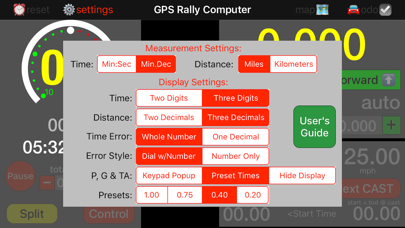
GPS Rally Computer Screenshot 1 of 5
GPS Rally Computer Screenshot 2 of 5
GPS Rally Computer Screenshot 3 of 5
GPS Rally Computer Screenshot 4 of 5
GPS Rally Computer Screenshot 5 of 5
Download from the App Store

About GPS Rally Computer

GPS Rally Computer is an overall app developed by MSYapps.

Download Statistics

User Ratings

GPS Rally Computer is rated 3.80 out of 5 stars. The rating is based on 5 ratings.

App Information

GPS Rally Computer costs $24.99 to download. The APK download size is 1.51 MB. The latest version available is 5.3.1. The last update was on February 7, 2024.

Technical Requirements

The app has a content rating of Everyone. The app has been available on Google Play March 2017.

Description
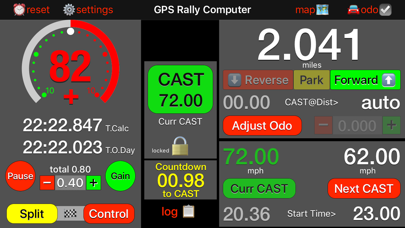
GPS Rally Computer is a Universal app designed to simplify computations necessary to navigate a traditional time-speed-distance (TSD) automobile rally. The design and implementation is based on specifications outlined by Clarence Westburg and Rich Bireta, commonly known as the Simple Rally Computer or its acronym SRC. The User's Manual is available on the app detail page linked at http://www.msyapps.com.

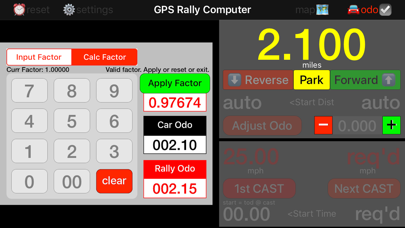
A TSD rally is comprised of stages set along a route defined by written instructions. The first stage is the Odometer Check stage that allows you to calibrate your car’s odometer with that of the Rally Master’s odometer.

In later stages you will follow a course at a particular average speed that will change from time to time at places that are generally unknown in advance.

In order to drive the course at the prescribed speeds. Odometer measurement is obtained from Apple’s GPS receiver or third-party devices via Bluetooth.

The GPS Rally Computer allows you to do all this and much, much more. For additional documentation, download the User’s Guide.

Features of the GPS Rally Computer:
- Clock time in either minutes and seconds to tenths of a second or decimal minutes to thousandths of a minute
- The clock is a 24-hour clock to simplify computations
- Distance measurements in either miles or kilometers to either two- or three-digit precision
- One button click to reset default conditions for starting a rally
- The internal computer clock can be adjusted to match the official rally clock
- The distance between the GPS receiver and the position on the car where the rally measurements are taken (the front wheels, for example) can be added for improved distance precision
- A "sprocket" button in the top menu bar allows access to the app settings from within the running application including settings for display of certain items
- Calibrate the car's odometer to the official rally odometer on the odometer check stage via a popup
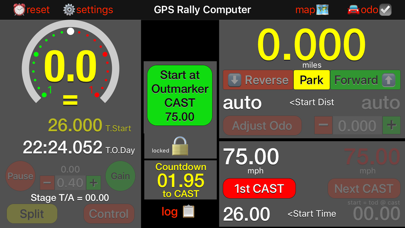
- Change average speed (CAST) on a custom popup keypad
- Preselect the next CAST to simplify the process of changing speed on each stage and setting CAST to zero for transit zones
- As time passes and as the car's odometer is incremented, the actual speed over the course is compared with the expected speed. The difference in seconds or hundredths of a minute is displayed along with an indication to either “Early” or “Late” to stay on pace.
- Time errors may be displayed in either of two modes selectable in the app Settings
- Pause or Gain time or take a Time Allowance on any leg or within a transit zone
- Handle off-course corrections to time and distance with a Reverse button
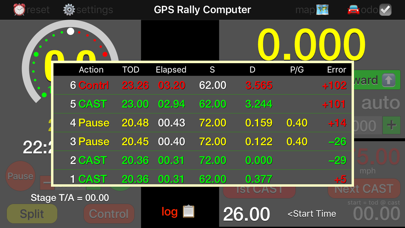
- Record "splits" of time and error at any time with a Split button
- Record "control" and reset time error and distance to zero and increment next starting time 5 minutes later (distance and time are modifiable) with a Control button.
- Set next starting time for the Next CAST and have the time tick down on the master clock and autostart CAST, or override with a manual button click
- Optionally, use a Dual GPS receiver via Bluetooth to supplement or substitute for the Apple internal GPS
- Connects to TSD Remote app that serves as a driver's heads-up display connected via local network.

Note: Use of the GPS Rally Computer during any particular rally will be subject to the rules and instructions governing the rally and may also define your category or class among race participants. Some rallies may, in fact, prohibit use of this app.

This app has been tested with Bluetooth connectivity to a Dual XGPS150A Universal GPS Receiver.

Disclaimer: Continued use of GPS running in the background can dramatically decrease battery life.
Show more Show less

More data about GPS Rally Computer

Price $24.99
Rating 3.80 based on 5 ratings
Ranking Not ranked
Version 5.3.1
App download size 1.51 MB
Suitable for Everyone

Alternative downloads for the GPS Rally Computer app

Richta Simple Rally Odometer icon Richta Simple Rally Odometer
David Bireta
5.0
$9.99
2 ratings
Checkpoint Clock icon Checkpoint Clock
David Bireta
4.0
$3.00
1 ratings
Rally Master icon Rally Master
David Bireta
3.0
Free
2 ratings
Rallymeter Basic TSD icon Rallymeter Basic TSD
CGPills SL
0.0
Free
Rabbit Connect icon Rabbit Connect
Rabbit Rally SL
1.0
Free
1 ratings
Speedpilot icon Speedpilot
Filippo Gozza
0.0
Free
BBORR Tracker icon BBORR Tracker
Frank Clark
5.0
Free
1 ratings
Richta GPS - Scoreboard icon Richta GPS - Scoreboard
David Bireta
0.0
Free

More from MSYapps

Open Road Race Timer icon Open Road Race Timer
MSYapps
2.7
$14.99
13 ratings
NCREIF Fund Index - ODCE icon NCREIF Fund Index - ODCE
MSYapps
4.0
Free
4 ratings
Quick Linear Regression icon Quick Linear Regression
MSYapps
1.0
$0.99
2 ratings
Save $$$$ icon Save $$$$
MSYapps
5.0
Free
2 ratings
Rally Computer Remote icon Rally Computer Remote
MSYapps
2.5
$1.99
2 ratings
TSD Rally Computer icon TSD Rally Computer
MSYapps
2.0
$24.99
2 ratings
Quick Bootstrap Statistics icon Quick Bootstrap Statistics
MSYapps
3.0
$0.99
2 ratings
GPS Twin Odometers icon GPS Twin Odometers
MSYapps
3.0
$12.99
2 ratings

Changelog of GPS Rally Computer

No changelog data

Developer information for MSYapps

MSYapps

Address:

Share GPS Rally Computer

Comments on GPS Rally Computer for iOS

We don't have enough comments to show example comments. Please check back later.

App Store Rankings for GPS Rally Computer

This app is not ranked

Technologies used by GPS Rally Computer

Apps other people are watching Today's trending apps Apps on sale Top new apps Popular Overall
Richta Simple Rally Odometer icon Richta Simple Rally Odometer
Checkpoint Clock icon Checkpoint Clock
Rally Master icon Rally Master
Rallymeter Basic TSD icon Rallymeter Basic TSD
Rabbit Connect icon Rabbit Connect
Speedpilot icon Speedpilot
BBORR Tracker icon BBORR Tracker
Richta GPS - Scoreboard icon Richta GPS - Scoreboard

Back to top
AppBrain Intelligence premium content

Subscribe now to get full and unlimited access to AppBrain Intelligence. You'll have access to:

  • App Intelligence dashboard (performance timeline, competitor comparison, country rankings, insight cards)
  • Detailed ranking data per app
  • Full timeline per developer
  • Device market shares data per country
1 Month

$75/mo
(billed every month)

SAVE 0%
Subscribe
3 Months

$65/mo
($195 billed every 3 months)

SAVE 13%
Subscribe
1 Year

$57.50/mo
($690 billed every year)

SAVE 23%
Subscribe
Each subscription will automatically renew 3 days before the expiration date for the same time period. Subscriptions can be cancelled at any time before the renewal.

AppBrain is a directory focused on discovering great apps and games. We give statistics, rankings and search options that Google Play and the App Store don't have. All trademarks are owned by their respective owners. AppBrain doesn't offer APKs or binaries, and always lets users install the official version from Google Play or the App Store.

More apps

  • Top Android apps being viewed
  • Singapore Gaming VPN -Low Ping
  • tomorrow - Minimal To-Do List
  • Make Me Bald Prank

Android Statistics

  • Android statistics
  • Google Play Developer stats
  • Trending Android Apps
  • Top popular Apps
  • Buy the best Android phone

About AppBrain

  • Contact
  • Privacy
  • Documentation
  • DMCA takedowns
  • Articles
  • Blog
  • Free webpage for your Android app
© 2010-2026 - AppBrain