

Crop&Scale
Crop&Scale is made and published by Ilia Bogdanovski. AppBrain is an independent app data site and isn't affiliated with Ilia Bogdanovski. The app name, icon, screenshots and description belong to Ilia Bogdanovski and are shown as published on the App Store.
AppBrain's verdict
- Last updated
- October 13, 2026
Rankings
App Store top chartsApp Store Rankings for Crop&Scale
Competitors
Similar apps and more from Ilia BogdanovskiAlternatives to Crop&Scale


More from Ilia Bogdanovski


Releases
Updates seen on the App Store- Version
- 1.0.0
- Launched
- September 2026
No changelog data
User feedback
Ratings and reviews on the App StoreComments on Crop&Scale for iOS
We don't have enough comments to show example comments. Please check back later.
Technology
Found in the app by AppBrain- Price
- Free
- App size
- 25.8 MB
- Content rating
- Everyone
Technologies used by Crop&Scale
About the app and developer
About Crop&Scale
Crop&Scale is a photo & video app developed by Ilia Bogdanovski.
User Ratings
The app has no ratings yet.
App Information
Crop&Scale is freely available from the App Store. The app size is 25.79 MB. The latest version available is 1.0.0. The last update was on October 13, 2026.
Technical Requirements
The app has a content rating of Everyone. The app has been available on the App Store since September 2026.
Developer information for Ilia Bogdanovski
Address:
Store listing
By Ilia Bogdanovski, from the App Store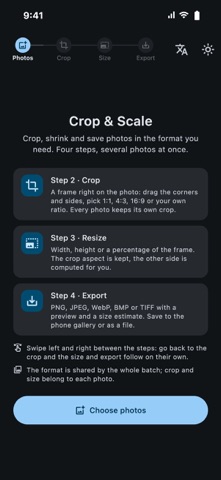


Description by Ilia Bogdanovski Written by the developer, not by AppBrain. Click to read.
CROP ON THE PHOTO
• Drag the frame, resize it by the corners and sides
• Presets: free, 1:1, 4:3, 3:4, 16:9, 9:16
• Custom ratio from your own numbers, e.g. 244×377
• Every photo keeps its own crop and aspect ratio
RESIZE
• Set width or height in pixels, the other side follows the crop proportions
• Or scale by percent with a slider
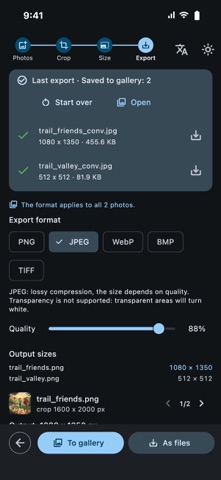
• Output size in pixels is shown before saving
CONVERT
• PNG (lossless), JPEG, WebP, BMP, TIFF
• Quality slider for JPEG and WebP with a live preview and an estimated file size
• BMP 24 / 8 / 4 / 1 bit with optional dithering, and a compact header for e-ink displays
• Opens HEIC, JPEG, PNG, WebP, GIF, BMP, TIFF
BATCH EXPORT
• Several images are processed in parallel in the background, the interface stays responsive
• Save one photo with the system dialog, or a whole batch into a folder you choose
• Existing files are never overwritten
PRIVACY
• Everything happens on your device, nothing is uploaded
• Location and other EXIF metadata are stripped from saved files
• No ads, no accounts, no tracking
Light and dark themes, English and Russian interface.