




AppBrain's verdict
- Last updated
- November 22, 2026
- Size
- 1.37 MB
User feedback
Ratings and reviews on the App StoreComments on Crossleaf: Search All PDFs for iOS
We don't have enough comments to show example comments. Please check back later.
Store listing
By MAHMUT SAFA BULAT, from the App StoreDescription by MAHMUT SAFA BULAT Written by the developer, not by AppBrain. Click to read.
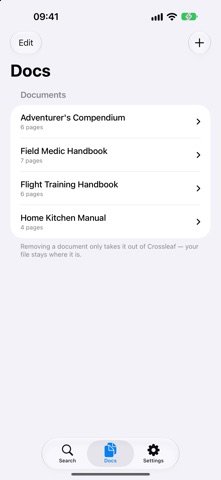
Add your manuals, textbooks and datasheets once, from Files or iCloud Drive, then type a phrase. Crossleaf shows every place it appears, in every document, organised by document, section and page. Tap a result and the page opens right at the match, highlighted. Go back and your results are still there.
SEARCH EVERYTHING AT ONCE
• One search across all your documents
• Results grouped as Document › Section › Page, from each PDF's own outline
• Capital letters and accents don't matter
• Works in many languages, including Chinese, Japanese, Korean, Arabic, Hebrew, Russian, Hindi and Thai
• Search history for the phrases you look up again and again
SCAN AND SEARCH
• Scan paper documents with the camera and turn them into searchable PDFs
• Pages without a text layer are read with on-device text recognition
• Recognised text is searched like everything else, and matches are highlighted on the page
• Nothing is uploaded to do it
MADE FOR iPAD, GREAT ON iPHONE
• Three columns on iPad: documents, results and the page side by side
• Full-screen reading with a single tap
• A quick, one-handed search on iPhone
YOUR FILES STAY WHERE THEY ARE
• Documents in iCloud Drive or Files are read in place; nothing is copied
• Replace a file with a new revision and Crossleaf indexes it again
• Give any document a short name to show in results
MARK UP WITH APPLE PENCIL
• Draw and highlight right on the page
• Your markup is saved into the PDF itself, so it shows up wherever you open it
BOOKMARKS AND REVISION REMINDERS
• Bookmark any page, grouped by document
• An optional weekly reminder to check for new revisions
PRIVATE BY DESIGN
Crossleaf never connects to the internet and collects no data. No account, no tracking, no ads. Your documents never leave your device, which makes it safe for company manuals and other files you are not allowed to upload.
Free for up to 3 documents. Crossleaf Unlimited is a single purchase — no subscription.
Safety and technology
Found in the app by AppBrain- Price
- Free
- App size
- 1.37 MB
- Content rating
- Everyone
Technologies used by Crossleaf: Search All PDFs
Releases
Updates seen on the App Store- Version
- 1.2.2
- Launched
- October 2026
No changelog data
Alternatives
Similar apps and more from MAHMUT SAFA BULATMore from MAHMUT SAFA BULAT

Rankings
App Store top chartsApp Store Rankings for Crossleaf: Search All PDFs
About the app and developer
About Crossleaf: Search All PDFs
Crossleaf: Search All PDFs is a productivity app developed by MAHMUT SAFA BULAT.
User Ratings
The app has no ratings yet.
App Information
Crossleaf: Search All PDFs is freely available from the App Store. The app size is 1.37 MB. The latest version available is 1.2.2. The last update was on November 22, 2026.
Technical Requirements
The app has a content rating of Everyone. The app has been available on the App Store since October 2026.
Crossleaf: Search All PDFs is made and published by MAHMUT SAFA BULAT. AppBrain is an independent app data site and isn't affiliated with MAHMUT SAFA BULAT. The app name, icon, screenshots and description belong to MAHMUT SAFA BULAT and are shown as published on the App Store.
Developer information for MAHMUT SAFA BULAT
Address: