

Crossroads eCite Application
Crossroads eCite Application is made and published by Crossroads Software Inc. AppBrain is an independent app data site and isn't affiliated with Crossroads Software Inc. The app name, icon, screenshots and description belong to Crossroads Software Inc and are shown as published on the App Store.
AppBrain's verdict
Established- Rating on App Store
- 4.33
- 6 ratings
- Last updated
- August 6, 2024
It doesn't have enough ratings yet to judge what users think.
Rankings
App Store top chartsApp Store Rankings for Crossroads eCite Application
Competitors
Similar apps and more from Crossroads Software IncAlternatives to Crossroads eCite Application


More from Crossroads Software Inc


Releases
Updates seen on the App Store- Version
- 1.0.49
- Launched
- August 2019
No changelog data
User feedback
Ratings and reviews on the App StoreComments on Crossroads eCite Application for iOS
We don't have enough comments to show example comments. Please check back later.
Technology
Found in the app by AppBrain- Price
- Free
- App size
- 21.7 MB
- Content rating
- Everyone
Technologies used by Crossroads eCite Application
About the app and developer
About Crossroads eCite Application
Crossroads eCite Application is a productivity app developed by Crossroads Software Inc.
What is the rating of Crossroads eCite Application?
Crossroads eCite Application is rated 4.33 out of 5 stars, based on 6 ratings.
Is Crossroads eCite Application free?
Crossroads eCite Application is free. The app size is 21.66 MB. The latest version available is 1.0.49. The last update was on August 6, 2024.
What are the requirements for Crossroads eCite Application?
The app has a content rating of Everyone. The app has been available on the App Store since August 2019.
Developer information for Crossroads Software Inc
Address:
Frequently asked questions about Crossroads eCite Application
Is Crossroads eCite Application free?
Yes. Crossroads eCite Application is free on the App Store.
Is Crossroads eCite Application still available?
Yes. Crossroads eCite Application is on the App Store, and the last update we saw was on August 6, 2024.
How large is Crossroads eCite Application?
Crossroads eCite Application is 21.66 MB.
Is Crossroads eCite Application suitable for children?
App Store rates the content of Crossroads eCite Application as suitable for everyone.
How do people rate Crossroads eCite Application?
Crossroads eCite Application scores 4.33 out of 5 stars, from 6 ratings on the App Store.
Who made Crossroads eCite Application?
Crossroads eCite Application was developed by Crossroads Software Inc. It is listed in the productivity category on the App Store.
What are the best alternatives to Crossroads eCite Application?
People looking at Crossroads eCite Application also look at these productivity apps: RIPALog, FARO Stream, Peregrine Mobile, CAPE Watch, TRACK - Salamander.
Store listing
By Crossroads Software Inc, from the App Store

Description by Crossroads Software Inc Written by the developer, not by AppBrain. Click to read.
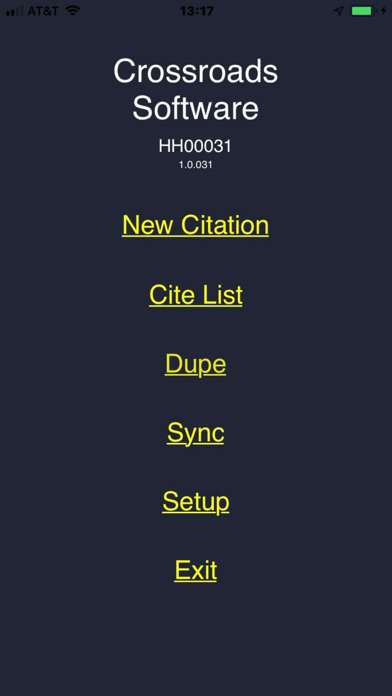
Speed: The Citation Writing process is much faster using our app than writing by hand. The ability to quickly select items from lists (Vehicles, Colors, Violation Codes, Courts, Streets, etc.), along with barcode reading of Drivers Licenses, Registration Cards, Vehicle VINS abbreviates the process substantially.
“Dupe” Function: Often, officers will work a specific problem road or intersection for traffic violations. After writing the first cite, many of the items in the cites that follow are the same: Location, Conditions, Violation Codes, Court, Court Date, etc. Using the “Dupe” function, all info from a previous cite can be duplicated and the current violator and vehicle info can be scanned from barcodes and a new cite completed very quickly. The “Dupe” function can also duplicate vehicle info (for additional cites to passengers in a cited vehicle) and even violator info (for additional cites to an already cited person).
Field-level Validation: Many boxes (such as dates, times, violation codes and other items) are checked for validity as the items are entered and are validated for accuracy and completeness before printing a cite.
Barcode Reading: Drives Licenses, vehicles and many registration documents have bar-coded information. The device camera or barcode reader is used to read the barcodes and the eCitation app translates the info into the appropriate sections. This increases speed and accuracy for entering violator and vehicle information.
Reduce Error Rates: Citation writing errors are greatly reduced by using items lists that are approved by the courts for violation codes, violation degrees, court dates, and other drop-down list items. Scanning barcodes for driver licenses and registration documents adds speed and accuracy to capturing violator and vehicle information.
Bluetooth Printing: The device can be quickly and easily paired with a Bluetooth printer. Printed cites are Judicial Council compliant, paper is fade and smudge resistant and approved printers are small, light, fast, rugged and have long battery life between charges.
Configurability: Most list items on the cite are configurable using the desktop management tool. Configurable items include Violation codes, vehicle makes, models and colors, hair color, eye color, courts, court dates, streets, race, weather, road conditions, lighting, and traffic conditions. When an item is changed using the desktop management app, the items are updated on “sync” of the device.
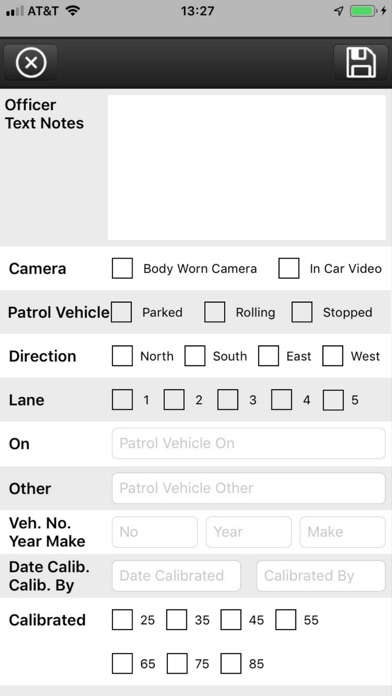
Officer Notes: Pre-formatted notes are set up with checkboxes and lists for common note items like location, lanes, conditions, violator behavior. Etc. Sections for violator statements and officer freeform notes with speech-to-text provide everything needed to document the event for use in court.
Photos: Pictures can be captured along with each cite to document the event. This is commonly used to photograph vehicle equipment violations, violator identity and driving conditions.
Wireless Sync: The app uses a wireless ‘sync’ to transfer cites to the desktop system (and back end database). Devices can use WiFi or air cards for syncing. On sync, the device configuration items are updated, cites are moved to the back end, ticket books are refreshed, and a check is made for any new program updates. Syncing is accomplished in just a few seconds.
Ticket Book Technology: Citation numbering is managed like hard copy ticket books. Each device has a book of tickets, and when it starts to run low, a new ticket book is issued on ‘sync’.