CTD Live Mobile is an overall app developed by Juan Pena.
How many times has CTD Live Mobile been downloaded?
What is the rating of CTD Live Mobile?
CTD Live Mobile has no ratings yet.
Is CTD Live Mobile free?
CTD Live Mobile costs $0.99 to download. The APK download size is 2.16 MB. The latest version available is 1.0.70. The last update was on June 27, 2026.
What are the requirements for CTD Live Mobile?
The app has a content rating of Everyone. The app has been available on Google Play a couple of days.
Description
CTD Live Mobile turns your iPhone or iPad into a fast, tactile remote control for OBS Studio. It connects to the OBS WebSocket server (obs-websocket 5.x, built into OBS 28 and later) and lets you run a live production from across the room — no extra screen, no clutter on your stream machine.
Built for streamers, AV operators, houses of worship, classrooms, esports, and anyone who runs a multi-camera show in OBS.
REQUIRES OBS STUDIO CTD Live Mobile is a remote control. It does nothing on its own. You need OBS Studio (free, open source) running on a separate Mac, PC, or Linux machine, with the WebSocket server enabled under Tools → WebSocket Server Settings. Your iPhone or iPad and the OBS machine must be on the same network.
CONNECT IN SECONDS • Scan the QR code from OBS (Tools → WebSocket Server Settings → Show Connect Info) with your camera, or • Enter host, port, and password by hand. • Supports obsws://, ws:// (plaintext), and wss:// (TLS) connections.
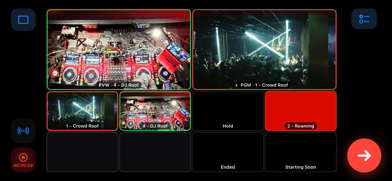
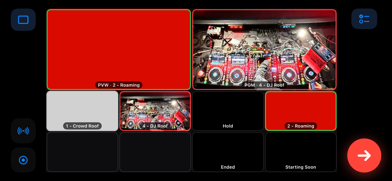
LIVE MULTIVIEW • A grid of live thumbnails for every scene, refreshed over the socket. • Tap a scene to preview it or cut it straight to air.
STUDIO MODE, DONE RIGHT • Full preview-to-program workflow with a dedicated TAKE button. • Hold to quick-cut a focused angle directly to air, then release.
STREAM & RECORD CONTROL • Start and stop streaming. • Start and stop recording. • Live stream and record timecode and on-air status at a glance.
AUTOMATION • Build scene playlists and trigger rules to automate sequences. • Map scenes, cuts, recording, and audio mute/volume to controller buttons.
FULL GAME-CONTROLLER SUPPORT • Drive the show with an Xbox, PlayStation, or MFi controller (GameController framework). • Steer a yellow focus ring with the d-pad or stick, then cut or preview with a button. • Custom button bindings and an on-screen controller help map.
DESIGNED FOR THE DEVICE • iPhone runs in landscape for a true control-surface feel. • iPad gives you a larger canvas with even more on screen at once.
PRIVATE BY DESIGN • No account, no sign-up, no analytics, no ads, no trackers. • Collects no personal data of any kind. • Talks only to the OBS server you configure. Settings stay on your device, and OBS passwords are kept in the iOS Keychain.
Camera access is used solely to scan the OBS connect-info QR code. Local Network access is used solely to reach your OBS server on the LAN.
Note: OBS Studio is a third-party application and is not affiliated with or endorsed by CineTech Digital.
Each subscription will automatically renew 3 days before the expiration date for
the same time period. Subscriptions can be cancelled at any time before the renewal.