

Cuevello Remote Menu & Screen
Cuevello Remote Menu & Screen is made and published by HOsy - intelligent software. AppBrain is an independent app data site and isn't affiliated with HOsy - intelligent software. The app name, icon, screenshots and description belong to HOsy - intelligent software. and are shown as published on the App Store.
AppBrain's verdict
- Last updated
- September 22, 2026
- Size
- 45.7 MB
User feedback
Ratings and reviews on the App StoreComments on Cuevello Remote Menu & Screen for iOS
We don't have enough comments to show example comments. Please check back later.
Store listing
By HOsy - intelligent software., from the App Store



Description by HOsy - intelligent software. Written by the developer, not by AppBrain. Click to read.
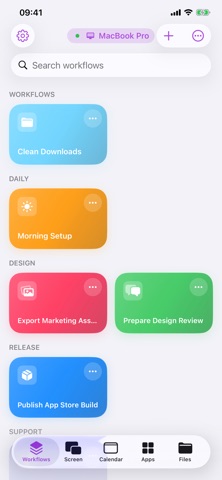
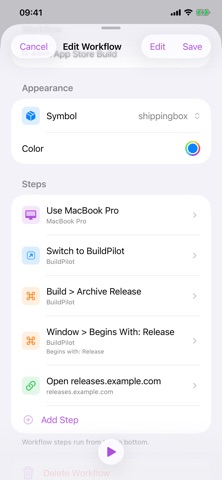
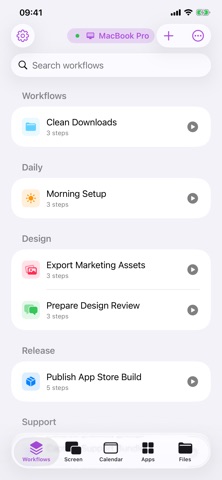
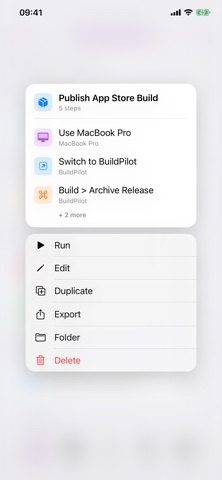
Pair your Mac locally, stream a monitor or app window, browse the menu of the active app, run menu commands, trigger keyboard shortcuts, open URLs, send text to the Mac clipboard, switch apps, and save repeatable routines as workflows.
Cuevello is made for the small Mac actions that interrupt your flow: checking a build, watching the iOS Simulator from iPad, opening a project URL, exporting a file, pasting text into a Mac app, dismissing a blocking dialog, or starting a prepared automation from across the room.
What Cuevello does:
- Stream and control a paired Mac screen
- View a monitor, app window, or selected app
- Use fullscreen or Picture in Picture for live streams
- Run Mac menu commands from your device
- Browse the active app's menus and submenus
- Trigger keyboard shortcuts from the app menu
- Build workflows with screen streams, menu commands, app actions, URLs, dynamic menu choices, clipboard text, and prompts
- Launch saved workflows from shortcuts and widgets
- Sync workflows between your devices
- Open URLs on the paired Mac
- Send text to the Mac clipboard
- Switch, open, or quit Mac apps
- Keep separate setups for multiple Macs
- Detect modal windows that block automation
Cuevello works locally. The Mac app publishes a local service, and your device connects on the same local network or through your VPN.
Use it for:
- Following up after AI-assisted work
- Checking local builds away from the desk
- Running saved shortcuts and Cuevello widgets from your device
- Sending text snippets to the macOS Clipboard before pasting
- Sending files to the Mac or downloading local Mac files
- Checking monitor screenshots before the next remote step
- Driving demos without breaking presentation focus
- Repeating export, share, archive, or render workflows
- Controlling a desk Mac, build Mac, or media Mac from one device
Requirements:
- Cuevello Mac app running on the Mac
- Device on the same local network as the Mac
- Accessibility permission on macOS so Cuevello can read and trigger menu items
- Local Network permission on the device for discovery and pairing
- Secure pairing for end-to-end encrypted transfers between paired devices
Safety and technology
Found in the app by AppBrain- Price
- Free
- App size
- 45.7 MB
- Content rating
- Everyone
Technologies used by Cuevello Remote Menu & Screen
Releases
Updates seen on the App Store- Version
- 1.6
- Launched
- June 2026
No changelog data
Alternatives
Similar apps and more from HOsy - intelligent software.Alternatives to Cuevello Remote Menu & Screen


More from HOsy - intelligent software.




Rankings
App Store top chartsApp Store Rankings for Cuevello Remote Menu & Screen
About the app and developer
About Cuevello Remote Menu & Screen
Cuevello Remote Menu & Screen is an overall app developed by HOsy - intelligent software.
What is the rating of Cuevello Remote Menu & Screen?
Cuevello Remote Menu & Screen has no ratings yet.
Is Cuevello Remote Menu & Screen free?
Cuevello Remote Menu & Screen is free. The app size is 45.72 MB. The latest version available is 1.6. The last update was on September 22, 2026.
What are the requirements for Cuevello Remote Menu & Screen?
The app has a content rating of Everyone. The app has been available on the App Store since June 2026.
Developer information for HOsy - intelligent software.
Address:
Frequently asked questions about Cuevello Remote Menu & Screen
Is Cuevello Remote Menu & Screen free?
Yes. Cuevello Remote Menu & Screen is free on the App Store.
Is Cuevello Remote Menu & Screen still available?
Yes. Cuevello Remote Menu & Screen is on the App Store, and the last update we saw was on September 22, 2026.
How large is Cuevello Remote Menu & Screen?
Cuevello Remote Menu & Screen is 45.72 MB.
Is Cuevello Remote Menu & Screen suitable for children?
App Store rates the content of Cuevello Remote Menu & Screen as suitable for everyone.
Who made Cuevello Remote Menu & Screen?
Cuevello Remote Menu & Screen was developed by HOsy - intelligent software. It is listed in the overall category on the App Store.
What are the best alternatives to Cuevello Remote Menu & Screen?
People looking at Cuevello Remote Menu & Screen also look at these overall apps: Apperture: Remote Desktop Apps, Diff Checker: Text Compare, Jockey OSC & MIDI, Shinobi Term, tasmoty.