

Custom Running Intervals
Custom Running Intervals is made and published by John Mallonee. AppBrain is an independent app data site and isn't affiliated with John Mallonee. The app name, icon, screenshots and description belong to John Mallonee and are shown as published on the App Store.
AppBrain's verdict
Established- Rating on App Store
- 2.00
- 1 ratings
- Last updated
- July 31, 2026
It doesn't have enough ratings yet to judge what users think.
Rankings
App Store top chartsApp Store Rankings for Custom Running Intervals
Competitors
Similar apps and more from John MalloneeAlternatives to Custom Running Intervals






More from John Mallonee


Releases
Updates seen on the App Store- Version
- 2.6.1
- Launched
- November 2020
No changelog data
User feedback
Ratings and reviews on the App StoreComments on Custom Running Intervals for iOS
We don't have enough comments to show example comments. Please check back later.
Technology
Found in the app by AppBrain- Price
- Free
- App size
- 11.1 MB
- Content rating
- Everyone
Technologies used by Custom Running Intervals
About the app and developer
About Custom Running Intervals
Custom Running Intervals is a health & fitness app developed by John Mallonee.
User Ratings
Custom Running Intervals is rated 2.00 out of 5 stars. The rating is based on one rating ratings.
App Information
Custom Running Intervals is freely available from the App Store. The app size is 11.06 MB. The latest version available is 2.6.1. The last update was on July 31, 2026.
Technical Requirements
The app has a content rating of Everyone. The app has been available on the App Store since November 2020.
Developer information for John Mallonee
Address:
Store listing
By John Mallonee, from the App Store




Description by John Mallonee Written by the developer, not by AppBrain. Click to read.
Features:
1. Configurable intervals - distance (miles, kilometers), time (hours, minutes, seconds).
2. Configurable repeat blocks of intervals - # of times (or until stopped), distance, time.
3. Clone activities (use an existing activity - repeats and intervals - as a basis to create a similar activity).
4. Apple Watch monitoring and control and heart rate (iPhone app must be started).
5. Configurable settings.
6. Audio cues by voice, tone, or both (in Settings).
7. Pause, Resume, or Stop an activity, Skip repeat blocks.
8. View current elapsed time, distance, interval progress, overall pace.
9. End an in-progress repeat block (and proceed to the next).
10. Results by interval and repeat block, as well as default distance unit (each mile or kilometer).
11. Results (including steps, time, distance, and pace) available immediately after run.
12. Map view to verify GPS location prior to starting run.
13. Map view of running route in results including markers by mile/kilometer and pauses.
14. Helpful on-screen guide when creating first activity and configuring.
15. Activities and results stored in iCloud for synchronization across devices and data loss prevention.
Apple Watch
If you have an Apple Watch, you can also start, pause, and stop an activity in progress from the watch. NOTE: the Apple Watch app (included with your iPhone download) communicates with the iPhone app, so the app must be started on both the watch and phone to use the watch app.
Apple Watch Features:
1. View existing activity configurations.
2. Start an activity (if iPhone app is started).
3. Pause, Resume, or Stop an activity.
4. View current elapsed time, distance, interval progress, overall pace.
5. End an in-progress repeat block (and proceed to the next).
Available Full Features (In App Purchase)
1. Configure an activity with multiple repeat blocks for more complex intervals (standard version allows one repeat block)
2. Add planned training runs on a Training Calendar for a selected custom interval (free version allows up to 5).
3. View and filter a graph of your pace over time for activities (free version allows up to 5 past runs).
4. View the results of your runs on the Training Calendar including a map of the route. weather conditions, elevation, pace, and heart rate.
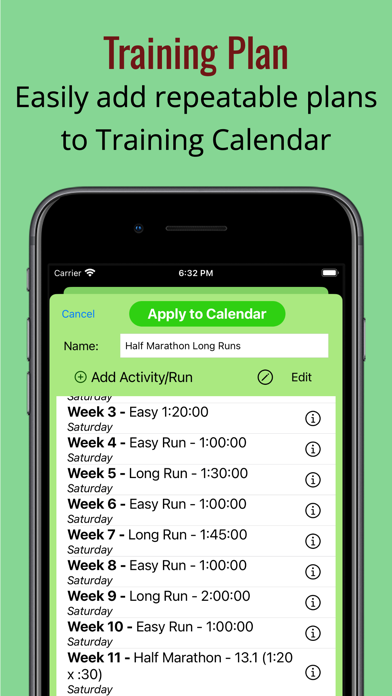
5. Create repeatable training plans to easily add planned runs to the Training Calendar.
6. Sort your past results by date, total time of run, distance, and pack.
7. Export your results (current or history) in GPX format for importing to other trackers.
8. Fix GPS for anomalies.
9. Import results in GPX format from any tracker app.
10. Track miles run on your pairs of shoes.
11. Manually enter results for a run if you forget to track.
12. Manually edit the time and distance for a run.
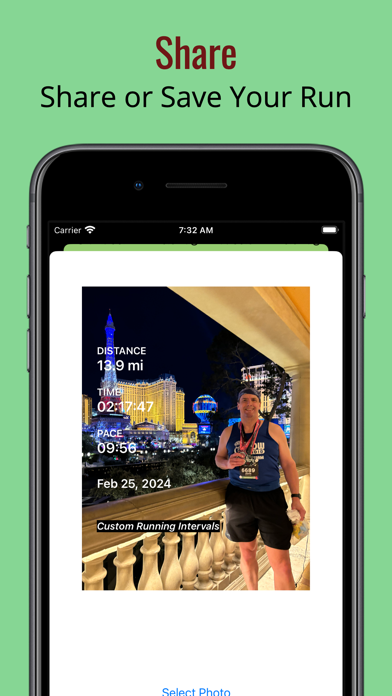
13. Share a run with photo to social media and other apps.
14. Track a run on a cruise ship.