

Cut Trim Split Video Editor
Cut Trim Split Video Editor is made and published by Farouk Elsayed. AppBrain is an independent app data site and isn't affiliated with Farouk Elsayed. The app name, icon, screenshots and description belong to Farouk Elsayed and are shown as published on the App Store.
AppBrain's verdict
New- Rating on App Store
- 5.00
- 1 ratings
- Last updated
- October 4, 2026
Cut Trim Split Video Editor came out 25 days ago. It doesn't have enough ratings yet to judge what users think.
Rankings
App Store top chartsApp Store Rankings for Cut Trim Split Video Editor
Competitors
Similar apps and more from Farouk ElsayedAlternatives to Cut Trim Split Video Editor


More from Farouk Elsayed



Releases
Updates seen on the App Store- Version
- 1.0
- Launched
- October 2026
No changelog data
User feedback
Ratings and reviews on the App StoreComments on Cut Trim Split Video Editor for iOS
We don't have enough comments to show example comments. Please check back later.
Technology
Found in the app by AppBrain- Price
- Free
- App size
- 22.3 MB
- Content rating
- Everyone
Technologies used by Cut Trim Split Video Editor
About the app and developer
About Cut Trim Split Video Editor
Cut Trim Split Video Editor is a photo & video app developed by Farouk Elsayed.
User Ratings
Cut Trim Split Video Editor is rated 5.00 out of 5 stars. The rating is based on one rating ratings.
App Information
Cut Trim Split Video Editor is freely available from the App Store. The app size is 22.28 MB. The latest version available is 1.0. The last update was on October 4, 2026.
Technical Requirements
The app has a content rating of Everyone. The app has been available on the App Store since October 2026.
Developer information for Farouk Elsayed
Address:
Store listing
By Farouk Elsayed, from the App Store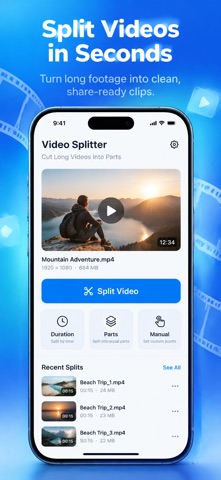



Description by Farouk Elsayed Written by the developer, not by AppBrain. Click to read.
Whether a recording is too long to post as a story or status, too large to send in a message, or simply needs breaking into sections, Video Splitter does the job without a desktop editor.
THREE WAYS TO SPLIT
• Duration: cut a video into clips of a fixed length. Choose 5, 10, 15, 20, 30, 45 or 60 seconds, or type your own custom length.
• Parts: divide a video into an equal number of clips, such as 2, 3, 4, 5 or 10 parts.
• Manual: play or scrub the timeline, tap Split Here to place a cut, drag markers to fine-tune them, and double-tap a marker to remove it.
SEE EVERY CUT BEFORE YOU SPLIT
• Scrub a filmstrip timeline with a live video preview
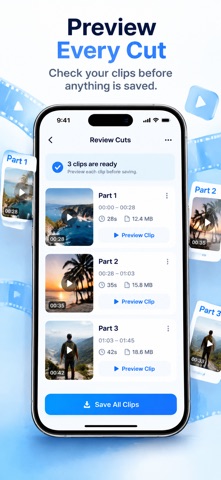
• Review the clips you'll get, with the real cut times listed
• Preview any clip before anything is saved
• See the estimated size of the finished clips
• Pieces shorter than half a second are merged into the previous clip, so there are no stray fragments
• Storage is checked before splitting starts, so you know upfront if there isn't enough space
• Follow clear progress while clips are created, and cancel at any time
ORIGINAL QUALITY OR EXACT CUTS
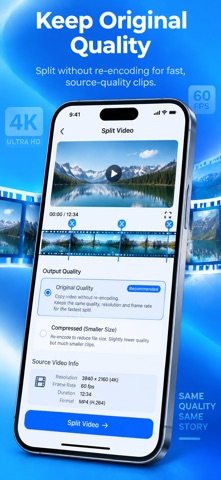
• Original quality copies the video without re-encoding, so clips look and sound identical to the source. It's the fastest option, with each cut placed at the nearest keyframe.
• Exact cuts re-encode once so every cut lands on the precise frame you chose, preserving resolution, frame rate, orientation, audio and HDR.
SAVE, SHARE AND KEEP YOUR CLIPS
• Play each clip right inside the app
• Save one clip or all clips to your photo library at once
• Share a single clip or every clip to any app
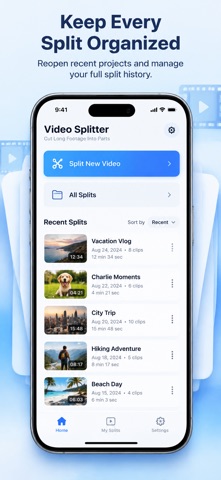
• Recent Splits keeps your latest splits on the home screen, ready to reopen
• All Splits shows your full history, sorted by newest, oldest, name or most clips
• See how much storage your clips use and delete any split to free up space
MADE FOR IPHONE AND IPAD
On iPad, a sidebar shows your splits and their clips side by side, you can search your split history, and you can drag a video in from Files or Photos.
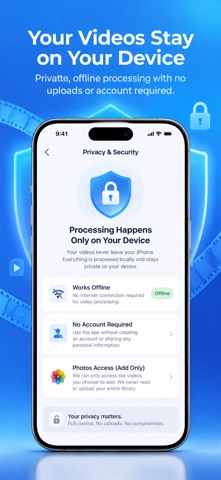
PRIVATE BY DESIGN
• Every video is split on your device and never uploaded
• No account or sign-in required
• Splitting works offline
• Add-only photo library access: the app can save clips but never read or change your library
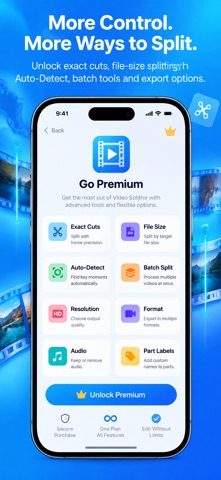
VIDEO SPLITTER PREMIUM
Remove the limits and unlock advanced tools:
• Unlimited clips per split (the free plan makes up to 10)
• Unlimited manual cuts (the free plan allows up to 3)
• Exact, frame-accurate cuts
• Split by file size: keep clips under targets from 8 MB to 100 MB for messaging and upload limits
• Auto-Detect: place cuts automatically at scene changes or pauses in the sound, then adjust them before splitting
• Batch split: divide up to 20 videos at once with the same duration or parts setting
• Export options: resize to 1080p, 720p or 480p, convert to H.264 or HEVC, remove audio, or number each clip with a "Part 2/5" label
Premium is an auto-renewable subscription. Payment is charged to your Apple Account at confirmation of purchase. The subscription renews automatically unless cancelled at least 24 hours before the end of the current period. Manage or cancel it anytime in your App Store account settings, and restore purchases from Settings.
HELP WHEN YOU NEED IT
Settings includes an FAQ, What's New, and quick ways to contact support, report a bug or request a feature. Terms of Service and Privacy Policy are available in the app.
Terms of Use (EULA)
https://www.apple.com/legal/internet-services/itunes/dev/stdeula/
https://sites.google.com/view/someniceapps/eula